"Great Service!"
Ronald and the team were super responsive to my questions and feature requests. I've never had an experience like this before from a software developer.

Luis G.
Verified Purchase
Forward receipt emails from Gmail, Outlook, or any inbox. AI extracts the merchant, date, and totals to Excel, CSV, or PDF. No inbox access needed. 30 free credits.








Simple Extraction Process
To extract receipts from emails, forward them to your private ReceiptsAI address, or set up an auto-forward rule in Gmail or Outlook once. Our AI reads the email body and attachments, extracts the merchant, date, totals, and tax, and turns everything into clean, export-ready expense records.

Use your private ReceiptsAI forwarding address to send receipt, invoice, or statement emails directly from Gmail, Outlook, Apple Mail, or any email provider.
Our AI reads the email body and attachments, then extracts merchant details, dates, totals, taxes, line items, and payment information automatically.
Every captured document stays filed and searchable in our receipt organizer for small business. Export clean data to Excel, CSV, or PDF. Ready for your accountant.
⤴ Turn hours of manual bookkeeping into minutes with AI automation. Have paper receipts too? Learn how to digitize receipts.
Extract Receipts From Gmail, Outlook, or Any Inbox
Some receipt tools ask you to connect your email account, which grants them read access to every message you receive. ReceiptsAI works differently. You get a private forwarding address, and only the emails you choose to forward ever leave your inbox.
Want it fully hands-free? Set up an auto-forwarding rule once and every new receipt is captured the moment it arrives.

Auto-forward receipt emails from Gmail with a one-time filter.
Read the setup guide
Set up an Outlook rule that forwards receipts as they arrive.
Read the setup guide
Route receipt emails from Zoho Mail to your private inbox.
Read the setup guideBulk-forward old receipt emails and each one is processed individually. Emails with multiple attachments are split into separate records automatically, and duplicates are flagged for review. Every receipt from the past year lands in one clean, categorized spreadsheet.
Powerful Expense Tracking Tools
Anywhere. Anytime. Any device. Upload and process documents while on the road or at the office.
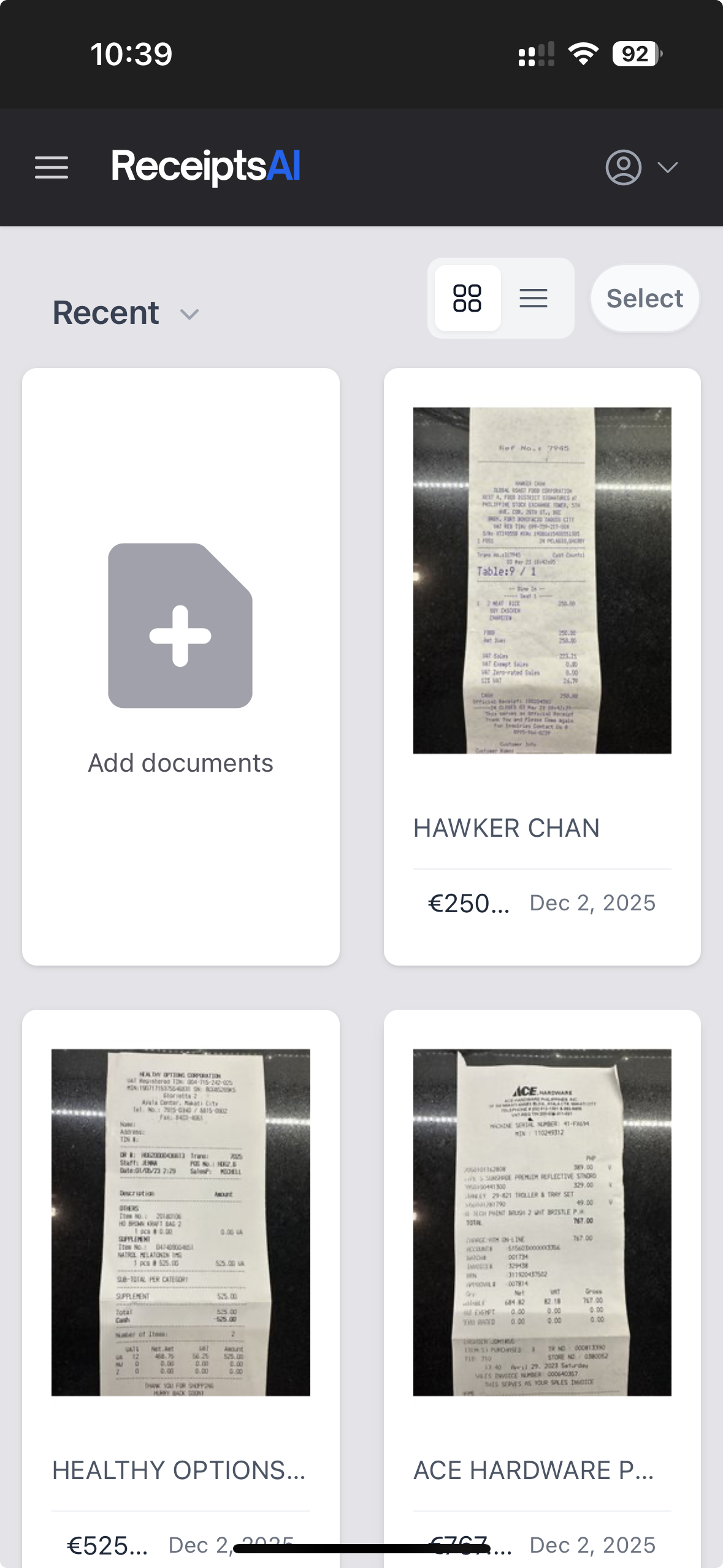
No more manual work. AI sorts every forwarded receipt into the right expense category.
Turn captured email receipt data into Excel, CSV, or PDF. Ready to import into QuickBooks, Xero, or any accounting software.
See spending at a glance. Instantly create reports from your captured email receipts.
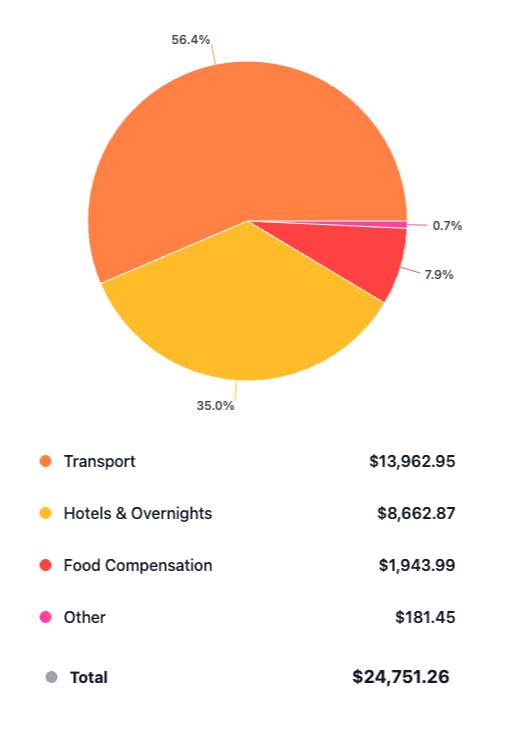
From Inbox to Spreadsheet in HoursMinutes
Ronald and the team were super responsive to my questions and feature requests. I've never had an experience like this before from a software developer.
Luis G.
Verified Purchase
As soon as you get a receipt you can scan it, the AI captures the relevant information, and there is very little interaction to get to the final expense submission.

Kirsten H.
Verified Purchase
After business trips, the last thing anyone wants is sorting receipts. ReceiptsAI makes my process much easier.

Vannesa T.
Verified Purchase
As someone who needs to keep track of monthly expenses, it saves me so much time. I love how it categorizes everything automatically.

Norma W.
Verified Purchase
I run multiple businesses and keeping track of receipts was a nightmare. ReceiptsAI transformed how I handle expense tracking.

Alice K.
Verified Purchase
It is effortless and saves me hours every month.
Josh D.
Verified Purchase
Ronald and the team were super responsive to my questions and feature requests. I've never had an experience like this before from a software developer.
Luis G.
Verified Purchase
As soon as you get a receipt you can scan it, the AI captures the relevant information, and there is very little interaction to get to the final expense submission.
Kirsten H.
Verified Purchase
After business trips, the last thing anyone wants is sorting receipts. ReceiptsAI makes my process much easier.
Vannesa T.
Verified Purchase
As someone who needs to keep track of monthly expenses, it saves me so much time. I love how it categorizes everything automatically.
Norma W.
Verified Purchase
I run multiple businesses and keeping track of receipts was a nightmare. ReceiptsAI transformed how I handle expense tracking.
Alice K.
Verified Purchase
It is effortless and saves me hours every month.
Josh D.
Verified Purchase
PRICING
Try free with 30 free credits. Upgrade at anytime for full access.
For freelancers.
Everything you need to capture, extract and export your documents.
Including:
Most Popular
For small businesses.
Business and personal books, kept separate and organized automatically.
Everything in Starter, plus:
For small businesses with employees.
Your whole team feeds the books, and you stay in control.
Everything in Premium, plus:
Are you a bookkeeping professional?
Switch to plans designed for managing more clients and documents.
Join 350+ small businesses saving time with ReceiptsAI
Can't find what you need? Email our support team.
Every ReceiptsAI account comes with its own private forwarding address. When you forward (or auto-forward) a receipt or invoice email to that address, our AI reads the email body and any attached PDFs or images, extracts the merchant, date, totals, taxes, and line items, and adds the result to your dashboard.
Yes. Forwarded emails are processed in isolated environments with SSL encryption, are never shared with third parties, and are never used to train AI models. Because you forward emails instead of connecting your account, ReceiptsAI never has read access to your inbox. You can permanently delete any email or extracted record at any time.
Read our data security FAQAny provider that can send email works. We support Gmail, Outlook, Apple Mail, Yahoo, Proton, and corporate email servers. You can forward manually or set up auto-forwarding rules so receipts are processed the moment they arrive.
Plain-text and HTML emails are both parsed, along with attached PDFs, JPGs, PNGs, and WEBP receipts/invoices. Multi-attachment emails are split into individual records automatically.
Yes. Email forwarding works great with vendor confirmations from Amazon, Uber, Lyft, Stripe, PayPal, Apple, Shopify, DoorDash, and hundreds of other senders, including SaaS subscription receipts that arrive as HTML emails.
Yes. Once data is extracted, our AI applies your custom categorization rules (or sensible defaults) so each forwarded receipt is sorted into the right expense category — ready for export to CSV, Excel, or PDF so you can easily forward it to your accounting software.
With email forwarding, there's nothing to download, screenshot, or drag-and-drop. Just hit forward (or set an auto-forward rule once) and the receipt is processed automatically.
Yes. ReceiptsAI identifies and flags duplicates. You can review and remove duplicates before exporting data.
ReceiptsAI can process receipt emails, invoices, bank statements, and credit card statements. It can also process booking confirmations, tickets, reservation emails, and other business-related emails that contain useful financial data.
Set up a Gmail auto-forwarding rule, or a filter for specific senders, that sends receipt emails to your private ReceiptsAI address. From then on, every receipt that lands in your Gmail inbox is extracted and categorized automatically, without granting any app read access to your mailbox. The same approach works in Outlook and Zoho Mail.
Gmail auto-forwarding guideForward the email to your private ReceiptsAI address. The receipt is saved to your dashboard with the merchant, date, and total already extracted, and you can download it or export it to Excel, CSV, or PDF at any time. No screenshots or manual downloads needed.
Forward the receipt email to ReceiptsAI, then export it as a PDF from your dashboard. This works for receipts in the email body as well as attachments, and you can export a single receipt or a complete expense report in one go.
Yes. Bulk-forward months of receipt emails and each one is processed individually. Emails with multiple attachments are split into separate records automatically. It is a fast way to catch up before tax season and get a full year of receipts into one clean spreadsheet.
Yes. Export your captured email receipts to Excel, CSV, or PDF in one click. The clean, formatted data is ready to share with your bookkeeper or use in your existing accounting software and bookkeeping workflow.
Join 350+ small businesses around the world who use ReceiptsAI to assist with their bookkeeping.
