AI bookkeeping assistance for small businesses

Automated bookkeeping for small businesses. Organize, categorize and track your spending easily. Connect your email and maintain bookkeeping records automatically.

User testimonial 1
User testimonial 2
User testimonial 3
Ronald - Co-founder
Richard - Co-founder

Trusted by 350+ small businesses

Start for free

No credit card required

Simple, easy to use interface. Connect your email and let AI handle your bookkeeping automatically. ⤴

Trusted by small businesses and featured on

AI ToolsSoftware WorldFuture ToolsThere's an AI for thatSaaSworthySoftonic
100,000+
Docs processed
350+
Small businesses served
5 hours
Time saved weekly

The ReceiptsAI effect

Your problemOur solution

Without ReceiptsAI

Receipts stay scattered.

Bookkeeping gets harder when every receipt lives in a different place.

User testimonial 1

Manually entering receipts takes hours every week

Takes hours every week
User testimonial 2

Documents scattered across emails, folders, and desks

Scattered everywhere
User testimonial 3

Forgotten receipts mean missed deductions at tax time

Missed deductions
With ReceiptsAI

Bookkeeping stays organized automatically.

From scattered receipts to organized bookkeeping records without the weekly cleanup.

  • AI extracts every field in seconds — merchant, date, amount, tax

  • One organized hub for every receipt, invoice, and statement

  • Clean reports and exports are ready whenever you need them

Email captureAI extractionAuto-categorizationMulti-currencyExports

Trusted by 350+ small businesses

AI extraction, categorization, and exports in one simple workflow.

How it works

How we make bookkeeping magical

No more digging through emails and manually entering receipts. Get organized and categorized bookkeeping data automatically, and generate monthly expense reports in seconds.

Start for Free
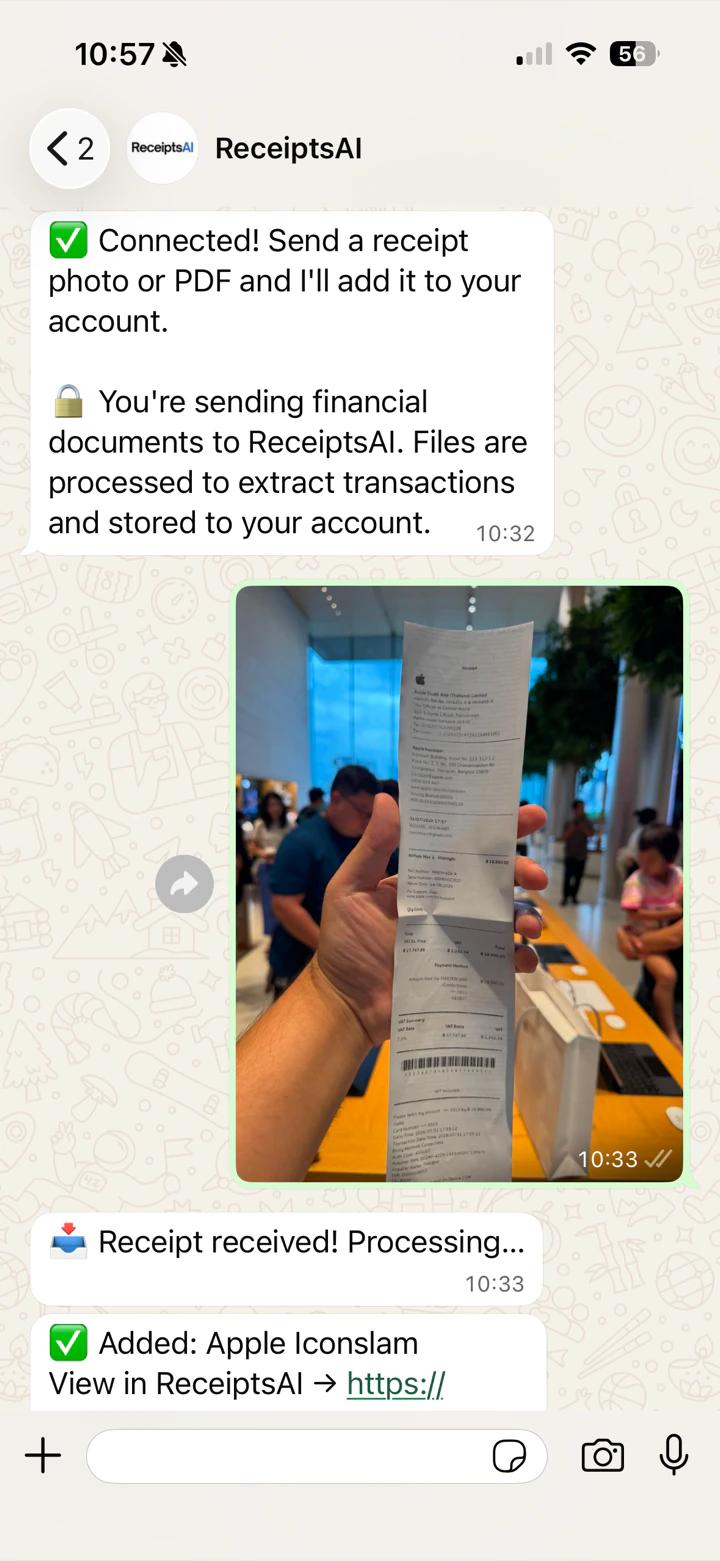
Forwarding receipts to ReceiptsAI via email
01

Upload

Drop in receipts, invoices, or bank statements from any device, or connect your email to forward matching documents based on your preferences.

AI extracting data fields from a receipt
02

Extract

Our AI identifies each document and captures the data you need for bookkeeping, including merchant names, dates, amounts, taxes, currencies, and more.

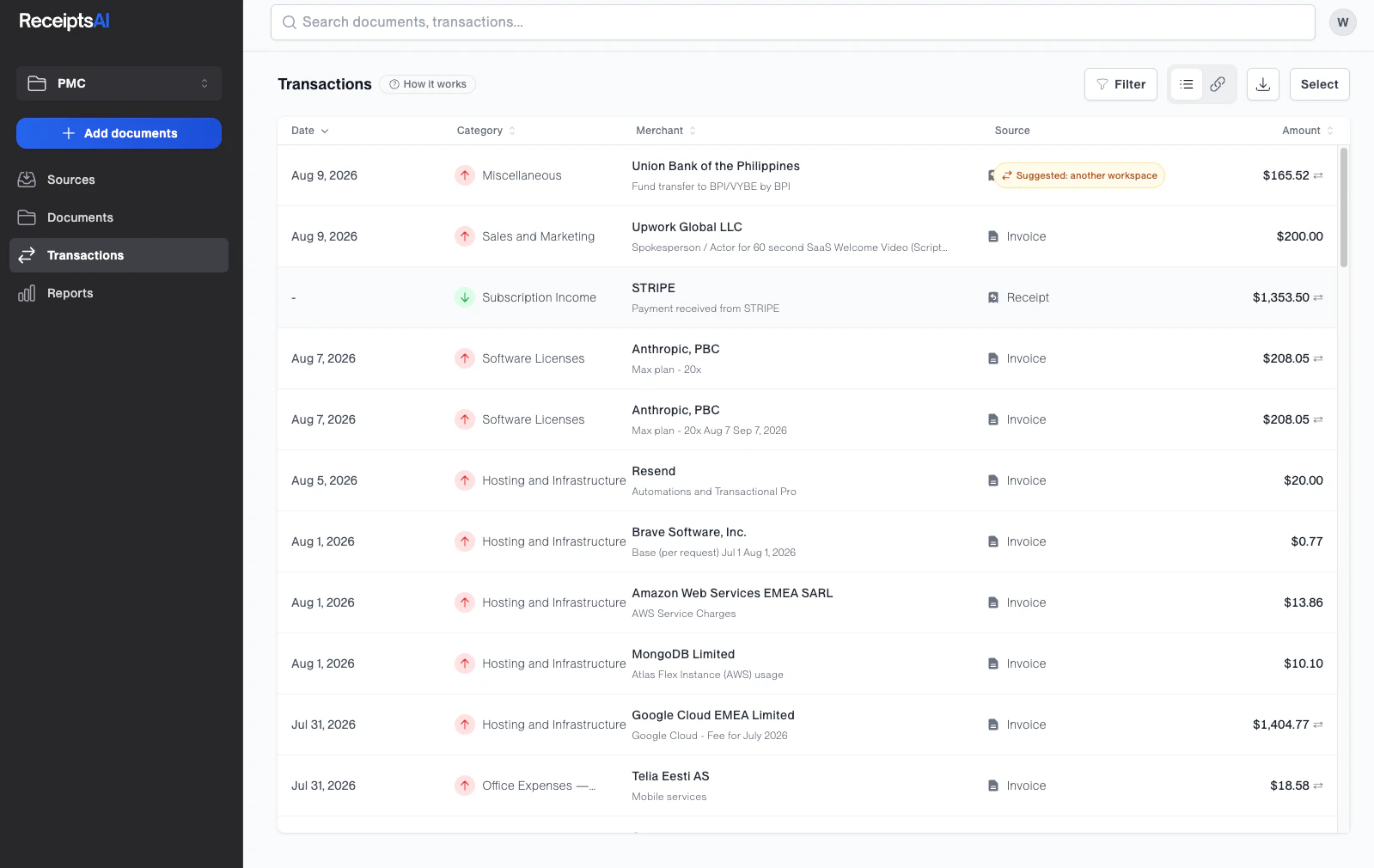
Organized and exportable documents in ReceiptsAI
03

Automated Bookkeeping

Your transactions are organized and categorized so you can analyze business spending, generate expense reports, and access your records whenever you need them.

Features

The AI bookkeeping toolkit for small businesses

Everything you need to turn scattered financial documents into organized data effortlessly.

Automated Bookkeeping

Capture receipts and statements from your email inbox

Connect your email inbox to capture receipts and invoices from Gmail, Outlook, and other mail providers. ReceiptsAI finds the documents you need and turns them into bookkeeping data.

Extracted receipt data in ReceiptsAI

Automated Expense Reports

Generate expense reports automatically

Monitor business spending with expense reports that break down totals by month, merchant, category, and tax. Share clean exports with your accountant whenever they need them.

Organized documents in ReceiptsAI

Monthly Spending Reports

Track monthly spending by category

Use pivot-table reports to compare spending across categories month by month. Spot trends, review budgets, and understand where business money is going without building spreadsheets from scratch.

Monthly spending by category pivot table in ReceiptsAI

Automated Expense Categorization

Expense categorization that follows your rules

Create custom bookkeeping rules for bank transactions and document data. ReceiptsAI applies your categories consistently, so reports match the way your business works.

Organized documents in ReceiptsAI

Industry Category Templates

Expense templates for every type of small business

Choose from over 30+ industry-specific category templates, then customize them to fit your exact needs. ReceiptsAI gives small businesses a ready-made structure without locking them into one way of working.

Industry-specific category templates in ReceiptsAI

Privacy-first

Automate bookkeeping without compromising your privacy

Define sensitive words or numbers like names or birthdays, and ReceiptsAI redacts them before AI processing.

Organized documents in ReceiptsAI

Who it's for

Simple bookkeeping software made for small businesses

Whether you're a solo freelancer, growing team, bookkeeper, or accountant, ReceiptsAI keeps bookkeeping simple and effortless.

01

Small Businesses

Keep organized as your business grows. Connect your email and automate your bookkeeping to keep your tax-time records ready without the monthly cleanup.

  • Capture receipts from Gmail and Outlook
  • Apply consistent expense categories
  • Export clean records for tax time
02

Freelancers

Stay focused on client work instead of admin. Snap, upload, or forward receipts as they happen, then review and export expense records when you need them.

  • Track expenses by client or project
  • Upload receipts from any device
  • Search and export receipt data quickly
03

Accountants & Bookkeepers

Save time cleaning up messy records and get auto-categorized documents ready for your clients.

  • Review extracted data with source documents
  • Apply consistent categorization rules
  • Search audit-ready records quickly

From teams who wanted simpler bookkeeping.

Real feedback from small businesses using ReceiptsAI to manage expenses without the usual receipt mess.

"Great Service!"

Ronald and the team were super responsive to my questions and feature requests. I've never had an experience like this before from a software developer.

Luis G.

Luis G.

Verified Purchase

"The easiest tool I've ever used."

As soon as you get a receipt you can scan it, the AI captures the relevant information, and there is very little interaction to get to the final expense submission.

Kirsten H.

Kirsten H.

Verified Purchase

"Simple, Straight-forward"

After business trips, the last thing anyone wants is sorting receipts. ReceiptsAI makes my process much easier.

Vannesa T.

Vannesa T.

Verified Purchase

"Very easy to use"

As someone who needs to keep track of monthly expenses, it saves me so much time. I love how it categorizes everything automatically.

Norma W.

Norma W.

Verified Purchase

"Impressive!"

I run multiple businesses and keeping track of receipts was a nightmare. ReceiptsAI transformed how I handle expense tracking.

Alice K.

Alice K.

Verified Purchase

"Effortless"

It is effortless and saves me hours every month.

J

Josh D.

Verified Purchase

"Great Service!"

Ronald and the team were super responsive to my questions and feature requests. I've never had an experience like this before from a software developer.

Luis G.

Luis G.

Verified Purchase

"The easiest tool I've ever used."

As soon as you get a receipt you can scan it, the AI captures the relevant information, and there is very little interaction to get to the final expense submission.

Kirsten H.

Kirsten H.

Verified Purchase

"Simple, Straight-forward"

After business trips, the last thing anyone wants is sorting receipts. ReceiptsAI makes my process much easier.

Vannesa T.

Vannesa T.

Verified Purchase

"Very easy to use"

As someone who needs to keep track of monthly expenses, it saves me so much time. I love how it categorizes everything automatically.

Norma W.

Norma W.

Verified Purchase

"Impressive!"

I run multiple businesses and keeping track of receipts was a nightmare. ReceiptsAI transformed how I handle expense tracking.

Alice K.

Alice K.

Verified Purchase

"Effortless"

It is effortless and saves me hours every month.

J

Josh D.

Verified Purchase

Privacy & security

What about my privacy?

Founded in Europe, we believe your data is yours. We never read your personal emails, we never sell your data to third parties, never store your data after you delete it, and have a privacy-first approach to data handling:

Read our full Privacy Policy

We only process bookkeeping documents

ReceiptsAI looks for receipts, invoices, purchase confirmations, and other expense documents. Personal emails are ignored and are not stored.

Privacy controls built in

Define sensitive words or numbers like names, birthdays, or account details, and ReceiptsAI redacts them before AI processing.

Disconnect anytime

You stay in control of connected accounts. Turn off email access whenever you want, and future emails will no longer be scanned or processed.

Simple, transparent pricing

Start free — no credit card required. Save 25% with annual billing.

Free

$0/month

Try ReceiptsAI risk-free — no credit card required.

Get started
  • 30 free credits
  • Data extraction from images or PDFs
  • Basic categorization
  • Email support
100% Money Back Guarantee

Starter

$12/month

Create custom categories and rules to automate your bookkeeping.

Get started
  • Process 100 pages per month
  • Up to 30 custom categories
  • Up to 20 custom rules
  • Custom document renaming
  • Auto duplicate detection
  • Email support

Premium

$29/month

Advanced features and automation for growing businesses.

Get started
  • Process 500 pages per month
  • Up to 100 custom categories
  • Up to 100 custom rules
  • Custom document renaming
  • Auto duplicate detection
  • Bulk processing
  • Priority support

All major credit cards accepted · 100% money-back guarantee · Cancel anytime

Frequently asked questions

Get quick answers about ReceiptsAI, from AI receipt processing and data extraction to security, billing, and supported files.

  • ReceiptsAI is an AI-powered bookkeeping assistant. We help small businesses and freelancers automate their financial document processing, saving hours of manual data entry every week.

    Read the full answer
  • Extracts 50+ data fields including merchant info, amounts, dates, taxes, line items, payment methods, and bank transactions with 99%+ accuracy.

    Read the full answer
  • Forward receipt and invoice emails to ReceiptsAI, or connect your inbox, and ReceiptsAI extracts, categorizes, and organizes the data automatically.

    Read the full answer
  • We support PDF files for bank statements and JPG, JPEG, PNG formats for receipts and invoices.

    Read the full answer
  • Export to CSV, Excel, or PDF reports. We also offer direct integration with accounting software like Xero and QuickBooks.

    Read the full answer
  • Yes, absolutely. We use bank-level security protocols including AES-256 encryption and comprehensive data protection measures to keep your financial data secure.

    Read the full answer
  • Yes! Start free with no credit card required, no commitment. Get 30 free credits to experience AI-powered bookkeeping.

    Read the full answer
  • Yes, you can cancel anytime with no fees or long-term contracts.

    Read the full answer