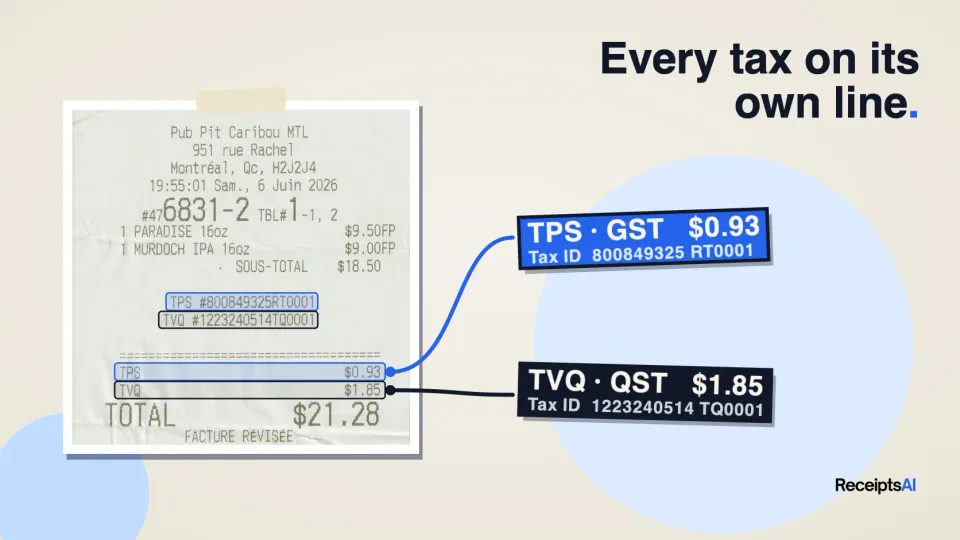

Buy something in Montreal and the receipt doesn't show one tax. It shows two: TPS and TVQ, each with its own amount and, somewhere near the bottom, its own registration number. Most receipt scanners squash all of that into a single "Tax" field. Then someone has to pull the receipt back out at filing time to split it again.
We recently rolled out multi-tax capture in ReceiptsAI. Every tax printed on a receipt or invoice is now recorded as its own line, with its own amount and the vendor's registration number for that tax. GST stays GST, QST stays QST, and both flow into your exports as separate columns.
What's new
- One line per tax. A Quebec receipt is recorded as a GST line and a QST line, not a single combined tax.
- One registration number per tax. The GST/HST number goes with the GST line and the QST number goes with the QST line, so you're not left with two numbers jammed into one field.
- French and English labels. TPS, TVQ, TVH and TVP are recognised as GST, QST, HST and PST, so the same tax always lands in the same place however the receipt prints it.
- Separate export columns. Your Excel and CSV exports get a column per tax type (Tax: GST, Tax: QST, Tax: PST) and per registration number (Tax ID: GST, Tax ID: QST). The total tax column is still there.
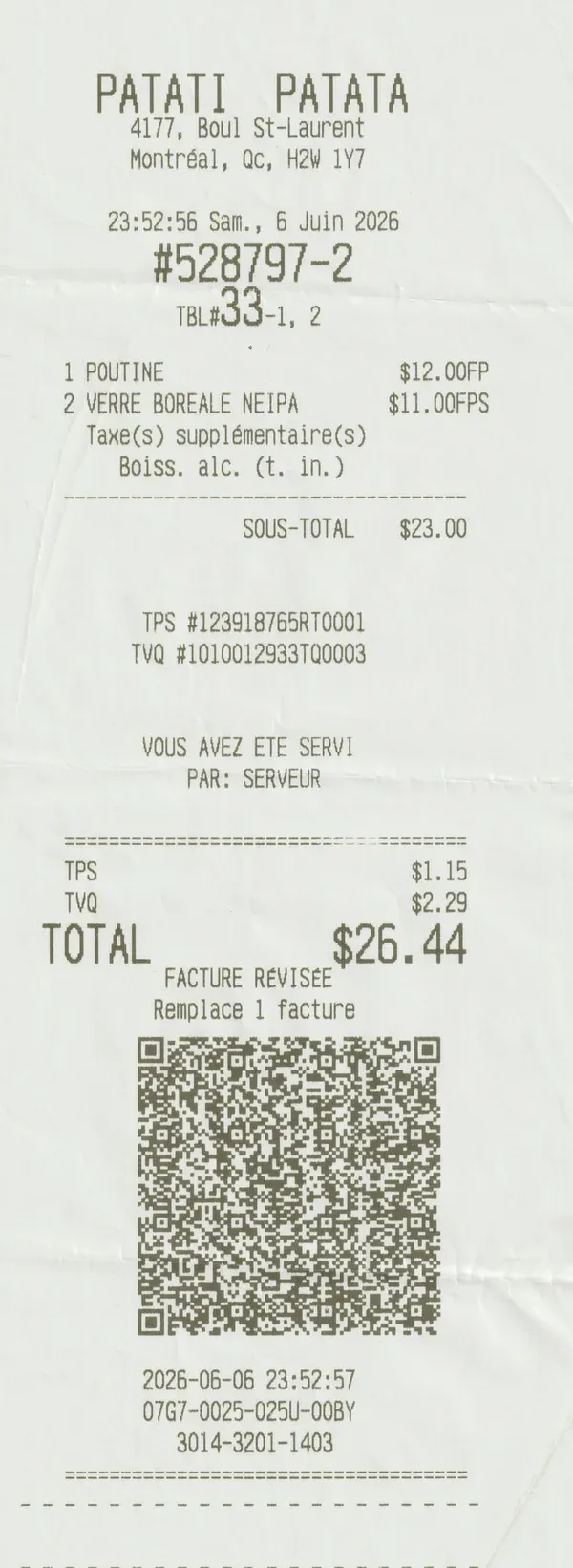
Why separate taxes matter
If you only track one tax, a single total is fine. But many businesses report each tax separately. In Quebec, GST goes to the federal return and QST goes to Revenu Québec. In BC and Saskatchewan, GST and PST are reported to different governments.
The registration numbers matter too. If you claim input tax credits in Canada, the CRA asks for the supplier's GST/HST registration number on purchases of $100 or more (see the CRA's rules). With each tax and its number already on its own line, you or your accountant can see what's there without digging out the paper. (ReceiptsAI keeps your records organized; your accountant can confirm what you need for your filing.)
How it handles Canada
- Quebec: GST (TPS) and QST (TVQ) as two lines, each with its own number.
- BC and Saskatchewan: GST plus PST.
- Manitoba: GST plus RST, including when the receipt calls it PST.
- Ontario and the Atlantic provinces: HST stays a single line. ReceiptsAI never splits it into GST and PST.
- Alberta and the territories: GST only.
Not just Canada
Plenty of places print more than one tax on a receipt, and ReceiptsAI recognises each one:
- India: CGST and SGST on sales within a state, IGST between states, with the vendor's GSTIN.
- United States: hotel bills that add an occupancy tax on top of sales tax, and restaurants with a separate meals or liquor tax.
- Japan: the 10% and 8% consumption tax rates on one receipt.
- UK and Europe: standard and reduced VAT rates on the same receipt.
- Brazil, Indonesia, Malaysia and more: each local tax type kept separate.
You stay in control
Open any receipt and you'll see each tax under the tax total. If something needs fixing, change the tax type from the dropdown, edit the amount, add a missing tax line, or add a registration number the receipt didn't print clearly. Your edits are kept and flow straight into your exports.
Available now on every plan
Multi-tax capture runs automatically on every receipt and invoice, on every plan including Free, at no extra credit cost. Upload a receipt, forward it by email, or send it on WhatsApp, and the taxes are split out for you.
FAQ
Do I need to turn anything on?
No. It runs on every new receipt and invoice.
What if a receipt only shows one tax?
You get one tax line, as before.
Will my exports change?
Exports now add a column for each tax type and registration number found in the documents you export. The total tax column stays where it was.
Does it work with French receipts?
Yes. TPS, TVQ, TVH and TVP are read as GST, QST, HST and PST.
Try it
Start for free with 30 credits and upload a receipt from Quebec, BC or anywhere with more than one tax. You'll see each tax on its own line.