
A paper receipt is a liability. Thermal paper fades, slips get lost, and manual data entry is a drain on your productivity. For the modern small business owner or freelancer, the digital filing cabinet is a necessity. It is an AI-driven system that makes sure every cent is accounted for as it happens.
Managing finances has shifted from a reactive chore to a proactive strategy. The challenge is no longer about finding a place to put paper. It is about choosing the right tools to capture, categorize, and sync data across your entire financial tech stack. This guide covers the current receipt scanning landscape, reviews the best tools available, and outlines how to build a digital filing cabinet that saves time and keeps you audit-ready. If you are starting from scratch, read our step-by-step guide on how to set up a digital filing cabinet first, then come back here to pick your tools.
The Shift from Paper to Predictive: The Rise of the Smart Cabinet
The technology behind receipt scanning has evolved far beyond basic Optical Character Recognition (OCR). While early tools merely read text, today's leaders use Large Language Models (LLMs) and specialized financial AI to understand context. When you scan a receipt from a hardware store, the system doesn't just see a vendor name and a total. It looks at your previous transactions and categories to suggest whether the purchase was a repair expense or a cost of goods sold.
This predictive capability has transformed the digital filing cabinet from a passive storage unit into an active assistant. For small business owners, this means the data entry portion of bookkeeping has dropped dramatically. The focus has shifted to data verification. Many scanning tools now connect to bank feeds and can match a photo of a receipt to the corresponding card transaction shortly after the purchase. That kind of immediacy is quickly becoming the standard.
Top-Tier Tools: Reviews of the Industry Leaders
Choosing the right digital filing cabinet software depends on your transaction volume, team size, and existing accounting software. Here are the front-runners.
ReceiptsAI: The Complete Digital Filing Cabinet
ReceiptsAI is a strong choice for small businesses and freelancers looking to build a complete digital filing cabinet without enterprise complexity. Its AI-powered receipt scanner delivers around 99% OCR accuracy, extracting merchant names, addresses, dates, amounts, tax information, and transaction descriptions from JPEG, PNG, HEIC, PDF, TIFF, and WEBP files. Beyond receipt scanning, it offers bank statement categorization, invoice processing, and automated expense categorization with up to 100 custom categories. Duplicate detection prevents double-entry errors, natural language search helps you find any document quickly, and you can forward receipts by email to a private inbox instead of uploading them one by one. Pricing starts free with 30 credits and no credit card, and paid plans start at $12/month. Your data exports cleanly to Excel or CSV, so it works alongside whatever accounting software you already use.
Dext Prepare
Dext remains a strong contender for accuracy, even when dealing with crumpled or faded receipts. Dext is particularly valuable for businesses with high transaction volumes or those working with an external bookkeeper. The Direct Fetch feature can pull invoices from supplier portals and online accounts without manual effort. It also handles bank statement extraction for easier reconciliation.
Expensify: The Evolution of Spend Management
Expensify has moved beyond simple scanning to become a comprehensive spend management platform. For freelancers and small teams who travel, the mobile app is a popular pick. Its Concierge assistant handles tasks like multi-currency conversions and per-diem calculations, and policy checks flag receipts that break company rules before you submit them. For those using the Expensify Card, reconciliation is close to instant.
Zoho Expense
For businesses already using the Zoho ecosystem, Zoho Expense offers a cost-effective, integrated solution. It can map expenses to your chart of accounts and is strong for tracking billable expenses back to specific clients or projects, with mileage tracking that feeds directly into expense reports.
Hubdoc
As a Xero-owned product, Hubdoc is the natural choice for Xero users. It excels in simplicity, focusing on being an efficient inbox for your financial documents. The folder-based organization system mimics an old-school filing cabinet but adds full-text search. Its ability to automatically fetch recurring bills from online portals makes it reliable for maintaining a clean audit trail.
Beyond the App: High-Volume Hardware for Growing Teams
Smartphone apps are the primary interface for receipt scanning, but hardware still plays a role for businesses handling physical paperwork, such as retail, construction, or legal services. The desktop scanner has been reimagined for the cloud.
The Fujitsu ScanSnap iX1600 is the industry workhorse. It is a standalone Wi-Fi device that functions without a computer. You can stack 50 mixed-size receipts into the feeder, press one button on the touchscreen, and the device scans both sides, cleans the images, and sends them directly to your cloud-based filing cabinet. This hardware is essential for offices that still receive a high volume of physical mail or invoices.
For the mobile professional, the tool of choice is a recent smartphone. Modern phone cameras and scanning apps automatically detect document edges, flatten curved paper, and correct poor lighting, so every scan stays legible. When combined with a scanning cradle or stand, your phone becomes a fast document digitizer that rivals expensive office equipment. The goal is to eliminate the pile-up by scanning documents the moment they arrive.
Navigating the Legal Landscape: Security and Compliance
A common hurdle for small business owners is the fear of an audit. Tax authorities such as the IRS and HMRC generally accept digital copies of receipts, provided they are complete, legible, and accurate. Requirements vary by country and situation, so check the rules that apply to you or ask your accountant.
This makes your choice of tool a matter of security. A digital filing cabinet should never be just a folder of JPEGs on a hard drive. Professional tools keep an audit trail: when the receipt was uploaded, who added it, and the metadata associated with the original file. That level of detail makes an auditor's questions much easier to answer.
Data sovereignty and privacy are also critical. Make sure your chosen tool encrypts data in transit and at rest and offers Multi-Factor Authentication (MFA). You are storing sensitive financial data, so your digital cabinet should be as secure as your bank account. Ask providers which security certifications they hold, such as SOC 2, and how they handle data deletion.
Building the Zero-Touch Workflow: Integration is Everything
The value of a digital filing cabinet is realized when it communicates with the rest of your business. A Zero-Touch workflow is one where information flows from the point of purchase to your financial reports with as little manual work as possible.
A best-practice workflow follows these steps:
- Capture: Pay for a business expense. If it is a physical receipt, snap a photo immediately via your app. If it is an email invoice, forward it to a dedicated inbox email address provided by your scanning tool.
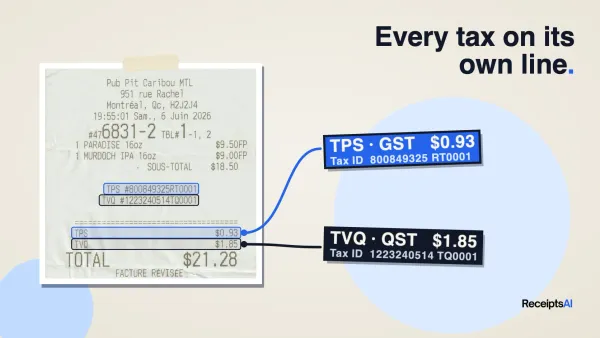
- Extract: The AI extracts the vendor, date, total, tax amount, and payment method.
- Categorize: The tool recognizes the vendor and assigns the expense to the correct category based on your history.
- Sync or export: The data and the image go to your accounting software, such as QuickBooks or Xero, either through a direct integration or a spreadsheet export.
- Archive: The digital image is stored in your searchable cloud cabinet, while the data is reconciled against your bank feed.
By the time you perform your monthly review, most of the work is finished. You are simply checking the AI's work for anomalies. This workflow provides immediate financial visibility. You can see your exact spend on subscriptions or travel at any time, rather than waiting for quarterly reports.
Maintenance Habits: Keeping Your Digital Cabinet Organized
Even the best AI tools require human oversight. To keep your digital filing cabinet useful, implement a few digital hygiene habits.
Adopt a "Search, Don't Sort" philosophy. Business owners used to spend hours creating nested folders. AI-powered search makes most of that unnecessary. As long as your receipts have the correct metadata (Vendor, Date, Category), you can find them instantly. Focus your energy on verifying tags rather than building complex folder structures. If you do prefer folders, our guide to setting up a digital filing cabinet walks through a simple structure and naming system.
Perform a Monthly Reconciliation Sweep. Spend 15 minutes at the end of each month looking for unmatched items in your scanning tool. This usually happens when a receipt was paid in cash or from a personal account, meaning the software could not find a corresponding bank transaction. Addressing these small gaps monthly prevents a massive workload at year-end.
Manage your Data Retention. While storage is cheap, keeping decades of receipts can clutter your search results. Many tools let you archive or delete documents once they have passed the retention period that applies to you, which is often around seven years. This keeps your active database lean and efficient.
Conclusion: The Freedom of the Paperless Office
Keeping a digital filing cabinet is now a basic requirement for any small business that wants to stay organized and competitive. By using AI-driven tools like ReceiptsAI, Dext, or Expensify, building consistent scanning habits, and connecting your workflow end to end, you reclaim your most valuable asset: your time.
For most small businesses, ReceiptsAI offers a good balance of powerful features, ease of use, and affordability. It covers receipt management, bank statement processing, and expense categorization in one place, so you can run your whole capture workflow from a single tool.
The transition from a physical shoebox to a digital system may feel like a significant shift, but the rewards come quickly. Fewer lost receipts, no more faded ink, and a calmer tax season. Instead of chasing paper, you get a clear, up-to-date view of your business's finances. Choose one tool, scan your first receipt, and move toward a paperless, efficient way of working.