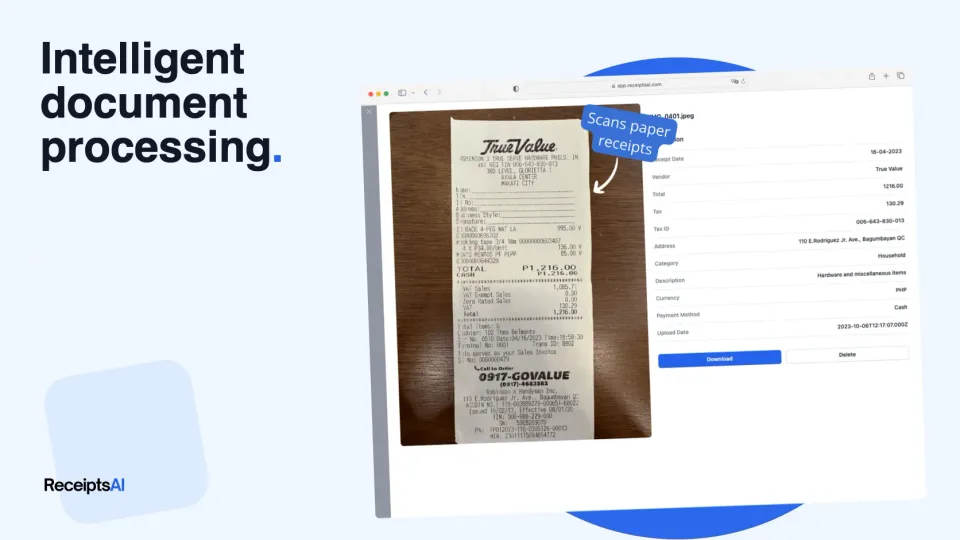

Intelligent Document Processing is an AI-powered way to read business documents and pull out useful data automatically, and the market is projected to grow from USD 3.17 billion in 2026 to USD 7.18 billion by 2031 as more companies replace manual data entry with AI-driven workflows. In practice, that means software can now do much of the reading, sorting, and extracting work that used to eat up your evenings.
If your desk, inbox, or phone camera roll is full of receipts, invoices, statements, and random PDFs, you're already feeling the problem that IDP solves. Intelligent Document Processing (IDP) is an AI-powered technology that automatically reads, understands, and extracts data from documents like receipts and invoices, much like a human would, but faster and more accurately.
For a small business owner, that can mean fewer hours typing numbers into spreadsheets. For an accountant or bookkeeper, it can mean less cleanup, fewer copy-paste mistakes, and a cleaner handoff into the accounting system you already use. The important part is that IDP doesn't just "see text." It tries to understand what that text means inside a real document.
Table of Contents
- The End of Manual Data Entry as You Know It
- How Intelligent Document Processing Actually Works
- IDP vs Traditional Automation What Is the Difference
- Practical IDP Use Cases for Your Business
- Benefits and Real-World Challenges of Adopting IDP
- How to Choose and Implement an IDP Solution
The End of Manual Data Entry as You Know It
Manual data entry usually starts small. A few receipts after lunch. A supplier invoice in your inbox. A PDF statement that "should only take a minute." Then Friday turns into reconciliation night, and you're zooming in on blurry totals, checking tax lines, and wondering whether you already entered that charge last week.
That work isn't just annoying. It steals attention from sales, client work, hiring, and cash flow. It also creates a hidden risk. Every time someone retypes a date, amount, or vendor name, there's a chance the books drift a little farther from reality.

Why this shift matters now
IDP has moved from a niche back-office tool to a mainstream operational system. The Mordor Intelligence IDP market analysis says the market reached USD 3.17 billion in 2026 and is projected to reach USD 7.18 billion by 2031, growing at a 17.78% CAGR. That growth reflects a simple business decision: companies are replacing repetitive manual entry with software that can process documents at scale.
North America held a 47.60% share of the market in 2025 in that same analysis, which suggests adoption is strongest where cloud tools, AI infrastructure, and document-heavy business workflows are already mature. If you run a small business in the US or Canada, this isn't some far-off enterprise trend. It's becoming part of the normal finance stack.
Practical rule: If your team still reads every receipt and invoice by hand, you're paying people to do work that software can now handle more consistently.
What this looks like in a small business
Think of IDP as the upgrade from "typing data in" to "reviewing smart suggestions." Instead of entering every field yourself, you upload or forward documents, and the system pulls out the merchant, amount, date, tax, payment method, or other details you care about. Then you verify exceptions instead of doing the whole job from scratch.
If you're trying to reduce bookkeeping drag, this shift sits next to other data entry automation workflows for finance teams. The main benefit isn't only speed. It's getting cleaner records without building your week around admin work.
How Intelligent Document Processing Actually Works
The term "AI document processing" often conjures an image of a black box. That's where confusion starts. IDP is easier to understand if you treat it like a very fast assistant who's been trained to open documents, recognize what's important, and send clean information where it belongs.

Think of IDP like a trained assistant
Say you hire someone to handle paperwork.
First, they collect documents from different places: email attachments, scans, phone photos, PDFs, or exported reports. Next, they clean them up enough to read them. Then they decide what each document is. Is this a receipt, invoice, contract, statement, or form? After that, they pull out the details you need, check whether those details make sense, and enter the final result into the right system.
That's basically IDP.
A technical breakdown from Databricks on intelligent document processing describes a seven-step pipeline: ingestion, preprocessing, OCR/ICR digitization, classification, NLP-driven data extraction, domain-specific validation, and structured data export in formats like JSON, CSV, and XML. The same source notes that this process can achieve accuracy rates ranging from 80% to 99% without predefined templates.
The seven steps in plain English
Behind the scenes, each part performs these actions:
Ingestion
The system takes in files from wherever they arrive. That could be uploads, scanned images, emails, or cloud folders.Preprocessing
It cleans the document so it's easier to read. This can include straightening a crooked scan, reducing visual noise, and improving legibility.OCR or ICR digitization
OCR turns printed text in an image into machine-readable text. ICR is a related approach used for harder handwriting-style characters.Classification
The system figures out what kind of document it's looking at, enabling different handling for an invoice compared to a bank statement.NLP-driven extraction
It starts to understand meaning, not just text. It identifies which number is the total, which date is the invoice date, and which line is the vendor name.Validation
It checks the extracted values against rules or other records. If the math looks wrong or a field is missing, it can flag that for review.Structured export
The clean output goes to an accounting platform, spreadsheet, database, or reporting workflow.
Good IDP doesn't replace judgment. It reduces the amount of human judgment needed for routine documents and reserves review time for the messy ones.
A short walkthrough can help if you want a second beginner-friendly explanation. Markdown Converters' guide to document AI does a good job translating the jargon into plain language.
Later in your workflow, this kind of extraction often feeds directly into automated invoice processing systems so approved data can move into bookkeeping without another round of retyping.
Why old OCR often disappoints
Many business owners become confused at this stage. They hear "OCR" and assume it's the same as IDP. It isn't.
OCR reads characters. IDP combines OCR with NLP, machine learning, and often computer vision so the system can classify documents, interpret fields, and improve over time. Hyland's guide to intelligent document processing explains that IDP uses OCR, NLP, and ML to handle structured, semi-structured, and unstructured documents without predefined templates, with stated accuracy ranging from 80% to 99% and support across 200+ languages.
Here's the video version if you'd rather see the idea in action:
IDP vs Traditional Automation What Is the Difference
A lot of software categories blur together in finance ops. OCR, RPA, document automation, AI extraction. Vendors mix the terms, and buyers end up comparing tools that solve very different problems.
Three tools that look similar but aren't
The easiest way to separate them is by asking one question: Does the system merely read text, follow rules, or interpret document context?
| Capability | Traditional OCR | RPA (with Basic OCR) | Intelligent Document Processing (IDP) |
|---|---|---|---|
| Main job | Converts images into text | Follows predefined steps across apps | Reads, classifies, extracts, and validates document data |
| Understands context | No | Very limited | Yes, to a practical degree |
| Handles messy layouts | Weak | Weak to moderate | Stronger, especially with training |
| Works with unstructured documents | Poorly | Poorly unless heavily scripted | Designed for this |
| Learns from corrections | No | Usually no | Yes, in systems with ML and review loops |
| Best fit | Clean, standard text capture | Repetitive screen-based workflows | Real document-heavy finance and ops work |
| Typical failure point | Misreads fields with no context | Breaks when layouts or steps change | Needs training and review for edge cases |
Traditional OCR is like copying all the words off a page into a text file. Useful, but shallow. If a receipt shows several dates, OCR won't know which one matters. If an invoice places the total in an unusual corner, OCR may grab the wrong figure and still look "successful."
RPA solves a different problem. It can move data from one system to another if the steps are stable. But if the input documents vary a lot, the bot becomes fragile. A changed layout, a missing field, or a handwritten note can break the workflow.
OCR reads letters. RPA follows instructions. IDP tries to understand the document well enough to make the data usable.
This difference matters most when you're automating accounting work with real-world documents instead of perfect samples. If your team is comparing tools, this is also where broader accounting automation software options start to separate into categories with very different setup and maintenance needs.
Practical IDP Use Cases for Your Business
The value of IDP becomes obvious when you follow an actual document from arrival to bookkeeping. Not a polished vendor demo. A real document from a phone photo, supplier email, or monthly download.

A crumpled receipt
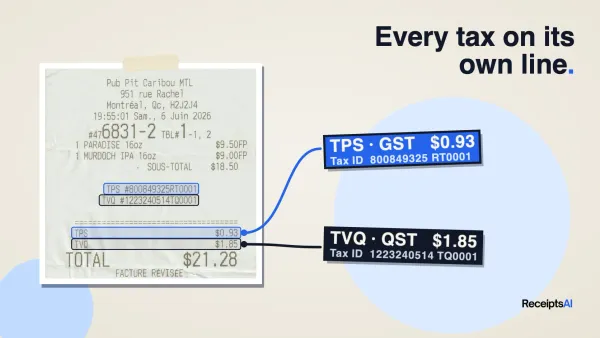
You buy supplies on the road, snap a photo in bad lighting, and forget about it until tax time. A basic scanner might only pull random text. IDP tries to identify the merchant, transaction date, total, tax, and payment details, then place that information into a structured record.
The useful part isn't just extraction. It's what happens next. The receipt can be categorized, renamed, stored with the right vendor, and made searchable later when you need to answer a bookkeeping question or support an expense claim.
A multi-page supplier invoice
Invoices are more complex because they often include line items, subtotals, tax fields, due dates, PO references, and payment terms. A human bookkeeper reads the whole thing and decides which fields matter. IDP aims to do the same pattern-recognition work automatically, then hand exceptions to a person.
Template-free processing is particularly important. Many businesses don't receive invoices in one standard layout. One vendor sends a PDF. Another sends a scan. A third includes extra notes and unusual formatting. Good IDP software should still identify the supplier, invoice number, invoice date, total, and line-item structure without requiring you to build a separate rule for every sender.
A monthly bank statement
Statements look orderly, but they create a different kind of workload. You may need transaction dates, descriptions, running balances, fees, deposits, withdrawals, and summary totals in a format that supports reconciliation or reporting.
IDP can extract the relevant entries and organize them for review instead of leaving someone to copy each line manually. For bookkeepers and forensic accountants, the big win is searchability. Once the data is structured, you can filter, compare, and review transactions much faster than you can with static PDFs.
A practical example is a tool like ReceiptsAI, which is built to process receipts, invoices, bank statements, PDFs, and spreadsheets for small businesses and accountants. Its role in an IDP workflow is straightforward: identify document type, extract key financial fields, sort files, categorize transactions, and prepare records for downstream bookkeeping work.
Common small-business uses include:
- Expense capture: Turn receipt photos into organized, searchable records.
- Invoice intake: Pull key fields from emailed invoices and prepare them for AP review.
- Monthly close support: Extract statement and transaction data for reconciliation.
- Audit prep: Keep supporting documents attached to clean, structured records.
- Multi-client bookkeeping: Standardize intake when every client sends documents in a different format.
Benefits and Real-World Challenges of Adopting IDP
A small business owner snaps a photo of a lunch receipt in the car, emails a supplier invoice from a phone, and uploads a bank statement PDF at the end of the month. On paper, that sounds simple. In practice, those files arrive blurry, cut off, handwritten, rotated, or formatted in ways no two vendors seem to share.
That is why IDP gets so much attention. It can cut down hours of repetitive document work. But it works best when the system is matched to your document mix and your review process, not when you expect perfect results from every file that hits the inbox.
Where IDP helps immediately
The first wins are usually easy to spot in day-to-day operations.
- Less manual entry: Staff spend less time retyping names, totals, dates, and line items.
- Cleaner records: Extracted data is easier to search, sort, and reconcile later.
- Faster reviews: Teams can focus on exceptions instead of opening every file and starting from zero.
- Better consistency: Similar documents can follow the same intake, extraction, and categorization steps.
- Stronger audit readiness: Digital records are easier to retrieve when a client, auditor, or tax preparer asks questions.

The payoff extends beyond speed. For many accountants and bookkeepers, the bigger improvement is that messy document intake becomes more manageable. Instead of hiring someone to read every receipt like a detective, you let software do the first pass and send uncertain cases to a human reviewer.
That sounds close to the promise vendors make. The difference is in the details.
Why the 99 percent claim can mislead people
High accuracy claims often come from controlled document sets. Real small-business paperwork is rarely controlled. It includes crumpled taxi receipts, handwritten service notes, dark phone photos, vendor templates that change without warning, and foreign-language or multi-currency documents.
A useful correction comes from Automation Anywhere's IDP overview and limitations discussion, which explains that the idea of universal 99% accuracy is misleading. The source notes that performance can drop on handwritten receipts and foreign-language documents, especially before a system has been trained on varied, unstructured formats.
That distinction matters.
If a vendor says "99% accuracy," your next question should be, "On which documents?" A polished demo set of clean invoices tells you very little about how the tool will perform on the files your team deals with every week.
For accountants, that gap shows up fast. The easy document is the standard invoice from a large supplier. The hard document is the faded fuel receipt, the handwritten delivery slip, the photo taken under warehouse lighting, or the bank export with labels that do not match the prior month.
Modern tools are starting to address that gap more directly. ReceiptsAI, for example, is built around financial document types small businesses and accountants see every day, including receipts, invoices, bank statements, PDFs, and spreadsheets. That focus matters because general document AI may look strong in a broad demo but struggle with the messy edge cases that create the most bookkeeping friction.
A practical buying lesson follows from that:
| Good question to ask | Why it matters |
|---|---|
| Can it handle handwritten and low-quality scans? | Many systems break down on the documents your team most wants help with |
| How does review work when fields are uncertain? | Human correction is part of a workable accounting process |
| Can it adapt to unusual document layouts? | Small businesses rarely receive uniform files |
| Does it support foreign-language or multi-currency documents? | That comes up often in travel, ecommerce, and import-heavy businesses |
Good IDP does not remove humans from the process. It gives them a smart assistant. The assistant reads first, organizes the pile, and flags what needs judgment. That is where the business value shows up.
How to Choose and Implement an IDP Solution
A small business owner usually does not buy IDP because "AI" sounds impressive. They buy it because someone is still keying in receipts on Friday night, month-end closes keep slipping, or the same invoice errors keep showing up in the books.
That is why choosing an IDP tool starts with process, not features. You are hiring a digital assistant for document work. Before you hire it, you need to know what job it will do, what mistakes you can tolerate, and when a human should step in.
What to check before you buy
Start with your real document pile. Vendor demos usually show clean PDFs with tidy layouts. Your team deals with wrinkled receipts, scans from old office printers, handwritten notes, and supplier invoices that change format without warning.

Use this checklist during evaluation:
- Document fit: Test receipts, invoices, statements, and the odd files that create extra cleanup each month.
- Field fit: Confirm the system captures the fields your accounting process needs, not just blocks of text.
- Review workflow: Look at how staff fix uncertain fields, approve exceptions, and keep work moving.
- Integration path: Check how data exports into your accounting stack, spreadsheet process, or document archive.
- Learning curve: If the interface feels clumsy, your team will avoid it.
- Support quality: Setup usually involves real process changes, so responsive support saves time fast.
- Pricing clarity: Make sure you know how costs change as volume grows or document types expand.
One practical warning matters here. Accuracy claims can sound impressive in a sales call, but they often come from controlled tests on cleaner documents than small businesses receive every day. If a tool performs well on polished samples but struggles with low-quality scans or mixed formats, the advertised number will not help your bookkeeping team.
That is also why flexibility matters more than a polished demo. A strong IDP system should handle variation, show confidence levels clearly, and make correction easy when the document is messy.
How to run a low-risk pilot
Start with one painful workflow. Do not roll the tool out across every document type on day one.
A good pilot looks like this:
Choose one document stream
Pick supplier invoices, expense receipts, or monthly bank statements.Use a realistic sample
Include the easy files and the ugly ones. The ugly ones show whether the system can hold up in daily use.Define success in plain language
Examples include faster review, fewer manual edits, cleaner exports, or less month-end backlog.Give one person ownership
A single reviewer keeps feedback consistent and spots patterns faster.Adjust rules, categories, and outputs
Many tools improve once they are tuned to your chart of accounts, naming rules, or approval flow.
Small-business advice: Start with the document type your team keeps postponing. That is usually where the return shows up first.
Once the pilot works, add the next document family. That approach keeps the project manageable and gives your team time to trust the system.
If you want to test this with the kinds of messy files accountants and small businesses see every week, ReceiptsAI lets you try receipt, invoice, and bank statement processing without changing your whole workflow first. Your own documents will tell you far more than a polished demo.