Free & Customizable
Chart of Accounts Maker
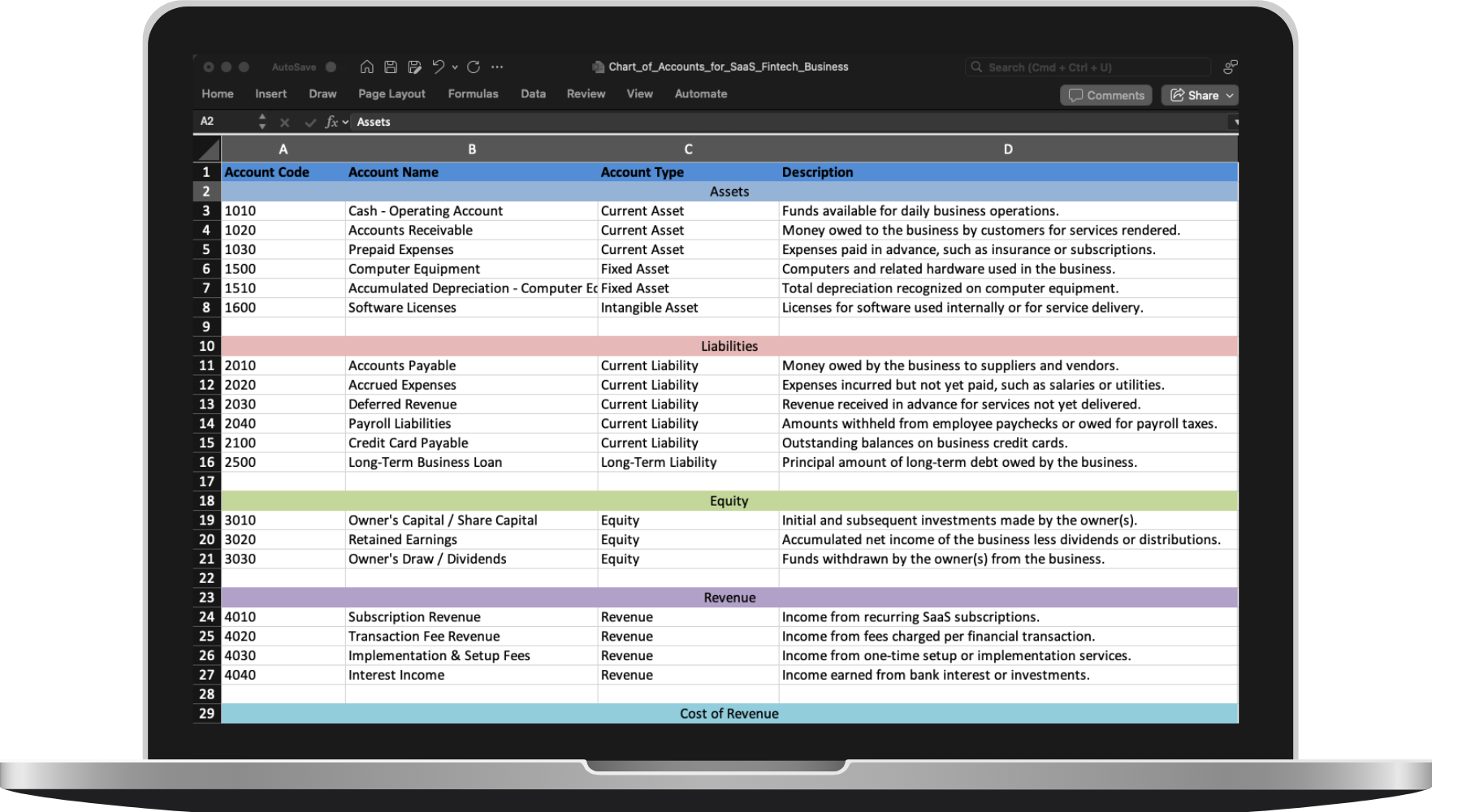
Describe your business and make a sample chart of accounts. Edit the result and export to Excel or PDF.
How to Create Your Own Chart of Accounts
Customized for Your Business
- 1
Describe.
- Enter a short prompt with your industry, business model, and any details like inventory, payroll, locations, or sales tax needs.
- 2
Generate.
- Our AI suggests account groups and account codes that fit the way your business earns revenue and tracks expenses.
- 3
Review.
- Rename groups, add accounts, change descriptions, and remove anything you do not need before exporting.
- 4
Export.
- Download a working chart of accounts you can share with your bookkeeper, accountant, or team.
The #1 AI Receipt App for Small Businesses
Track your Expenses Automatically with AI
Automated Bookkeeping. Upload documents, set your preferences, and let AI do the rest.


"Great Service!"
Ronald and the team were super responsive to my questions and feature requests. I've never had an experience like this before from a software developer.

"The easiest tool I've ever used."
It is very very easy, as soon as you get a receipt you can scan it, the AI will capture all relevant information and it is very little interaction to get to the final submission of the expense. It is so easy!!!

"Simple, Straight-forward"
Following business trips or even a few weeks in the office, the last thing that someone wants to do is take time out of their day to sort through receipts. It makes my process much easier.

"Very easy to use"
ReceiptsAI is very easy to use. As someone who needs to keep track of monthly expenses, it saves me so much time. The AI is incredibly accurate and I love how it categorizes everything automatically.

"Impressive!"
I run multiple businesses and keeping track of receipts was a nightmare. Once you have it setup, it completely transformed how I handle expense tracking. Impressive!

"Effortless"
It is effortless and saves me hours every month.
"Highly recommend!"
The accuracy of the AI is incredible. It catches details I would have missed manually entering receipts.
"Time saver!"
What used to take me hours now takes minutes. The automatic categorization is very good.
"Great customer support!"
Not only is the product helpful, but the support team is very responsive.
"Great Service!"
Ronald and the team were super responsive to my questions and feature requests. I've never had an experience like this before from a software developer.
"The easiest tool I've ever used."
It is very very easy, as soon as you get a receipt you can scan it, the AI will capture all relevant information and it is very little interaction to get to the final submission of the expense. It is so easy!!!
"Simple, Straight-forward"
Following business trips or even a few weeks in the office, the last thing that someone wants to do is take time out of their day to sort through receipts. It makes my process much easier.
What is a Chart of Accounts?
A chart of accounts is the bookkeeping structure that keeps your financial data organized and reporting-ready.
A list of every account you track
A chart of accounts is the master list of the accounts used in your bookkeeping system, including assets, liabilities, equity, revenue, and expenses.
The structure behind your reports
It creates the framework for your balance sheet, profit and loss statement, and other financial reports by organizing transactions into the right categories.
Customized to how your business operates
The right chart of accounts depends on your industry, revenue model, inventory, payroll, taxes, and reporting needs, which is why many businesses tailor it to their workflow.
Frequently asked questions
Can't find what you need? Email our support team.
A chart of accounts is the master list of accounts your business uses to organize assets, liabilities, equity, revenue, and expenses. It provides the structure behind your bookkeeping and financial reports.
It is useful for small business owners, bookkeepers, accountants, and operators who need a fast starting point for a new business or a cleaner accounting structure for an existing one.
Yes. You can update group names, account codes, account names, account types, and descriptions before exporting the final file.
Yes. You can export the generated chart of accounts to Excel for further editing or PDF for sharing and review.
Yes. The chart of accounts maker is a free tool and does not require a sign-up to generate, edit, and export a draft COA.
The generated result is a practical starting point. You may still want to adjust naming conventions, numbering rules, or tax-specific accounts to match your accountant or accounting system.
Save time managing receipts
Join 350+ small businesses around the world who use ReceiptsAI to assist with their bookkeeping.
