Free Family Vacation Budget Template
Go on a lovely family vacation without breaking the bank! Our simple family vacation budget makes it easy to plan, estimate and track costs from transportation to accommodation to food and more.
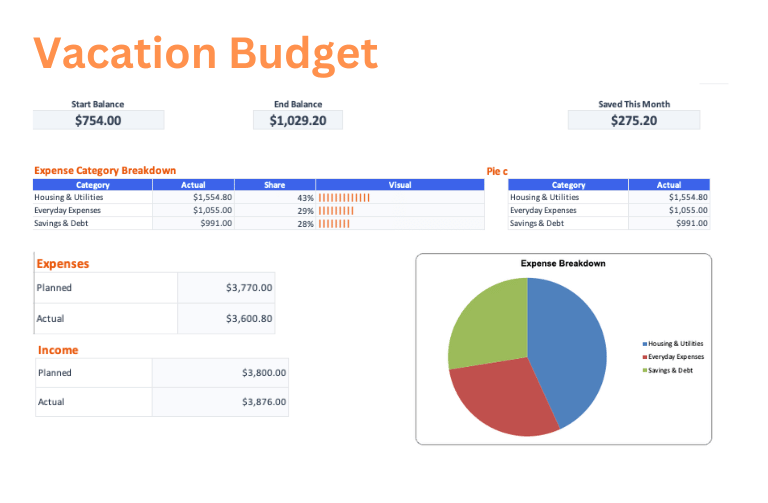
Download the Family Vacation Budget template
Choose a clean workbook, sample Excel file, or printable PDF.
Let ReceiptsAI do it automatically
Upload documents once and let AI extract, categorize, and organize the work for you.
What is the Family Vacation Budget Template?
The Family Vacation Budget template helps plan a trip by organizing airfare, car rental, gas, parking, hotels, vacation rentals, restaurants, groceries, snacks, theme parks, tours, kids activities, entertainment, souvenirs, travel insurance, and contingency. It compares estimated trip costs with actual bookings and purchases so families can see the full vacation cost before departure.
Who is this for?
This template is for families, parents, group travelers, grandparents, and anyone coordinating a vacation with multiple people and shared expenses. It is useful when comparing destinations, booking lodging, choosing activities, or deciding whether a trip fits the household budget.
What does the Family Vacation Budget Template contain?
Transportation
- Airfare (Family)
- Car Rental
- Gas
- Parking
Accommodation
- Hotel/Resort
- Vacation Rental
Food & Dining
- Restaurants
- Groceries
- Snacks & Drinks
Activities & Entertainment
- Theme Parks
- Tours & Excursions
- Kids Activities
- Entertainment
Miscellaneous
- Souvenirs
- Travel Insurance
- Contingency
How to use the Family Vacation Budget Template
- 1
Review the sample family vacation budget categories and adjust the planned amounts for transportation, accommodation, and food & dining before exporting.
- 2
Open the Excel workbook on the Dashboard tab and follow the Get Started note at the top.
- 3
Set your starting balance on the Budget tab, then edit only the highlighted cells and enter amounts as positive numbers.
- 4
Replace the example rows on the Transactions tab with your own income and expenses as money comes in or bills are paid.
- 5
Use the Budget and Dashboard tabs to review actuals, differences, ending balance, and the category breakdown without changing formula cells.
Why use this template?
Family vacations can exceed the plan when meals, activities, souvenirs, parking, and travel extras are added after the big bookings. This template keeps the full trip visible so families can make tradeoffs before nonrefundable reservations and avoid spending stress during the vacation.
Further, every ReceiptsAI budget template sets itself apart from other generic templates with:
Free with no sign-up
Create and download the template without an email address, credit card, or required account.
Simple and easy to use
Start with clear budget categories, highlighted editable cells, and familiar Excel or Google Sheets workflows.
Visual budget summaries
Use built-in visuals like pie charts and bar charts to understand where money is going at a glance.
Editable with AI help
Customize the template for your unique needs, or use AI to reshape the budget faster.
Together, these features make the family vacation budget template a practical starting point you can download immediately, adapt quickly, and keep using as your numbers change.