Free Restaurant Opening Budget Template
Get your restaurant off the ground with our simple restaurant opening budget template. This templates makes it easy to plan, estimate and control costs from build-out and equipment purchases to marketing and launch.
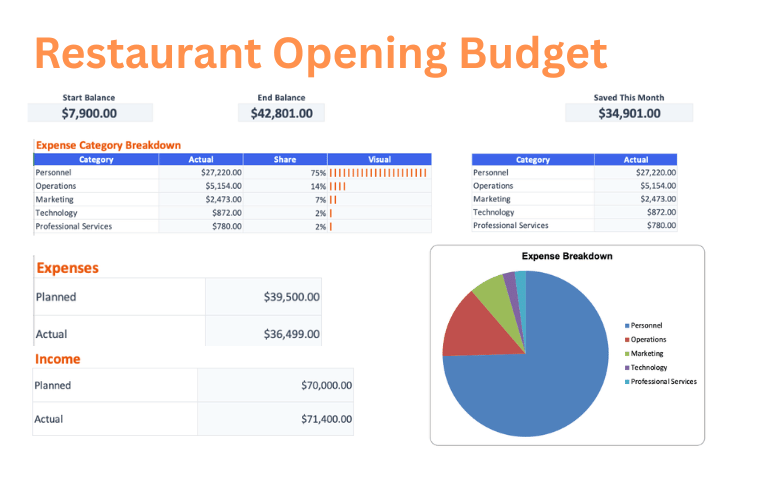
Download the Restaurant Opening Budget template
Choose a clean workbook, sample Excel file, or printable PDF.
Let ReceiptsAI do it automatically
Upload documents once and let AI extract, categorize, and organize the work for you.
What is the Restaurant Opening Budget Template?
The Restaurant Opening Budget template helps plan launch costs by organizing lease deposits, renovation, interior design, signage, kitchen equipment, refrigeration, POS systems, furniture, fixtures, permits, insurance, initial inventory, and marketing. It compares estimated startup costs with actual commitments so operators can see how much cash is needed before opening day.
Who is this for?
This template is for restaurant owners, chefs, hospitality operators, investors, franchisees, and teams evaluating a new food service concept. It is useful for funding plans, landlord negotiations, build-out decisions, equipment quotes, permit planning, and launch budget approvals.
What does the Restaurant Opening Budget Template contain?
Build-Out & Design
- Lease Deposit
- Renovation & Construction
- Interior Design
- Signage
Kitchen Equipment
- Commercial Appliances
- Cookware & Utensils
- Refrigeration
- POS System
Furniture & Fixtures
- Tables & Chairs
- Bar Equipment
- Lighting Fixtures
Licenses & Pre-Opening
- Licenses & Permits
- Insurance
- Initial Inventory
- Marketing & Launch
How to use the Restaurant Opening Budget Template
- 1
Review the sample restaurant opening budget categories and adjust the planned amounts for build-out & design, kitchen equipment, and furniture & fixtures before exporting.
- 2
Open the Excel workbook on the Dashboard tab and follow the Get Started note at the top.
- 3
Set your starting balance on the Budget tab, then edit only the highlighted cells and enter amounts as positive numbers.
- 4
Replace the example rows on the Transactions tab with your own income and expenses as money comes in or bills are paid.
- 5
Use the Budget and Dashboard tabs to review actuals, differences, ending balance, and the category breakdown without changing formula cells.
Why use this template?
Restaurant openings require expensive decisions before regular revenue starts, and underestimating build-out, equipment, or pre-opening inventory can leave a concept underfunded. This template keeps startup commitments visible so the launch plan stays realistic before deposits and purchases are locked in.
Further, every ReceiptsAI budget template sets itself apart from other generic templates with:
Free with no sign-up
Create and download the template without an email address, credit card, or required account.
Simple and easy to use
Start with clear budget categories, highlighted editable cells, and familiar Excel or Google Sheets workflows.
Visual budget summaries
Use built-in visuals like pie charts and bar charts to understand where money is going at a glance.
Editable with AI help
Customize the template for your unique needs, or use AI to reshape the budget faster.
Together, these features make the restaurant opening budget template a practical starting point you can download immediately, adapt quickly, and keep using as your numbers change.