Free Project Budget Template
Planning a new project? Our generic business project budget template is perfect for helping you in planning, estimating and controlling costs.
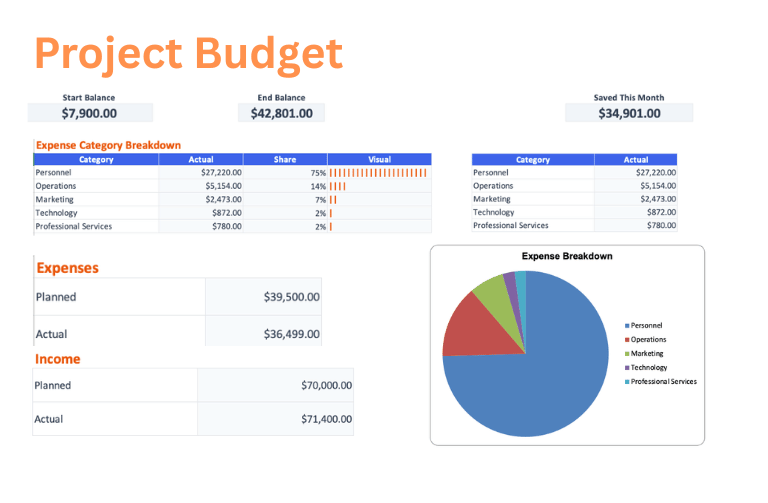
Download the Project Budget template
Choose a clean workbook, sample Excel file, or printable PDF.
Let ReceiptsAI do it automatically
Upload documents once and let AI extract, categorize, and organize the work for you.
What is the Project Budget Template?
The Project Budget template helps plan a business project by organizing personnel, consultants, equipment, software, travel, meetings, marketing, and contingency into one estimate-vs-actual budget. It gives teams a flexible cost plan for tracking what was approved, what has been spent, and what remains available.
Who is this for?
This template is for project managers, consultants, operations teams, department leads, and small businesses preparing internal initiatives, client projects, launches, or cross-functional work. It is useful for budget approvals, stakeholder reviews, scope planning, and post-project cost comparisons.
What does the Project Budget Template contain?
Personnel
- Project Manager
- Team Members
- Consultants
Equipment & Supplies
- Software Licenses
- Hardware
- Office Supplies
Operations
- Travel
- Meetings & Events
Marketing
- Advertising
- Promotional Materials
Contingency
- Reserve Fund
How to use the Project Budget Template
- 1
Review the sample project budget categories and adjust the planned amounts for personnel, equipment & supplies, and operations before exporting.
- 2
Open the Excel workbook on the Dashboard tab and follow the Get Started note at the top.
- 3
Set your starting balance on the Budget tab, then edit only the highlighted cells and enter amounts as positive numbers.
- 4
Replace the example rows on the Transactions tab with your own income and expenses as money comes in or bills are paid.
- 5
Use the Budget and Dashboard tabs to review actuals, differences, ending balance, and the category breakdown without changing formula cells.
Why use this template?
Project costs can become unclear when people, tools, vendors, and travel are approved in separate conversations. This template keeps the cost picture together so teams can make tradeoffs early, preserve contingency, and avoid discovering budget pressure only after commitments have been made.
Further, every ReceiptsAI budget template sets itself apart from other generic templates with:
Free with no sign-up
Create and download the template without an email address, credit card, or required account.
Simple and easy to use
Start with clear budget categories, highlighted editable cells, and familiar Excel or Google Sheets workflows.
Visual budget summaries
Use built-in visuals like pie charts and bar charts to understand where money is going at a glance.
Editable with AI help
Customize the template for your unique needs, or use AI to reshape the budget faster.
Together, these features make the project budget template a practical starting point you can download immediately, adapt quickly, and keep using as your numbers change.