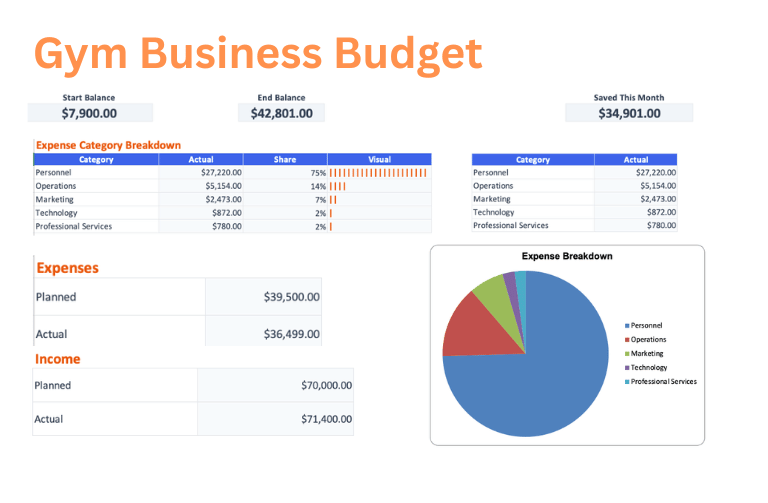
Free Customizable PDF Gym/Fitness Center Budget Template

Download our free Gym/Fitness Center Budget template to effectively manage your Business costs. This customizable tool helps freelancers and business owners track expenses for facility costs, equipment, and staffing in one place. Ensure precise financial planning with our easy-to-use Excel and PDF compatible format.

Expense TypeEstimateActual
Est: $11500.00 | Act: $0.00
Rent/Lease
$8000
$
Utilities
$1500
$
Insurance
$800
$
Maintenance & Cleaning
$1200
$
Est: $3500.00 | Act: $0.00
Equipment Purchases
$2000
$
Equipment Repairs
$500
$
Equipment Leasing
$1000
$
Est: $18000.00 | Act: $0.00
Trainers Salaries
$12000
$
Front Desk Staff
$4000
$
Cleaning Staff
$2000
$
Est: $3200.00 | Act: $0.00
Marketing & Advertising
$2500
$
Software Subscriptions
$300
$
Supplies (towels, etc)
$400
$
TOTAL$36200.00$0.00

Tired of manually budgeting? Save time with ReceiptsAI

Save time generating expense reports, organizing receipts, invoices or bank statements, categorizing transactions, and more. Try it risk-free with 30 credits free.

Get Started in Minutes

How to Use Our Budget Templates

Get started with our budget templates in just a few simple steps.

Choose a Template.
Browse our collection of free budget templates and select one that matches your needs.
Customize Your Budget.
Edit categories, adjust amounts, and add or remove line items to match your specific situation.
Export and Use.
Download your budget as an Excel file for ongoing tracking or as a PDF for printing and sharing.
Track Your Expenses.
Fill in the "Actual" column as you spend money to see how your spending compares to your budget.
Person budgeting with templates

Why Gym Owners Love our Templates

Everything you need to manage your finances effectively.

AI-Powered Budget Planning

Our AI creates a fast template with common expenses for your next project. It can generate a personalized budget with realistic estimates in seconds.

Export to Excel or PDF

Download as Excel to track expenses throughout the month, or export to PDF for printing and record-keeping. Full compatibility with Google Sheets.

Fully Customizable

Add or remove categories and budget items, adjust estimates, and tailor the budget to match your unique financial situation.

Business Expense Categories

Track business expenses by category: office supplies, software, marketing, travel, and more. Perfect for tax deductions.

Income & Revenue Tracking

Track multiple income streams, client payments, and revenue sources. Compare income to expenses to monitor profitability.

Quarterly & Annual Planning

Plan budgets by quarter and year. Track seasonal variations in income and expenses to better forecast cash flow.

Need more templates?

Explore our library of 100+ free templates, professionally created for freelancers and business owners.

Create an Expense Report in Minutes with AI

Simply upload your documents and our AI automatically categorizes every transaction to give you a clear, visual breakdown of your finances

The #1 Budget Management Software

Why use ReceiptsAI

ReceiptsAI is the gold standard in expense management. Automatically extract, categorize, and track your expenses with AI.

Feature
ReceiptsAI
Others
Free Templates

Unlimited Forever

Limited or paid only

AI Generation

AI-powered custom budgets

Manual creation only

Export Options

Excel & PDF export

Behind a paywall

Data Capture

Extract everything from Receipts, Invoices, and Statements

Data Entry

Expense Tracking

AI-powered automatic categorization and intelligent expense sorting

Manual categorization

Processing Speed

Process multiple invoices simultaneously in seconds with parallel processing

Slow

Security Standards

GDPR-compliant with bank-level encryption and secure USA-based storage

Data Harvesting

PRICING

AI Bookkeeping Assistance for less than a cup of coffee per day.

Try free with 30 free credits. Upgrade at anytime for full access.

Free

Perfect for trying ReceiptsAI risk-free with no credit card required.

$0/month

  • 30 free credits
  • Data Extraction from Images or PDFs
  • Basic categorization
  • Email Support
Get started

100% Money Back Guarantee

Starter

Get started with basic AI bookkeeping, create your own categories and rules, and begin to automate your bookkeeping.

$12/month

  • Process 100 pages per month
  • Up to 30 Custom Categories
  • Up to 20 Custom Rules
  • Custom Document Renaming
  • Auto Duplicate Detection
  • Email support
Get started

Premium

Boost your productivity with advanced AI features and enhanced automation for growing businesses.

$29/month

  • Process 500 pages per month
  • Up to 100 Custom Categories
  • Up to 100 Custom Rules
  • Custom Document Renaming
  • Auto Duplicate Detection
  • Priority Support
  • Bulk Processing
Get started
All major credit cards accepted
100% money back guarantee
Unsubscribe at any time

Join over 300+ small businesses saving time with ReceiptsAI

C
4.5 (20+ reviews)

"Great Service!"

Ronald and the team were super responsive to my questions and feature requests. I've never had an experience like this before from a software developer.

Luis G.
Luis G.
Verified Purchase

"The easiest tool I've ever used."

It is very very easy, as soon as you get a receipt you can scan it, the AI will capture all relevant information and it is very little interaction to get to the final submission of the expense. It is so easy!!!

Kirsten H.
Kirsten H.
Verified Purchase

"Simple, Straight-forward"

Following business trips or even a few weeks in the office, the last thing that someone wants to do is take time out of their day to sort through receipts. It makes my process much easier.

Vannesa T.
Vannesa T.
Verified Purchase

"Very easy to use"

ReceiptsAI is very easy to use. As someone who needs to keep track of monthly expenses, it saves me so much time. The AI is incredibly accurate and I love how it categorizes everything automatically.

Norma W.
Norma W.
Verified Purchase

"Impressive!"

I run multiple businesses and keeping track of receipts was a nightmare. Once you have it setup, it completely transformed how I handle expense tracking. Impressive!

Alice K.
Alice K.
Verified Purchase

"Effortless"

It is effortless and saves me hours every month.

Josh D.
Verified Purchase

"Highly recommend!"

The accuracy of the AI is incredible. It catches details I would have missed manually entering receipts.

Sarah L.
Verified Purchase

"Time saver!"

What used to take me hours now takes minutes. The automatic categorization is very good.

Juan R.
Verified Purchase

"Great customer support!"

Not only is the product helpful, but the support team is very responsive.

Emma T.
Verified Purchase

Frequently asked questions

Have a different question and can't find the answer you're looking for? Reach out to our support team by sending us an email and we'll get back to you as soon as we can.

Do you have a small business budget template in Excel?

Yes. Use the Business category to start with a business-friendly budget structure. Export to Excel and customize for revenue streams, operating expenses, payroll/contractors, and marketing.

How do I make a freelancer income and expense tracker spreadsheet?

Start with a template, then add sections for client income, tools/software, subcontractors, and business travel. Track Actual weekly so you always know your net income and where spending is creeping up.

What expense categories should I use for a freelance business?

Common categories include software, equipment, coworking, marketing, education, contractors, insurance, and taxes. Templates give you a baseline list you can refine to match your work.

How do I budget for quarterly taxes as a freelancer?

Add a dedicated “Tax set-aside” line item and treat it like a non-negotiable expense. Updating Actual income regularly helps you keep the tax estimate realistic throughout the quarter.

Can I use this budget template for cash flow planning?

Yes. You can organize the spreadsheet by month and track expected vs actual income/expenses. That makes it easier to see lean months ahead of time and adjust spending proactively.

Can I share a business budget with my accountant?

Yes. Export to Excel for easy review, or open in Google Sheets to share access. Keeping categories clean and consistent makes your reporting much easier at tax time.

Save time managing receipts

Join 300+ small businesses around the world who use ReceiptsAI to assist with their bookkeeping.

ReceiptsAI screenshot