Free Construction Budget Template
Create a comprehensive construction budget for your next project with material, labor, and equipment costs. Our simple-to-use budget template can help you plan, estimate and control costs from materials to labor to equipment to permits and more.
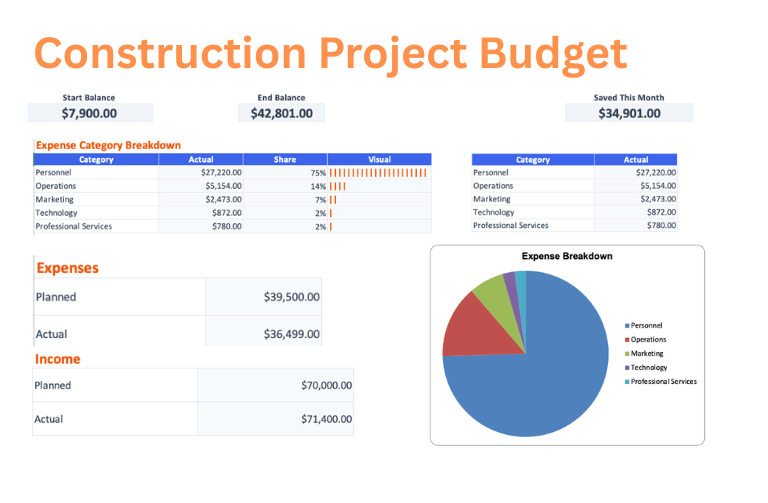
Download the Construction Budget template
Choose a clean workbook, sample Excel file, or printable PDF.
Let ReceiptsAI do it automatically
Upload documents once and let AI extract, categorize, and organize the work for you.
What is the Construction Budget Template?
The Construction Budget template helps plan a building project by organizing materials, trade labor, equipment rentals, permits, insurance, and other job costs in one estimate-vs-actual workbook. It gives contractors and project owners a practical way to compare the original budget with real spending as invoices, subcontractor bills, and change orders come in.
Who is this for?
This template is for general contractors, remodelers, builders, construction managers, and property owners who need to compare bids, prepare client estimates, review subcontractor allowances, or monitor job costs during active work. It is especially useful when several trades, material orders, and permit costs need to stay aligned with the same project budget.
What does the Construction Budget Template contain?
Materials
- Lumber
- Concrete
- Steel
- Roofing Materials
Labor
- General Contractors
- Electricians
- Plumbers
- Carpenters
Equipment
- Heavy Machinery Rental
- Tools & Equipment
Permits & Insurance
- Building Permits
- Insurance
How to use the Construction Budget Template
- 1
Review the sample construction budget categories and adjust the planned amounts for materials, labor, and equipment before exporting.
- 2
Open the Excel workbook on the Dashboard tab and follow the Get Started note at the top.
- 3
Set your starting balance on the Budget tab, then edit only the highlighted cells and enter amounts as positive numbers.
- 4
Replace the example rows on the Transactions tab with your own income and expenses as money comes in or bills are paid.
- 5
Use the Budget and Dashboard tabs to review actuals, differences, ending balance, and the category breakdown without changing formula cells.
Why use this template?
Construction projects can drift off budget when material prices change, labor runs long, or change orders get approved without a clear view of the total. This template keeps planned and actual costs side by side so overruns are easier to spot before they weaken margins, delay draws, or create difficult client conversations.
Further, every ReceiptsAI budget template sets itself apart from other generic templates with:
Free with no sign-up
Create and download the template without an email address, credit card, or required account.
Simple and easy to use
Start with clear budget categories, highlighted editable cells, and familiar Excel or Google Sheets workflows.
Visual budget summaries
Use built-in visuals like pie charts and bar charts to understand where money is going at a glance.
Editable with AI help
Customize the template for your unique needs, or use AI to reshape the budget faster.
Together, these features make the construction budget template a practical starting point you can download immediately, adapt quickly, and keep using as your numbers change.