

At month-end, the same scene plays out in a lot of small businesses. Receipts are still in glove compartments, invoices are buried in email threads, bank statements sit in a downloads folder with names like “statement(4).pdf,” and someone has to turn all of that into books that reconcile.
That's where the stress starts. A missing receipt becomes a Slack message. A mislabeled PDF becomes ten minutes of searching. An auditor or tax preparer asks for support, and what should be routine turns into a scramble.
Accounting document management software fixes that problem when it's set up properly. It gives finance teams and owners one place to capture, sort, search, and retrieve the paperwork behind the numbers. Modern systems are built around centralized digital storage, AI-powered data capture, and searchable metadata so teams can turn paper records and scattered files into a searchable repository that can be retrieved within seconds, as described in this overview of accounting document management software.
If bank statements are one of your biggest friction points, it also helps to pair document management with practical solutions for manual bank statement data entry, especially when you're still receiving PDFs from multiple banks in different formats. For teams moving away from filing cabinets and disconnected folders, this guide to setting up your digital filing cabinet is also a useful starting point.
Table of Contents
- Escaping the Paperwork Pileup
- What Is Accounting Document Management Software Really
- Core Features That Automate Your Bookkeeping
- Key Benefits for Small Businesses and Accountants
- How to Choose the Right Software for Your Needs
- Implementation and Data Migration Best Practices
- Maximizing ROI with Smart Accounting Workflows
Escaping the Paperwork Pileup
The paperwork problem usually doesn't look dramatic at first. It looks ordinary. A few vendor bills arrive by email. A few fuel receipts stay in someone's pocket. A few customer documents come in through a portal, while others arrive as phone photos or PDFs with no naming standard.
Then month-end arrives, and the ordinary mess becomes expensive. Someone has to identify which invoice belongs to which vendor, whether the same document was already posted, and where the supporting file lives. If the business has more than one location, more than one entity, or outside bookkeeping help, the confusion multiplies fast.
That's why accounting document management software matters. It doesn't just store files. It gives accounting teams a controlled way to collect, organize, and retrieve the paperwork that supports every transaction.
Why the old process breaks down
Paper folders and shared drives can work when volume is low. They stop working when documents come from too many places and nobody follows the same intake routine.
Common failures show up quickly:
- Documents arrive in different channels: email, scanner, mobile photo, portal upload, and desktop download.
- File names mean nothing: “scan001.pdf” tells nobody what the document is.
- Support gets separated from the transaction: the bookkeeping entry exists, but the backup is somewhere else.
- Search depends on memory: if the person who filed it is out, everyone else loses time.
Practical rule: If your team has to remember where a document might be, you don't have a document system. You have a guessing system.
What better looks like
A well-run setup turns incoming documents into a consistent digital flow. Receipts, invoices, statements, and reports land in one system. The software reads key fields, tags the file, and makes it searchable by the details accountants use, such as vendor, date, amount, client, or document type.
That changes daily work in a very practical way. Instead of chasing paperwork before you can book the month, you process support as it arrives. By the time close starts, much of the cleanup work is already done.
What Is Accounting Document Management Software Really
The term often brings to mind “cloud storage.” That's too narrow. Shared folders can hold files, but they don't manage the accounting work wrapped around those files.
Accounting document management software is closer to an intelligent records assistant. It stores documents, but it also helps classify them, route them, preserve versions, and make them usable inside finance processes.

More than shared storage
The category has moved well beyond scan-and-store tools. Industry roundups show a shift from older on-premise systems to cloud-based platforms that sit inside a broader accounting stack, with products like Canopy, iManage, Onvio Firm Management, SmartVault, Firm360, Box, OneDrive, and SharePoint commonly used in accounting workflows, as noted in this market roundup.
That evolution matters because mature tools now focus on operational controls, not just storage. Version control, secure client portals, workflow automation, and integrations are part of the baseline expectation.
A simple way to think about it is this:
| Tool type | What it does well | Where it falls short for accounting |
|---|---|---|
| Basic cloud drive | Stores and shares files | Weak routing, inconsistent naming, limited workflow structure |
| Portal-only tool | Exchanges documents with clients | Often doesn't organize internal review and bookkeeping steps well |
| Accounting document management software | Handles intake, indexing, search, permissions, versions, and workflow | Requires setup discipline to get the full value |
Why accountants use it differently
Finance teams don't just need a place to put PDFs. They need a single source of truth for support behind transactions, reconciliations, approvals, and reporting.
That means the software has to answer practical questions fast:
- Where is the current version?
- Who uploaded or changed it?
- Can I find every invoice for this vendor?
- Can I pull support for this period without opening five systems?
A good system reduces dependence on whoever “usually knows where things are.”
That's the line between generic file storage and a finance-ready document process. One stores information. The other helps accounting teams control it.
Core Features That Automate Your Bookkeeping
The most useful systems don't win on feature count. They win because they remove repetitive handling from the bookkeeping cycle. In accounting workflows, the highest-value capability is automation around document intake and routing, including watching folders, renaming files with standard conventions, splitting PDFs, and triggering follow-up steps, according to IRIS's explanation of document workflow automation.
That matters because manual handling is where inconsistency creeps in. The file gets saved to the wrong client, the receipt name doesn't match the transaction, or the approval email never gets attached.

Capture and extraction
The first job is intake. Good accounting document management software should accept documents the way they arrive, not the way a vendor wishes they arrived. That usually means email forwarding, drag-and-drop upload, scanner input, mobile photos, and bulk PDF import.
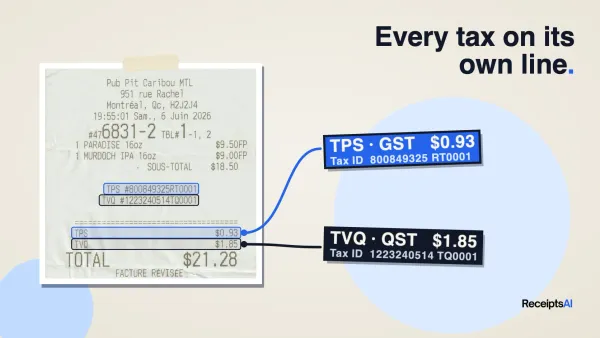
Then comes extraction. OCR reads text from scans and photos. AI extraction goes further and identifies usable fields such as vendor name, invoice date, tax, total, currency, or line item details.
One practical example is using a tool like ReceiptsAI to upload receipts, invoices, statements, PDFs, and spreadsheets, then automatically identify document types, extract key fields, sort files, rename them, and make them searchable inside a bookkeeping workflow.
If you're comparing extraction tools for invoice-heavy work, it's worth testing services that can extract facts from invoices using AI so you can see how well they handle the formats your suppliers send.
Routing, naming, and search
Once data is captured, the software needs to decide what happens next. Weak tools often fall apart at this stage. They may scan well, but they still leave your team to clean up every file by hand.
A stronger setup usually includes:
- Automatic naming rules: Files are renamed based on vendor, date, amount, client, or period.
- Folder or client routing: The document lands in the right workspace without staff dragging it manually.
- Metadata tagging: You can search by supplier, project, entity, amount, or month rather than by folder memory.
- Duplicate handling: The team can catch repeated uploads before they hit the books.
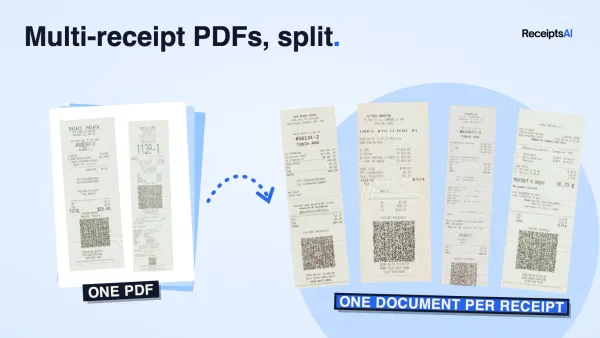
- PDF handling: Multi-page files can be split when one upload contains several statements or invoices.
Before this type of setup, a clerk might spend time downloading attachments, opening each file, renaming it, then re-uploading or filing it. After setup, the same clerk mainly reviews exceptions.
The best automation doesn't eliminate judgment. It eliminates avoidable handling.
Here's where a video walkthrough can help make those workflow ideas concrete:
Where integrations matter
A document platform becomes more useful when it doesn't sit alone. If your team books transactions in QuickBooks, Xero, Sage, or another accounting system, the document process should support that work instead of creating another reconciliation layer.
Look for integrations and exports that reduce rekeying. In practice, that means:
- Documents enter once through upload or email.
- Data is extracted and categorized without manual retyping.
- The accounting team reviews exceptions rather than every field.
- Structured output moves into bookkeeping through export, sync, or import-ready files.
What doesn't work is buying a “document solution” that still forces staff to copy totals, dates, and vendor names from one screen into another. That only digitizes storage. It doesn't automate bookkeeping.
Key Benefits for Small Businesses and Accountants
The value of accounting document management software isn't that it gives you prettier folders. Its biggest operational value is that it improves month-end close and audit readiness by reducing the hours spent classifying, renaming, and linking support to transactions, as discussed in this analysis of document management outcomes for accounting firms.
That's the shift many buyers miss. Storage is the visible feature. Operational control is the ultimate payoff.

A faster close starts with cleaner support
Month-end slows down when support is missing, mismatched, or trapped in someone's inbox. Teams waste time confirming whether a PDF belongs to the entry in front of them or whether the file is the final version.
A better document process changes the shape of close:
- Fewer interruptions: Support is already attached, tagged, or easy to retrieve.
- Cleaner handoffs: Bookkeepers, controllers, and outside accountants work from the same document set.
- Less rework: Naming and classification happen consistently, so staff don't correct the same issue twice.
- Quicker review: Exceptions stand out because the routine work was handled earlier.
That doesn't mean close becomes effortless. It means the accounting team spends its time reviewing financial activity, not hunting for attachments.
Audit readiness is an operating habit
Audit readiness isn't created the week before the request list arrives. It's built every time a document is captured properly, stored consistently, and linked to the transaction it supports.
When a business relies on paper folders, ad hoc email chains, and desktop saves, audit prep becomes reconstruction. Someone has to piece together who approved what, where the invoice came from, and whether the version in the folder is the same one the team used.
Clean books help. Clean support matters just as much.
The practical benefits show up outside formal audits too. Loan reviews, due diligence requests, tax preparation, insurance claims, and internal investigations all get easier when documentation is complete and retrievable.
Security and control improve with structure
Paper is easy to lose. Shared drives are easy to misuse. A document workflow with permissions, searchable records, and version awareness gives accounting teams tighter control over who can access financial files and what happens to those files over time.
That's particularly useful for firms handling multiple clients or businesses with several staff touching payables, reimbursements, and statements. Structure reduces accidental exposure and reduces dependence on informal workarounds.
How to Choose the Right Software for Your Needs
Software demos are polished. Your documents aren't. That gap is where most buying mistakes happen.
When evaluating a platform, the biggest question isn't whether the interface looks modern. It's whether the system can handle the messy, mixed-format paperwork your team already deals with. Public vendor content often highlights AI and automation, but buyers should test extraction quality under real-world conditions such as messy inputs, foreign currencies, and mixed-format files, as emphasized in this guidance on evaluating accounting document AI.
Test the ugly documents, not the demo samples
Don't judge a system by a perfect sample invoice. Use the worst documents you regularly receive.
Include things like:
- Wrinkled or low-light receipts: mobile photos from drivers, store managers, or field staff
- Multi-page bank statement PDFs: especially files with summary pages and transaction details mixed together
- Foreign currency invoices: if your business buys across borders
- Mixed batches: one upload containing receipts, invoices, statements, and spreadsheets
- Vendor PDFs with odd layouts: the kind that break rigid templates
What you're looking for is not perfection. You're looking for manageable exception handling. A useful platform should process the routine documents well and make the hard ones easy to review.
A practical comparison point is whether the tool can fit into broader accounting automation software workflows instead of acting like a disconnected storage app.
Buy for your actual document mess, not the vendor's ideal workflow.
Compare tools with a practical checklist
Use a structured review instead of a feature wishlist. This keeps the decision grounded in finance operations.
| Criteria | What to Look For | Why It Matters |
|---|---|---|
| Ease of intake | Email forwarding, upload, scanner support, bulk import | Staff won't follow a process that adds friction |
| Extraction quality | Strong OCR and AI handling on your own sample files | Bad extraction creates cleanup work instead of saving time |
| Searchability | Metadata search by vendor, date, amount, client, and type | Search should depend on data, not memory |
| Workflow controls | Routing, status tracking, approvals, and exception review | Documents need to move, not just sit in storage |
| Naming and filing rules | Standardized automatic renaming and organization | Consistency improves retrieval and audit support |
| Permissions | Role-based access for staff, managers, clients, or departments | Sensitive financial files need controlled visibility |
| Version handling | Clear current version and history of changes | Prevents confusion during review and approval |
| Integration options | Accounting system syncs, exports, or import-ready outputs | Reduces rekeying and duplicate effort |
| Support quality | Fast help during setup and issue resolution | Small teams can't afford long implementation stalls |
| Pricing clarity | Simple plans, volume limits, and add-on transparency | Hidden usage costs create problems later |
Two more buying rules matter more than most feature lists. First, involve the people who process invoices, receipts, and statements every week. Second, ask how the tool handles exceptions, because that's where finance teams spend their real time.
Implementation and Data Migration Best Practices
A good rollout is usually boring. That's a compliment. It means the team knows where documents go, how files are named, who reviews exceptions, and what gets migrated first.
The biggest implementation mistake is trying to digitize everything at once. Old archives, current AP, employee receipts, statements, and client files all compete for attention. Small businesses do better when they start with one live workflow and build from there.
Start with one workflow you already hate
Pick the process that causes the most recurring friction. For many teams, that's vendor invoices, employee expense receipts, or monthly bank statement handling.
Then define a simple operating model:
- Choose the intake path: email inbox, upload folder, scanner, or mobile submission.
- Define the naming pattern: for example, vendor plus date plus amount or client plus period plus document type.
- Set ownership: who reviews extracted data, who fixes exceptions, who approves final posting.
- Decide where the support lives: by client, entity, vendor, month, or engagement.
That gives the team a contained pilot. It's easier to improve one process than rescue six half-finished ones.
Build rules before you import everything
Migration gets easier when the destination is organized first. Don't import thousands of files into a system that still has no folder logic, metadata standards, or user permissions.
Create the rules up front:
- Folder structure: simple enough that new staff can understand it quickly
- Document categories: receipt, invoice, statement, contract, report, tax file, and so on
- Access permissions: who can view, edit, approve, or export
- Retention habits: what should remain active versus archived
- Exception handling: what happens when the system can't confidently classify a file
If your backlog includes statement PDFs that need structured output, this guide on converting PDF files to CSV for accounting workflows can help you think through migration priorities.
Start with the current month if you want quick adoption. Staff trust a new system faster when it solves today's work before yesterday's backlog.
Train for routine behavior, not feature mastery
Many users don't need deep training on every menu. They need confidence in the handful of actions they'll repeat every day.
Focus training on:
- How to submit documents
- How to search and retrieve
- How to review exceptions
- How to confirm the right file version
- How to prepare support for month-end and external requests
When people know those steps, adoption improves. When training becomes a tour of every setting, people forget the practical workflow and return to email attachments.
Maximizing ROI with Smart Accounting Workflows
The software only pays off when it becomes part of routine behavior. If staff upload in batches once a quarter, the system becomes a nicer archive. If they use it daily, it becomes an operating tool.
The strongest returns usually come from a few repeatable workflows that reduce lag between transaction activity and document capture.
Daily and weekly workflows that keep books current
A simple daily workflow works well for owner-managed businesses and field teams:
- Receipt capture the same day: staff snap or forward receipts when the purchase happens
- Automatic classification: the system reads merchant, date, tax, amount, and type
- Exception review in a short queue: accounting checks anything unclear instead of reprocessing everything
- Searchable storage: support is available later without asking employees to resend it
For accounts payable, a weekly invoice routine is often enough:
- Vendor invoices arrive through a dedicated email address.
- The system captures and sorts them.
- Finance reviews exceptions and duplicates.
- Approved items move into the bookkeeping flow.
- Support remains attached and searchable for later review.
That kind of cadence reduces end-of-month compression. Work is spread through the month instead of saved for a stressful close window.
What good habits look like at month-end
By month-end, a disciplined workflow should leave the accounting team with review work rather than collection work. They should be validating postings, checking for missing support, and clearing exceptions. They shouldn't be downloading attachments from old emails or asking managers to resend receipts from three weeks ago.
The businesses that get the most value from accounting document management software usually follow a few habits consistently:
- They capture documents close to the transaction date
- They enforce one intake process instead of five unofficial ones
- They standardize naming and classification
- They review exceptions on a schedule
- They keep support linked to the accounting record
That's what turns document management into time savings. Not the software alone, but the workflow discipline around it.
If you want a simple way to centralize receipts, invoices, bank statements, and other bookkeeping paperwork, ReceiptsAI is built for small businesses and accountants who need AI extraction, searchable records, bulk processing, and straightforward automation without a heavy setup burden.