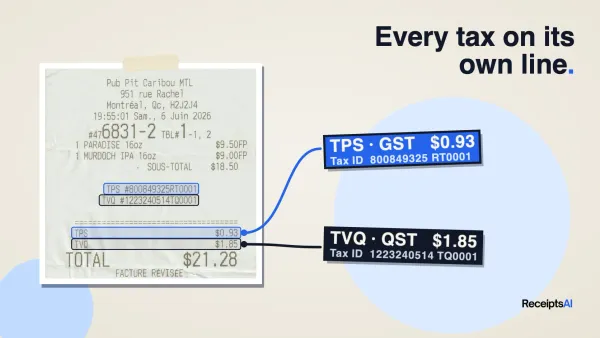
You open your banking app, see three client payments that arrived on different days, one invoice that's overdue, a card charge you half-recognize, and a pile of receipts sitting in your email. Tax season isn't even the main problem yet. The main problem is that your money is moving faster than your system can keep up.
That's where most freelance bookkeeping breaks down. Not at the obvious stuff like “save your receipts,” but in the messy middle: cash arrives late, expenses don't fit neatly into one bucket, and personal life overlaps with business in annoying ways. If your bookkeeping only works when business is simple, it doesn't really work.
A good system fixes that. It gives you a clean way to track income, classify expenses, follow up on unpaid invoices, and stay ready for taxes without rebuilding your records from scratch every few months.
Table of Contents
- Why Smart Bookkeeping is Your Freelance Superpower
- Laying the Foundation Your First Hour of Setup
- Building Your Bookkeeping Rhythm Daily Weekly and Monthly Tasks
- Automating Your Workflow with Modern Tools
- Decoding Deductions What Freelancers Can and Cannot Claim
- Managing Irregular Cash Flow and Late Payments
- Common Bookkeeping Mistakes and How to Fix Them
- Frequently Asked Questions About Freelance Bookkeeping
Why Smart Bookkeeping is Your Freelance Superpower
Freelancers usually don't hate bookkeeping because numbers are hard. They hate it because disorganized books create low-grade stress all year, then turn into a full panic when taxes, client questions, or cash shortages show up.
The fix isn't becoming an accountant. It's building a system that tells you three things fast: what came in, what went out, and what still needs your attention. When that system works, pricing gets easier, tax prep gets cleaner, and you stop making decisions from memory.
Freelancing is a substantial part of the economy. Upwork-linked reporting says 39% of the U.S. workforce freelanced in 2022, up from 36% in 2021, and U.S. freelancers generated over $1 trillion in income in 2022. The same reporting says nearly 1.57 billion people globally are freelancers, or about 47% of the global workforce (freelance statistics roundup). Bookkeeping for freelancers is a mainstream business skill now.
Practical rule: Your books should help you run the business today, not just explain it to your tax preparer later.
Smart bookkeeping does a few things that generic advice usually misses:
- It protects cash flow: You can see overdue invoices, upcoming bills, and whether this month's income is usable.
- It protects deductions: Clean records and clear categories make valid claims easier to defend.
- It protects your time: Small weekly updates beat a year-end reconstruction every time.
If you've been avoiding your books because they feel messy, that's normal. But messy books don't mean you're bad at business. They usually mean you need a tighter workflow.
Laying the Foundation Your First Hour of Setup
The first hour matters because it removes the two causes of most freelance bookkeeping problems: mixed money and inconsistent categories. If you fix those first, almost everything else gets easier.

Guidance for freelancers repeatedly recommends the same sequence: separate business and personal finances, record income and expenses as they occur, categorize transactions using a fixed chart of accounts, and reconcile bank statements monthly because that reduces missed transactions, deduction errors, and reconciliation problems before tax filing (bookkeeping process guidance).
Separate money first
Open a dedicated business bank account if you haven't already. Even if you're a solo operator, this is the line between “I think that was business” and “I can prove it.”
Use that account for client income and business spending only. If you pay yourself, transfer money out intentionally. Don't swipe the business card for groceries and promise yourself you'll sort it out later. You won't, or you'll do it under pressure and make bad calls.
If you sell digital services internationally, payment setup matters too. If you're comparing checkout, tax-handling, and payment collection options for software or digital products, it's worth reviewing how merchant-of-record models work before choosing a stack. This guide to compare top MoR providers is useful for understanding the operational trade-offs.
Pick one tracking method
Spreadsheets can work. So can accounting software. The mistake is bouncing between both with no clear owner.
Choose one place where every transaction ends up. That could be:
- A spreadsheet if your transaction volume is low and you're disciplined.
- Bookkeeping software if you want bank feeds, recurring invoices, and easier reconciliation.
- A document capture workflow if your biggest bottleneck is receipts and emailed invoices.
Your method matters less than consistency. One hour a week is commonly recommended for freelancer bookkeeping updates so invoices, bills, and expenses don't pile up into a backlog.
Use a simple chart of accounts
Most freelancers overcomplicate this. You don't need a chart of accounts that looks like a large company's general ledger. You need categories you'll use correctly.
A solid starter version for service freelancers looks like this:
| Account Type | Suggested Category |
|---|---|
| Income | Client Services |
| Income | Retainers |
| Income | Project Fees |
| Expense | Software and Subscriptions |
| Expense | Marketing |
| Expense | Travel |
| Expense | Meals |
| Expense | Professional Fees |
| Expense | Education and Training |
| Expense | Phone and Internet |
| Expense | Office Supplies |
| Expense | Bank and Payment Fees |
| Expense | Contractors |
| Expense | Home Office |
| Owner Equity | Owner Pay |
Keep it boring. Clear beats clever.
If you want a walkthrough for building categories that stay usable as your business grows, this guide on making a chart of accounts is a helpful reference.
A freelancer doesn't need more categories. A freelancer needs fewer ambiguous ones.
Building Your Bookkeeping Rhythm Daily Weekly and Monthly Tasks
A working setup is only half the job. The other half is rhythm. Bookkeeping for freelancers becomes manageable when each task has a home and a frequency.
Start with the visual routine below, then make it boring enough to repeat.

Daily capture
Daily doesn't mean doing a full bookkeeping session every day. It means catching loose documents before they disappear.
Your daily habit can be as simple as:
- Save receipts immediately: Forward email receipts or snap a photo of paper ones.
- Check payment notifications: Confirm whether client money arrived.
- Flag odd transactions: If you see a charge you won't remember later, note it now.
Tiny capture beats heroic reconstruction. The freelancer who logs a taxi receipt on the same day has an easier month-end than the freelancer who tries to remember what happened weeks later.
For recordkeeping, organized digital files matter. Independent guidance recommends keeping itemized receipts, invoices, and bank records in a digital filing system, backing them up regularly, and keeping tax-related documents for at least three years in many cases (freelancer recordkeeping guidance).
Weekly money check-in
This is the session that keeps your books alive. Put it on your calendar and protect it like client work.
During the weekly check-in:
- Categorize new transactions: Don't let uncategorized items stack up.
- Match receipts to charges: Especially for travel, meals, software, and mixed-use costs.
- Review unpaid invoices: Follow up while the work is still fresh in the client's mind.
- Scan for duplicates: Imported bank transactions and emailed records can overlap.
If a transaction needs detective work, it already cost you too much time.
A quick explainer can help if you need a refresher on how a simple routine should look in practice.
Monthly reconciliation and review
Monthly reconciliation is where bookkeeping turns from data entry into decision-making. Compare your books against your bank and card statements and make sure every transaction is accounted for once, in the right place.
Then review the month with business questions, not just accounting questions:
| Review Area | What to Look For |
|---|---|
| Income | Which clients paid, which are still open |
| Expenses | Anything unusually high or hard to classify |
| Cash position | Whether upcoming bills outpace expected receipts |
| Profitability | Whether recent projects were worth the effort |
Monthly review is also where weak systems reveal themselves. If you can't tell what you earned, what you spent, or what's overdue without digging through email, the issue isn't effort. It's workflow.
Automating Your Workflow with Modern Tools
Manual bookkeeping is still common. It's also an unforced error for most freelancers.
If you're retyping receipt totals, renaming files by hand, checking whether invoices were paid, and searching old emails every month, you're spending skilled time on clerical work. In a freelance business, that trade rarely makes sense.

What to automate first
Not every task deserves automation. Start with the repetitive ones that happen whether you feel motivated or not.
Good first targets are:
- Receipt collection: Email forwarding, mobile capture, and automatic document sorting.
- Invoice follow-up: Scheduled reminders for unpaid invoices.
- Transaction categorization: Rules for recurring merchants like software tools, phone bills, and payment processors.
- Document storage: Auto-filing by vendor, date, or category.
This is also where a dedicated invoice workflow helps. If you want a practical overview of how automated invoice handling reduces repetitive chasing and manual entry, this piece on an AI-powered invoice solution is worth reading.
A simple automation that saves real time
One of the easiest upgrades is email forwarding for receipts. Most freelancers already receive software invoices, travel confirmations, and subscription renewals in their inbox. Instead of downloading each file, renaming it, and uploading it later, send those emails automatically into your bookkeeping document flow.
That one change removes a recurring decision. No more “I'll file this later.” It gets filed when it arrives.
For freelancers who want that kind of workflow, tools like QuickBooks, Xero, and receipt management automation for freelancers can handle document capture, extraction, and categorization support in different ways. ReceiptsAI, for example, is built around forwarding receipts, invoices, and statements into a centralized workflow that extracts key details and organizes records for bookkeeping.
The real win from automation isn't speed alone. It's fewer chances to forget.
Automation also improves consistency. A recurring software charge categorized by rule is usually cleaner than the same charge categorized manually six different ways across the year. That consistency matters when you review expenses, prepare taxes, or hand records to an accountant.
You still need oversight. Automation should do the sorting, not the final thinking. Review categories, check duplicates, and correct exceptions. But don't confuse “I should review my books” with “I should manually build them from scratch every month.”
Decoding Deductions What Freelancers Can and Cannot Claim
Freelancers get nervous for good reason. The obvious expenses are easy. The stress comes from the ones that live in both worlds, business and personal.
That's the gap in most bookkeeping advice. It tells you to keep receipts, but not how to decide whether a mixed phone bill, a home internet plan, a research subscription, or a meal is really deductible in a defensible way. Xero's freelancer guidance highlights this exact blind spot around home-office use, subscriptions, phone and internet allocation, meals, and travel (freelancer deduction guidance).

Use decision rules not guesswork
The cleanest question isn't “Can I get away with this?” It's “Can I explain why this expense belongs to the business?”
Use a rule set like this:
- Direct business use: The easiest category. Design software, domain renewals, client gifts, contractor payments.
- Mixed use: Potentially deductible, but only the business portion should be tracked.
- Personal with weak business framing: Usually not worth forcing into your books.
If you need more nuance around self-employed insurance questions, especially where tax treatment gets technical, these Pounds Health Insurance deduction insights are a useful supplemental read.
How to handle mixed-use expenses
Good bookkeeping for freelancers becomes practical instead of theoretical.
Consider common edge cases:
| Expense | Better Treatment |
|---|---|
| Phone bill | Track the business-use portion consistently |
| Home internet | Allocate the business share if you use it for client work |
| Home office costs | Keep records tied to a dedicated work area |
| Subscription with mixed use | Deduct only the part clearly connected to client work |
| Meals | Keep notes on who, why, and the business purpose |
| Travel | Separate business travel from personal add-ons |
The key is consistency. If you split your internet bill one way in January and another way in June, you're creating noise in your own records.
Gray areas that need better notes
The hard cases usually aren't impossible. They're under-documented.
A few examples:
- Streaming services for research: If a writer or marketer uses a platform for client analysis, that still needs a clear business rationale. “I also use it personally” makes it mixed-use by default.
- Clothing: If it doubles as normal streetwear, be careful. Calling everyday clothing “branding” doesn't make it a business expense.
- Coffee meetings: A receipt alone isn't enough. Add the client name and purpose.
Clean notes beat creative deductions.
This is why vague categories like “Miscellaneous” are dangerous. They hide the exact transactions that deserve explanation. Better to classify conservatively and attach a note than claim aggressively and forget why you did it.
Managing Irregular Cash Flow and Late Payments
A lot of bookkeeping advice stops once the transaction is recorded. That's not enough for freelancers. Accurate books don't guarantee timely cash.
One of the most overlooked issues is timing: invoices get paid late, retainers arrive in pieces, foreign-currency payments clear unpredictably, and your tax obligations don't wait for any of that. That's the blind spot highlighted in Monily's freelancer bookkeeping discussion. The core question isn't just how to record transactions, but how to stay solvent and compliant when cash is irregular (cash-flow timing for freelancers).
Read your books like a cash forecast
Your bookkeeping data should show more than past activity. It should tell you what the next few weeks might feel like.
Start with three lists:
- Expected incoming cash: Invoices already sent, retainers due, installment dates.
- Committed outflows: Software renewals, contractor payments, rent, taxes.
- Uncertain items: Late clients, disputed invoices, currency-converted payments.
Then separate money mentally or physically into buckets. One for taxes. One for operating costs. One for your pay. If you want a simple starting point, this freelancer budget template helps you map income against irregular expenses and planned reserves.
Set up payment friction in your favor
Late payments are partly a collection problem and partly a setup problem.
Tighten these areas first:
- Invoice immediately: Don't wait until the end of the week if the work is done now.
- Use clear terms: Spell out due dates, deposits, milestones, and late policies before work starts.
- Automate reminders: The system should follow up even when you're busy.
- Shorten exposure: For larger projects, bill in stages instead of waiting for one final payment.
A freelancer with clean books but weak payment terms can still run into cash trouble. A freelancer with average books and strong invoicing discipline often sleeps better. The strongest setup has both.
Common Bookkeeping Mistakes and How to Fix Them
Most freelance bookkeeping problems are repetitive. They come from a few habits that keep creating the same mess.
The Bureau of Labor Statistics reports a median annual wage of $49,210 for bookkeeping, accounting, and auditing clerks in May 2024, which is a good reminder that bookkeeping is skilled work, not random admin (BLS bookkeeping occupation data). Treat it that way and your system improves fast.
Here are the mistakes that cause the most trouble:
- Mixing personal and business spending: This makes every review slower. Fix it with a dedicated business account and card.
- Using “Miscellaneous” for everything odd: That category becomes a junk drawer. Fix it by creating a few clear categories and adding notes for edge cases.
- Waiting until year-end: Backlogs create bad guesses. Fix it with a weekly bookkeeping session.
- Ignoring small expenses: Tiny purchases still count, and they're the first to disappear. Fix it with same-day receipt capture.
- Forgetting about unpaid invoices: Revenue on paper isn't cash in the bank. Fix it with a weekly accounts receivable check.
- No tax reserve: Good months can feel richer than they are. Fix it by moving tax money out of your operating account regularly.
- Trusting automation blindly: Rules help, but they can misclassify exceptions. Fix it with a monthly review and reconciliation.
Sloppy books usually come from delayed decisions, not difficult math.
Frequently Asked Questions About Freelance Bookkeeping
Do I really need an accountant if I use software
Not always. Software can handle tracking, categorization, and reporting. An accountant still helps when your tax situation gets more complex, your deductions become less obvious, or you need someone to review your setup before mistakes compound.
What's the difference between cash and accrual accounting again, and can I switch
Cash accounting records income when you receive it and expenses when you pay them. Accrual accounting records them when they're earned or incurred. Many freelancers prefer cash accounting because it matches the way money moves through a solo business. If you switch methods, do it intentionally and keep the change consistent.
How do I handle payments from international clients in different currencies
Record the payment clearly, note the invoice it belongs to, and reconcile what landed in your account after any conversion or payment processing differences. Multi-currency work needs tighter matching because delays, exchange movement, and partial payments create more room for confusion.
If your current system depends on downloading files, renaming receipts, and chasing paperwork across email and cloud folders, it's probably time to simplify it. ReceiptsAI helps freelancers centralize receipts, invoices, and statements, extract key data automatically, and keep records organized for monthly bookkeeping and tax prep without turning the process into another part-time job.