Introducing Line-Item Categorization for Receipts and Invoices


We've recently launched line-item categorization with ReceiptsAI.
Line Item Categorization lets us break one receipt into multiple categorized entries—so your reports reflect what actually happened, your exports are cleaner, and you’re not stuck doing manual splits in a spreadsheet after the fact.
Key points to know
- We can split one receipt into multiple line items, each with its own amount and category.
- Categories come from your existing custom category rules.
- Each line item shows up separately in bookkeeping exports, while the original receipt image stays attached for audit trail clarity.
Here’s how it works in ReceiptsAI (the workflow)
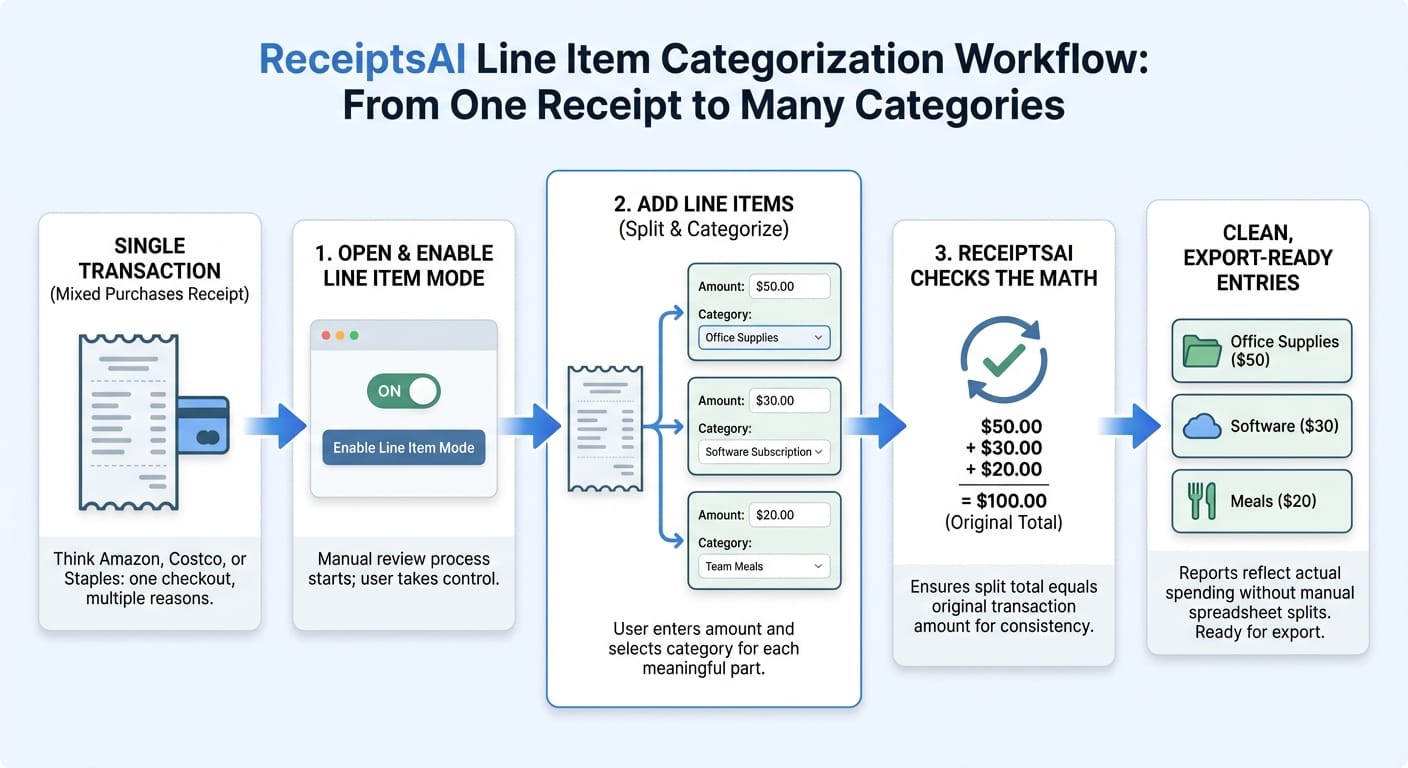
Line Item Categorization is designed to be straightforward and controlled by you. It’s a manual review process where you decide the split, and ReceiptsAI ensures it stays consistent and export-ready.
Here’s how it works in practice:
1. Open a transaction that has a receipt with mixed purchases.
2. Enable line-item mode for that transaction.
3. Add line items for each meaningful part of the receipt.
- For each line item, enter an amount and select a category (pulled from your custom category rules).
4. ReceiptsAI checks the math:
- The line items must sum to the receipt total.
- This validation is important—your exports and reports depend on the split being complete and accurate.
5. Once saved, ReceiptsAI treats the receipt as properly split into categorized entries:
- Each line item appears as its own categorized piece of the transaction in your reports and bookkeeping exports.
- The original receipt image remains attached, so you still have a clear audit trail back to the source document.
The net result: one receipt becomes many clean, categorized lines—without losing the original context.
What the split looks like (two concrete examples)
To make the outcome tangible, here are a couple scenarios we see often.
Scenario A: $156 Amazon order
- Wireless keyboard: $45 → Office Equipment
- Personal headphones: $79 → Personal/Non-Deductible
- Shipping: $12 → Shipping & Delivery
- Tax: $20 → split proportionally or assign to the highest category
The important part isn’t the exact tax method—it’s that the receipt no longer forces you into one “best guess” category.
Scenario B: Quarterly Costco run
- Printer paper (business): $34 → Office Supplies
- Coffee pods (office kitchen): $28 → Meals & Entertainment
- Personal groceries: $143 → Personal/Non-Deductible
Instead of burying everything under “Office Expenses,” your categories reflect reality—business vs. personal, supplies vs. meals—while still tying back to the same receipt image.
Why mixed receipts cause real reporting problems
The core pain is simple: one payment doesn’t always equal one purpose. A $247 order might include office supplies, a software subscription, and a personal item. If we force that into a single category like “Office Expenses” or “Miscellaneous,” your numbers stop meaning what you think they mean.
Practically, that shows up in a few ways:
- Your P&L gets distorted (software looks cheaper than it is, office supplies look inflated, etc.).
- Tax estimates get less reliable, because deductions are no longer mapped to the right buckets.
- Your accountant (or future you) ends up with vague inputs that require follow-up, rework, or assumptions.
Over a year, those small inaccuracies compound—especially for teams who buy frequently from general retailers.
If you regularly shop at mixed-inventory merchants (Amazon, Costco, Staples, big-box retailers), line item categorization is the simplest way to keep your books accurate without extra side-work. Next time you review one of those “everything in one cart” receipts, open the transaction and switch to line-item mode—we’ll help you keep the totals aligned and your exports clean.
Try Line-Item Categorization with ReceiptsAI now and get 30 free credits to get started.