Wrap Up The Year-End Budget With AI: How to Generate a Yearly Expense Report in minutes
Wrap Up The Year-End Budget With AI: How to Generate a Yearly Expense Report in minutes


Sorting through a year’s worth of receipts and expenses can be overwhelming, but AI tools like ReceiptsAI make it quick and efficient. Instead of manually organizing receipts and bank statements, you can upload your documents, and the AI will extract details like amounts, dates, and merchant names with high accuracy. The result? A PDF expense report generated for you in minutes, not hours.
Here’s a quick summary:
- ReceiptsAI automates data extraction and categorization: Tools like ReceiptsAI use OCR and machine learning to process receipts, invoices, and bank statements, reducing errors and saving time.
- Stay compliant and audit-ready: AI ensures your records meet tax standards, linking every transaction to its original document.
- Export reports effortlessly: Generate detailed Excel files ready for record-keeping, accountants or tax software.
Stop wasting hours on manual expense tracking. AI simplifies the process, so you can focus on growing your business while staying organized and prepared for tax season.
{NEW} Never Dread Expense Reports Again: An AI Solution
Why Year-End Expense Reports Matter for Your Business
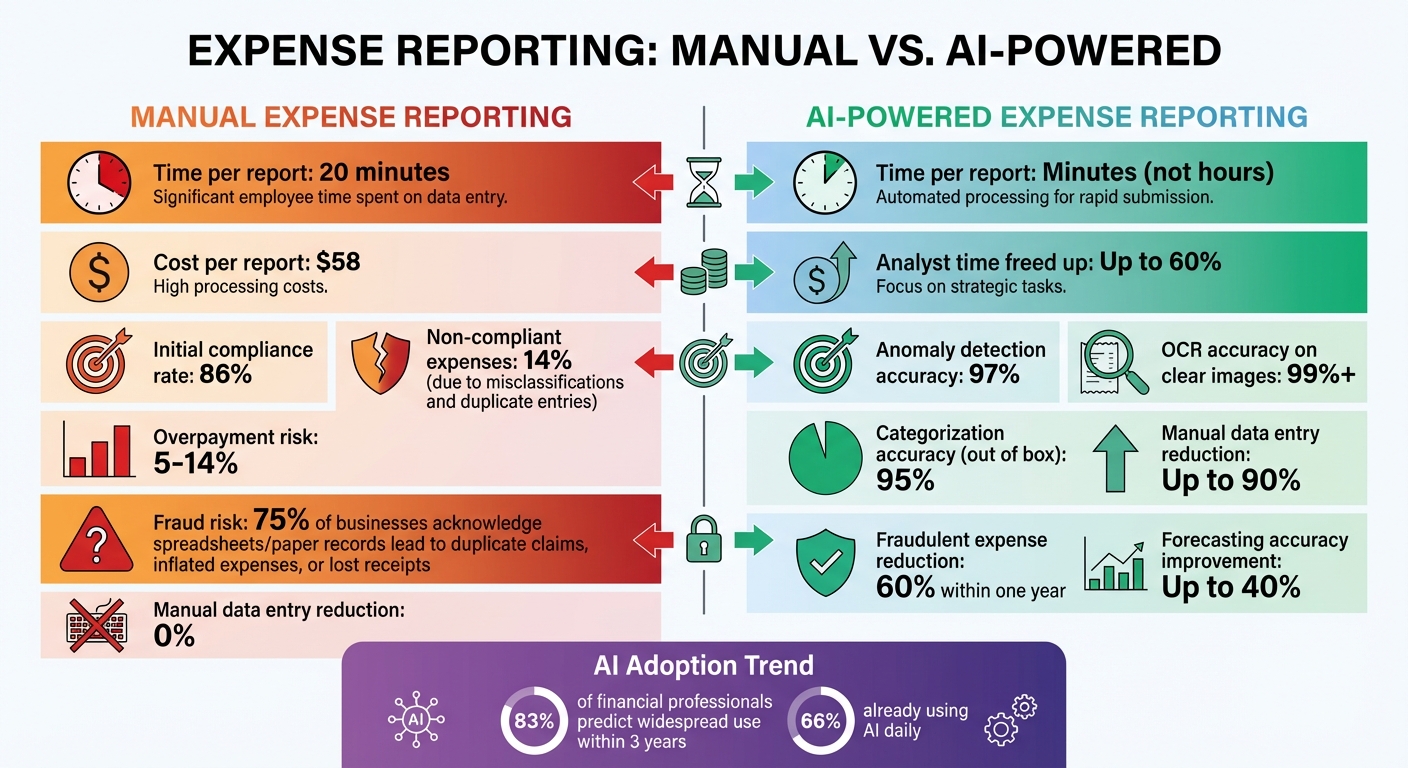
AI vs Manual Expense Reporting: Time, Cost, and Accuracy Comparison
Year-end expense reports are more than just administrative tasks - they're essential for keeping your business financially healthy and compliant. Accurate reports not only help you claim tax benefits but also simplify audits. For example, the IRS de minimis safe harbor rule allows deductions for items costing up to $2,500 (or $5,000 per invoice). Without proper records, these potential savings could slip through your fingers.
Maintaining detailed records also ensures you're prepared for audits. By logging transactions, you create a complete and organized trail that's invaluable when auditors come knocking.
Compliance is another critical factor. Research shows that about 86% of expenses are initially compliant, but the remaining 14% result from mistakes like misclassifications or intentional issues such as duplicate entries. These errors can lead to overpayments of 5–14% and hurt VAT recovery efforts. Without accurate reporting, these problems can go unnoticed, putting your business at risk.
Still, achieving this level of accuracy manually is no small feat.
Problems with Manual Reporting
Manual expense reporting is a time-consuming and error-prone process. On average, it takes about 20 minutes to complete a single report and costs $58 to process. Now imagine handling hundreds - or even thousands - of transactions. The potential for mistakes grows exponentially.
Manual methods also increase the risk of fraud. Around 75% of businesses acknowledge that relying on spreadsheets and paper records can lead to duplicate claims, inflated expenses, or lost receipts. This makes it much harder to stay compliant and maintain thorough documentation.
These inefficiencies and risks highlight the pressing need for a better solution.
How AI Fixes These Problems
AI takes the hassle out of expense reporting by automating the process and identifying anomalies with an impressive 97% accuracy. This ensures your expenses align with policies and regulations, saving time, reducing errors, and safeguarding your business.
How AI Extracts and Processes Financial Data
AI takes the chaos of receipts and bank statements and turns it into neatly organized data through a series of steps. It starts with Optical Character Recognition (OCR), which scans your documents - whether they’re physical or digital. The system captures a clear image, cleans it up by reducing noise and fixing any skew, and isolates the text. Then, it breaks the image into sections and converts each character into searchable digital text.
From there, machine learning kicks in. By analyzing historical transaction data, it identifies patterns and automatically categorizes expenses with impressive precision. For example, AI can examine line items on a receipt and separate "Office Supplies" from "Groceries", even if both were purchased from the same store. This step lays the groundwork for more advanced categorization techniques, which we’ll dive into next.
How OCR and Data Categorization Work
Natural Language Processing (NLP) takes things further by interpreting the context behind expense descriptions and notes. Machine learning constantly refines its accuracy by learning from past data. In recent demonstrations, AI-powered tools processed thousands of documents and transactions in real time, categorizing expenses based on patterns it had learned and even flagging unusual entries. Businesses using these systems have reported cutting manual data entry by as much as 90%. AI doesn’t just extract information - it ensures that every critical detail is captured, a topic we’ll explore in the next section.
What Data AI Extracts from Your Documents
AI pulls out essential details like vendor names, dates, amounts, and tax information from receipts. From bank statements, it captures transaction amounts, dates, and payees. Invoices? It extracts invoice numbers, payment terms, and due dates. This detailed data ensures your expense reports are thorough and ready for audits. With everything accounted for, year-end reporting becomes smoother, and every deduction is backed by solid documentation.
Setting Up ReceiptsAI for Year-End Reporting
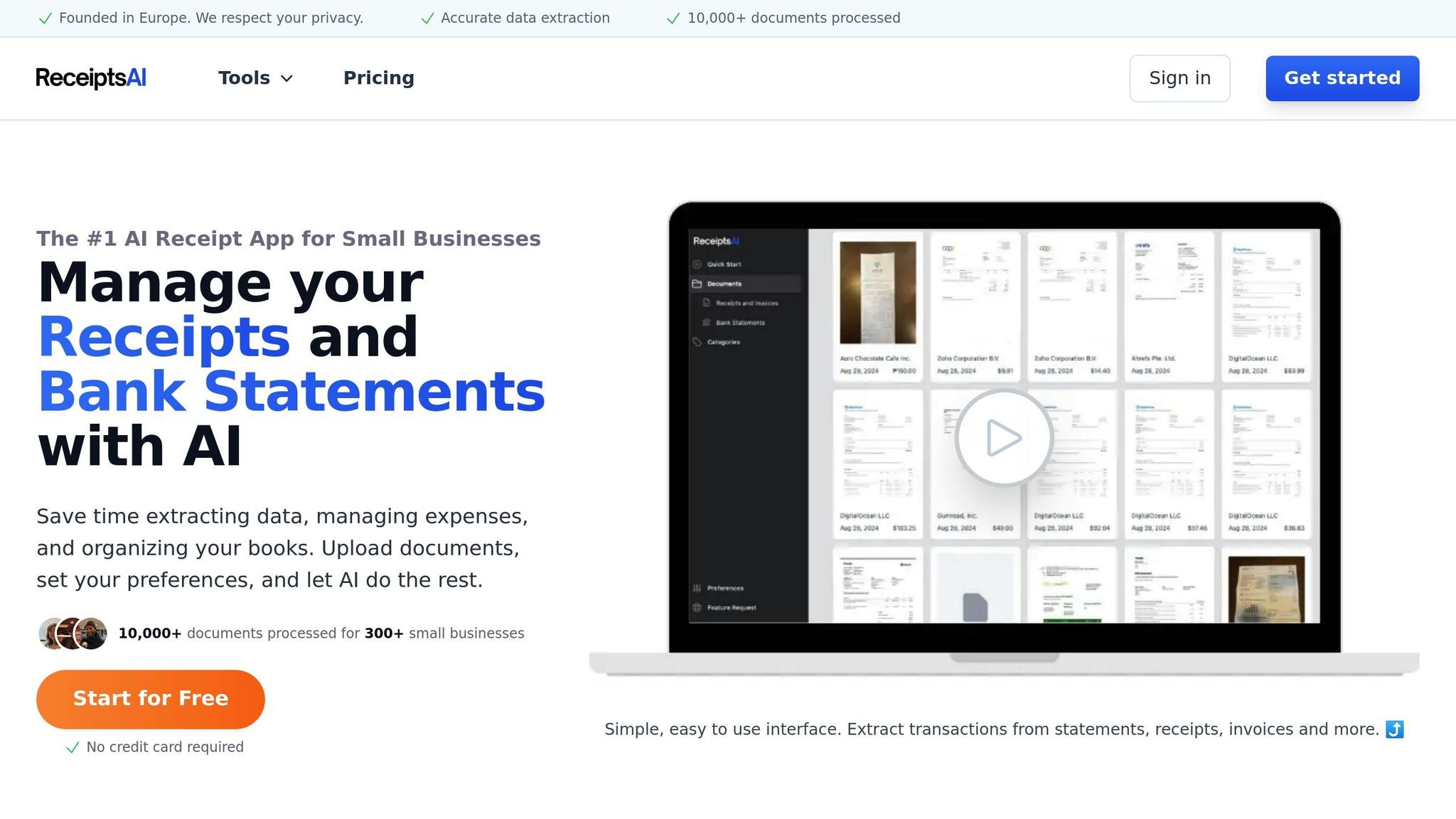
Getting started with ReceiptsAI is simple. You can upload receipts in a few ways: send up to three via text, email up to three attachments, or drag and drop as many as 10 photos at once. Supported file formats include JPEG, PNG, PDF, TIFF, WEBP, HEIC, and HEIF (note that PDFs are accepted only through email or the website).
For the best results, capture receipts in well-lit, flat conditions. The AI will automatically extract key details like merchant names, dates, amounts, and categories with over 99% accuracy on clear images. If you have lengthy receipts, you can fold or omit irrelevant sections and focus on what matters most. Plus, ReceiptsAI detects and flags duplicate uploads to keep your records neat and organized.
Once your receipts are uploaded, organizing them is straightforward and user-friendly.
Uploading and Organizing Multiple Receipts
After uploading, you can easily sort your receipts using Folder AI. To activate Folder AI, head to your Dashboard, click "Edit Profile", and start assigning receipts by replying with an existing folder number or creating a new folder name. Need to add notes for specific expenses? You can include a memo in your text message, use the subject line in your email, or click "Edit Receipt" on the website.
"It is effortless and saves me hours every month." – Josh D., Verified Purchase
Once organized, you can take it a step further by tailoring your expense categories to fit your business needs.
Setting Up Custom Expense Categories
Customizing expense categories is available with the Starter plan (up to 30 categories) and the Premium plan (up to 100 categories). You can connect ReceiptsAI to your accounting software, such as QuickBooks or Xero, and configure your Chart of Accounts. Simply enable the bank or credit card accounts you use for business expenses and disable any categories you rarely use. This setup helps the system align with your business structure, ensuring more precise categorization.
Automating Expense Categorization and Matching
ReceiptsAI takes automated data extraction a step further by simplifying expense categorization and transaction matching. After your receipts are neatly organized for end-of-year review, the platform uses machine learning to analyze transaction details and assign categories based on the items purchased. The result? An accurate expense report without the manual hassle.
What makes this even better is the system's ability to learn. Anytime you make a correction, ReceiptsAI remembers it and applies the adjustment to future transactions. It adapts to your company’s unique patterns over time, all without requiring technical configuration. This ongoing learning process ensures improved accuracy as you continue using the platform.
"The key distinction between AI agents and rule-based automation lies in their ability to interpret ambiguous information, learn from past categorizations, and continuously improve their performance." – Datagrid Team
ReceiptsAI starts strong with a 95% categorization accuracy rate right out of the box and gets even better as more data is processed.
Creating Custom Rules for Better Accuracy
To make the process even smarter, ReceiptsAI allows you to create custom categorization rules. These rules teach the system how to handle specific vendors or expense types. For instance, if a vendor supplies both office supplies and client gifts, you can set a rule prompting the system to review line items before categorizing the expense.
These custom rules are seamlessly integrated into the AI’s learning process, ensuring the system becomes more precise and tailored to your business needs as it grows.
Exporting Your Year-End Expense Report
Once you've processed your receipts, ReceiptsAI takes care of the heavy lifting by compiling all your transactions into a single, tax-ready report. This eliminates the need for hours of manual sorting and organizing, making it easier to wrap up your financial year.
Creating a Complete Expense Report
ReceiptsAI simplifies your financial management by linking every expense to its original document, ensuring your records are complete and audit-ready. When you generate your year-end report, all transactions, categories, and supporting documents are neatly compiled into a single, searchable file. This makes it easy to locate specific details and export what you need in just a few clicks.
Choosing Your Export Format
ReceiptsAI offers exports in Excel format, making it compatible with most accounting and tax software. The exported file includes essential details like merchant names, dates, amounts, categories, and tax calculations, all presented in a clean, structured layout.
The flexibility of Excel allows you to customize the data to suit your needs. You can create pivot tables, apply custom formulas, or adjust the format to match your accountant's preferences. If you use platforms like QuickBooks or Xero, the Excel file can be imported directly, saving you hours of manual data entry. This efficient export process means you can complete your year-end reporting in minutes, freeing up time to focus on planning for the year ahead.
Maintaining Compliance and Accuracy with AI Validation
When it comes to year-end reporting, every transaction needs to align with tax authority standards. That’s where ReceiptsAI steps in. It validates your data by pulling out critical details like merchant names, transaction dates, amounts, and GST numbers. This process helps catch errors that could lead to audits or penalties. Essentially, it ties your expense data directly to audit requirements, building on the idea of streamlined record-keeping.
But ReceiptsAI doesn’t stop at data extraction. It also cross-checks new transactions against existing records to reduce mistakes. For instance, one financial institution saw a 60% reduction in fraudulent expenses within just a year of using AI monitoring. Plus, it captures details often missed during manual entry - even from faded or hard-to-read receipts.
Keeping Audit-Ready Records
In today’s digital-first world, maintaining electronic records is essential for tax compliance. ReceiptsAI ensures your data is structured to meet these standards from the very beginning. Every expense in your year-end report is directly linked to its original receipt image, creating a fully searchable digital archive. This means no more digging through filing cabinets when auditors need specific documents.
With ReceiptsAI, every transaction stores complete details - merchant names, dates, amounts, categories, and tax calculations. This thorough documentation creates a clear audit trail, allowing accountants and auditors to find exactly what they need in seconds.
Security and Privacy Protection
Once compliance and accuracy are handled, ReceiptsAI focuses on keeping your data safe. Your financial information is protected with bank-level encryption and GDPR-compliant storage. All receipts and transaction details are encrypted into unreadable code, accessible only to authorized users. These robust security measures ensure your sensitive business data stays private and your year-end financial records remain secure.
Conclusion
Year-end expense reporting doesn't have to be a time-consuming headache anymore - ReceiptsAI turns what used to take days into a task you can finish in just minutes. By automating receipt capture, data extraction, and categorization, it takes the manual work off your plate so you can focus on growing your business.
The numbers speak for themselves. A whopping 83% of financial service professionals predict AI will be widely used in financial reporting within three years, and 66% are already incorporating it into their daily operations. This isn’t just about following trends - it’s about staying ahead by improving speed and accuracy. In fact, AI automation can boost forecasting accuracy and speed by up to 40%, while freeing up as much as 60% of analysts’ time to focus on strategic insights.
Users of ReceiptsAI have noticed the difference firsthand.
With ReceiptsAI, you can wrap up year-end expenses in minutes, giving you the freedom to focus on strategic planning - whether that’s identifying cost-saving opportunities or laying the groundwork for a stronger financial future in 2026. By cutting down on time spent on tedious tasks, ReceiptsAI not only speeds up your reporting but also helps you create smarter spending plans for the year ahead. Ready to take the stress out of expense reporting? Start with the free tier - 30 pages, no credit card required.
FAQs
How does ReceiptsAI make sure my expenses are categorized accurately?
ReceiptsAI leverages cutting-edge AI algorithms to meticulously analyze your receipts and financial data, ensuring every expense lands in the right category. Over time, the system gets smarter by identifying patterns in your spending habits, which helps it refine its accuracy with regular use.
To make things even more precise, ReceiptsAI combines data from receipt images, transaction records, and any details you provide. This cross-referencing significantly reduces errors, making tasks like tax preparation or financial planning faster and less stressful.
How does ReceiptsAI ensure my financial data stays secure and private?
ReceiptsAI takes your data security and privacy seriously, employing strong measures to protect your information at every step. Advanced encryption ensures your financial data remains secure, whether it's being stored or transmitted, so only those with proper authorization can access it. The platform also follows strict compliance guidelines to align with industry standards for data protection.
To safeguard your privacy, ReceiptsAI uses your data exclusively for necessary tasks like creating reports or budgets. Plus, your personal and financial information is never shared with third parties without your explicit consent, offering you confidence and peace of mind while using the platform.