ReceiptsAI vs. ChatGPT: Why ReceiptsAI wins when managing receipts and bank statements


If you’ve tried to “just use AI” to clean up receipts and bank statements, you already know where it breaks: the output looks useful, but it isn’t bookkeeping-ready. A general tool might summarize a PDF, miss the tax amount, drop the transaction date, or change the table format from one file to the next. Then you’re back to manual cleanup in spreadsheets, chasing duplicates, and answering the same month-end questions (“Why is Meals so high?”) with incomplete data.
This article lays out a practical workflow to turn messy receipts and statements into clean, exportable transaction records in a way you can repeat every week. You’ll see where ReceiptsAI fits when ChatGPT starts to struggle: structured extraction, transaction-level statement parsing, rule-based categorization, currency handling, and traceability back to source documents. The point is straightforward: fewer manual touches, fewer avoidable errors, and cleaner month-end reporting.
By the end, you’ll be able to:
- Batch-process mixed receipts and bank/credit card statements without reformatting every output.
- Extract structured fields (merchant, date, tax, totals, line items) into consistent columns.
- Split statements into individual transactions you can reconcile and filter.
- Apply consistent categories using rules (merchant matching/regex), not repeated prompting.
- Normalize multi-currency spend into one reporting currency for cleaner visibility.
- Keep an audit trail tying every transaction back to the original document.
---
Step 1: Capture and batch-upload everything (without sorting first)
What to do
Upload your receipts and statements together: photos, PDFs, emailed receipts, and monthly bank/credit card statements. The goal is to remove “pre-work.” Don’t rename files. Don’t sort by vendor. Don’t run separate sessions for each document type.
ReceiptsAI is set up for mixed uploads. It can route receipts vs. invoices vs. statements into the right extraction flow so you’re not handling each file like a special case. (It’s also positioned as privacy-conscious—founded in Europe and GDPR compliant—so it’s designed with document handling in mind.)
Why it matters
Most finance admin time gets burned before extraction even starts. If your process requires careful file prep to make tools behave, it won’t happen weekly. It becomes a month-end scramble.
ChatGPT, in practice, is a one-off conversation: paste text or upload a file, ask for output, then repeat. It doesn’t manage a batch, track what you already processed, or reliably keep a stable schema across multiple documents.
Common mistake to avoid
Mistake: uploading “only the clean ones.”
Messy receipts (crumpled photos, partial captures, odd formats) get delayed, and that’s how “unknown spend” shows up later. Upload everything, then use validation to flag what needs review.
Practical checklist
- Collect sources in one place:
- Receipt photos (mobile)
- Vendor PDFs (email downloads)
- Bank and credit card statements (monthly PDFs/CSVs)
- Upload in batches (weekly is realistic for most small teams)
- Skip renaming unless you have a hard requirement; optimize for throughput
Mini-example:
A two-person catering business uploads (1) 35 fuel and grocery receipts from a phone camera roll, (2) a Visa statement PDF, and (3) two supplier invoices. ReceiptsAI processes them as one batch and produces a unified transaction list instead of three separate “reports.”
Next step: Pick a cadence (weekly is a good default) and do one batch upload exactly as-is, no sorting.
---
Step 2: Extract structured fields (not just a summary)
What to do
Extract standardized fields from each receipt/invoice: merchant name, transaction date, subtotal, tax/VAT/GST, tip, total, and (when it’s useful) line items. For statements, capture account metadata and statement period information in addition to transactions.
This is where purpose-built extraction matters. You don’t just want the text; you want the data mapped into bookkeeping-shaped fields you can trust and reuse.
Why it matters
Accounting systems and spreadsheets run on consistent columns, not paragraphs. If you can’t reliably populate date/merchant/tax/total, you can’t categorize confidently, reconcile cleanly, or produce tax-ready records without manual intervention.
ChatGPT can interpret documents, but it’s not designed to hold a fixed schema. It may change headings, skip fields that are present, or guess when it’s unsure. In finance ops, “pretty” output isn’t the goal. Repeatable, verifiable fields are.
Common mistake to avoid
Mistake: accepting narrative output because it looks polished.
A summary can feel productive but doesn’t help you close the month. Push everything into rows/fields first. Add notes later if needed.
Practical checklist
For each document, confirm you have:
- Merchant/vendor name (normalized consistently)
- Transaction date
- Total amount
- Tax amount (if applicable)
- Currency
- Payment method/reference (if present)
- Line items (only when they affect reporting or billing)
Mini-example:
A freelancer has a hotel receipt with room rate, occupancy tax, and a separate resort fee. ReceiptsAI captures the components so the total reconciles and the tax amount is available for reporting.
Next step: Spot-check 5–10 documents and confirm the same fields appear in the same columns every time.
---
Step 3: Turn bank statements into transaction-level records (the part ChatGPT usually won’t operationalize)
What to do
Process bank/credit card statements so each line becomes one transaction record with:
- Date
- Description/merchant
- Debit/credit amount
- Currency
- Running balance (if present)
- Reference IDs (when available)
ReceiptsAI focuses on transaction-level granularity so the output behaves like ledger lines, not a table you still have to reshape. For credit cards specifically, its dedicated Credit Card Statement Extractor is designed to turn statement PDFs into structured transaction data you can export (for example, to Excel/CSV).
Why it matters
This is the difference between “I can read my statement” and “I can close my books.” Once you have proper transaction rows, you can:
- Reconcile receipts/invoices to statement lines
- Detect duplicates
- Report by month/vendor/category without cleanup
- Export reliably into your accounting workflow (including exporting to common formats like Excel/CSV)
ChatGPT may produce a table that looks fine on one statement and breaks on the next. And it often defaults to summaries (“Top spend categories…”) which don’t help with reconciliation.
Common mistake to avoid
Mistake: using summaries as a substitute for line-level records.
You can’t answer “Which charge was duplicated?” or “Which transaction was reimbursed?” without line-level data.
Practical checklist
- Each statement line becomes one row/transaction
- Debits vs. credits are clearly separated
- Original description text is preserved (you’ll use it for rules)
- Statement period metadata is stored for traceability
Mini-example:
A logistics team has “FUEL*STATION 1847” repeated across multiple days. ReceiptsAI splits each charge into separate transactions so each can be matched to a receipt photo.
Next step: Take your latest statement and confirm you can filter, sort, and export transactions without reformatting.
---
Step 4: Categorize consistently with rules (instead of re-prompting every month)
What to do
Define categories that match how you run the business (simple is fine). Then set auto-categorization rules based on:
- Merchant matching (exact or fuzzy)
- Text patterns/regex (e.g., “UBER|LYFT” → Travel)
- Amount thresholds (optional; use sparingly)
- Account/card source (useful if cards map to teams or projects)
ReceiptsAI supports reusable rules and hierarchical categories so you’re not redoing categorization decisions every month.
Why it matters
Category consistency is what makes your P&L usable. If “Meals,” “Dining,” and “Food” drift over time, month-end turns into reclassing and debate.
ChatGPT can suggest categories, but it doesn’t give you a persistent rule engine that applies the same logic next week. That usually leads to repeated prompting or inconsistent results across runs.
Common mistake to avoid
Mistake: creating too many categories too early.
Over-granularity slows review and increases misclassification. Start with 10–20 categories. Add detail only where it changes decisions, client billing, or tax handling.
Practical checklist (starter categories that work)
- Advertising & Marketing
- Software & Subscriptions
- Travel (split into Airfare/Lodging if needed)
- Meals (separate if your policy requires it)
- Office Supplies
- Contractor Costs
- Fuel & Vehicle
- Shipping & Postage
- Professional Services
- Bank Fees & Interest
Mini-example rule set (small agency):
- If description contains `ADOBE|FIGMA|NOTION` → Software & Subscriptions
- If merchant matches `WEWORK|REGUS` → Office / Coworking
- If description contains `UBER|LYFT|TAXI` → Travel / Ground Transport
Next step: Create 5–10 rules for your highest-frequency merchants. That’s where you’ll get most of the consistency quickly.
---
Step 5: Normalize multi-currency spend for clean reporting
What to do
If you have spend in multiple currencies, use ReceiptsAI’s currency detection and normalization to convert amounts into your reporting currency, while keeping the original currency and original amount.
Why it matters
Multi-currency spend breaks basic operational questions:
- “What did we spend on Travel last month?”
- “What’s our monthly burn?”
- “Which client/project is profitable?”
Manual conversion is slow and easy to mess up. ChatGPT can convert values if you ask, but it’s not a reliable normalization layer across a batch, and it can misread currency symbols or apply assumptions inconsistently.
Common mistake to avoid
Mistake: converting without keeping the original amount.
For disputes, audits, and simple sanity checks, you want both:
- Original currency + original total (as shown on the receipt/statement)
- Converted amount for reporting
Practical checklist
- Confirm currency is detected per transaction/document
- Store: original amount, original currency, converted amount, and conversion metadata when available
- Use one default reporting currency for cash-flow and category reports
Mini-example:
A hospitality operator buys supplies in GBP and pays SaaS tools in USD. ReceiptsAI normalizes both into one reporting currency so monthly reporting is readable and comparable.
Next step: Decide on one reporting currency and make sure your exports include both original and converted fields.
---
Step 6: Make reporting operational (pivot views and drill-down, not just a spreadsheet dump)
What to do
Review spend using pivot-style views (by month, category, merchant). Then drill down into the underlying transactions and source documents when something looks off.
ReceiptsAI supports the operational loop: summary → drill-down → fix → export. That’s the difference between “I extracted data” and “I can actually close the month.”
Why it matters
Month-end closes stall when you can’t answer follow-up questions quickly:
- “What’s in this category?”
- “Is this reimbursable?”
- “Why did expenses spike?”
ChatGPT can provide analysis, but it doesn’t give you a durable drill-down experience tied to specific transactions and source documents.
Common mistake to avoid
Mistake: treating reporting as the final step instead of a control step.
A pivot table is a validation tool. Spikes and odd merchants are your prompt to fix miscategorization or duplicates before export.
Practical checklist
- Review monthly totals by category
- Drill into top categories to spot outliers
- Filter by merchant to confirm categorization consistency
- Flag uncertain transactions for follow-up (missing receipt, unclear merchant)
Mini-example:
An admin team sees “Meals” unusually high in January. Drill-down shows hotel restaurant charges categorized as Meals but they should be Lodging/Travel under policy. Fixing it before export avoids rework later.
Next step: Make one quick monthly review view your standard gate before exporting.
---
Validation and quality control: make it audit-friendly and duplicate-resistant
What to do
Before export, run a short QC pass aimed at the errors that cause real downstream pain:
- Duplicates (same receipt twice; receipt plus statement line counted twice)
- Missing fields (no date, unclear merchant, missing total)
- Out-of-policy items (personal spend on business cards; missing receipt requirements)
- Edge cases (refunds, chargebacks, tips, split payments)
ReceiptsAI is useful here because of provenance: each transaction can link back to the source document so you can confirm quickly instead of “trusting the model.”
Why it matters
The goal isn’t perfection. It’s defensible records. If you face a tax question, a reimbursement dispute, or an internal review, you need to show the source document and how it became a ledger entry.
ChatGPT doesn’t maintain a reliable audit trail with document provenance and consistent record linkage. That pushes the burden back onto you.
Common mistake to avoid
Mistake: skipping verification because totals “look right.”
Bad categories and duplicates often still produce plausible totals. Run checks that catch silent failures.
QC checklist (10 minutes that saves hours later)
- Sort by amount descending: verify top 10 transactions
- Filter for missing merchant/date/total: fix or flag
- Check duplicates by same date + amount + merchant similarity
- Confirm refunds/credits are negative and categorized correctly
- Spot-check tax fields on a few receipts where tax matters (VAT/GST jurisdictions)
Next step: Put this QC checklist into your month-end routine and don’t export until it’s done.
---
Export and downstream use: hand off clean data to accounting (and speed up month-end)
What to do
Export clean structured data to CSV/Excel for:
- Import into accounting software (or your bookkeeper’s template)
- Monthly close packages (expense detail plus receipt links)
- Client reimbursements (project-coded spend)
- Tax prep support (categories plus supporting documents)
ReceiptsAI is most useful when export is the end of the process, not the start of another cleanup cycle. (It supports common export targets and formats, including Excel/CSV, and mentions integrations with tools like QuickBooks and Xero.)
Why it matters
Clean exports reduce rework downstream:
- Faster reconciliation (statement lines match ledger lines)
- Cleaner category reporting (less reclassing)
- Better cash-flow visibility (more consistent month-to-month)
- Smoother tax prep (supporting documentation is traceable)
Common mistake to avoid
Mistake: exporting “everything” without a handoff standard.
Agree with your bookkeeper (or your internal owner of the ledger) on required columns and rules so exports don’t come back for rework.
Practical export checklist (bookkeeper-friendly)
Include at minimum:
- Date, merchant, description
- Category (and subcategory if used)
- Amount (converted) plus currency fields (original and converted)
- Tax amount (if tracked)
- Source document reference/link for audit trail
- Notes/tags (client/project, reimbursable, etc.)
Mini-example:
A three-person consultancy exports monthly expenses with project tags. Their accountant imports the CSV, and the team generates a reimbursable report for clients without rebuilding the same dataset in multiple spreadsheets.
Next step: Ask your accountant/bookkeeper for their import template and match your export columns to it.
---
Conclusion: the practical reason ReceiptsAI beats ChatGPT for receipts and statements
ChatGPT can help you interpret or summarize financial documents. It’s not designed to run a repeatable bookkeeping workflow. Receipts and bank statements require structured extraction, transaction-level records, consistent categorization rules, currency normalization, and an audit trail. And you need that applied the same way every month across mixed document types.
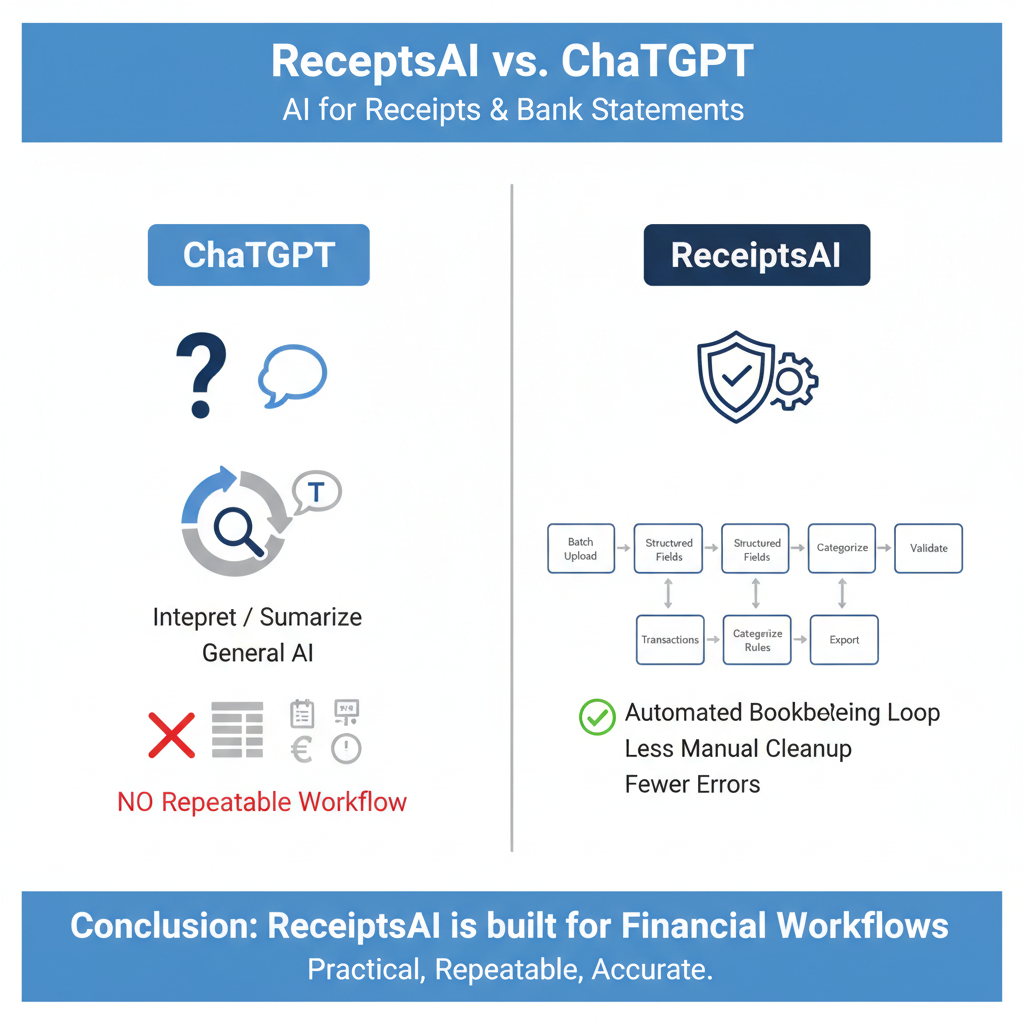
ReceiptsAI is built around that operational loop: batch upload → structured fields → statement transactions → rules-based categories → validation → export. The practical outcome is less manual cleanup and fewer quiet errors that surface at month-end.
Next step (do this today):
1) Upload one month of receipts plus your latest card/bank statement together.
2) Set 10–15 categories and 5 simple merchant rules.
3) Run the QC checklist and export a CSV for your bookkeeper or accounting tool.
You’ll quickly see where the process tightens up and where you still need a review step.
---
FAQ
Can I use ChatGPT and still get good results for bookkeeping?
For small volumes, ChatGPT can produce helpful summaries or one-off tables. The operational issue is consistency: no persistent rules, no statement-first transaction pipeline, and limited audit-ready provenance. If you want a month-end close that runs the same way every time, a workflow tool like ReceiptsAI is typically a better fit.
What if my receipts are messy photos or partially captured?
That’s normal (fuel, meals, parking). Upload them anyway and use validation to flag missing fields. A workable process assumes exceptions and gives you a clear “needs review” queue rather than forcing you to pre-clean everything.
How does ReceiptsAI handle duplicates (receipt + statement line)?
Treat duplicates as a standard case, not an anomaly. Use duplicate checks based on date/amount/merchant similarity, then confirm by drilling into the source documents. The goal is one clean expense record with traceability, not two entries that inflate spend.
Do I need line-item extraction for every receipt?
Usually not. For many small businesses, header fields (date, merchant, total, tax, category) are enough. Line items matter when you need tighter cost control, detailed client billing, compliance requirements, or when a single receipt includes multiple expense types you track differently.
Will this make me “audit-proof” for taxes?
No tool can guarantee that, and requirements depend on jurisdiction and policy. What ReceiptsAI can do is make your records more audit-friendly: consistent transaction data, supporting documents attached, and traceability from reported numbers back to the original receipts and statements.