Real-Time Receipt to CSV Conversion
AI-powered OCR converts receipts to CSV in seconds, extracting merchant, date, amount, tax, and categories for easy accounting imports.


Manually entering receipt data wastes hours every week and often leads to errors. ReceiptsAI solves this by using AI-powered OCR to extract receipt details like merchant name, date, amount, and tax in 3–5 seconds. It categorizes expenses automatically and exports them into a CSV file, ready for accounting software like QuickBooks or FreshBooks.
Key Benefits:
- Saves Time: Processes receipts 10x faster than manual methods.
- Accuracy: Over 99% accurate in data extraction, reducing errors.
- Cost Savings: Cuts bookkeeping expenses by up to 75%.
- Instant Insights: Provides real-time financial data for better decision-making.
- Tax Prep Made Easy: Keeps audit-ready records with fewer lost receipts.
ReceiptsAI simplifies receipt management with features like auto-categorization, custom rules, and US-formatted CSV exports. Follow five simple steps - create an account, upload receipts, review data, and download your CSV - to streamline your bookkeeping process.
This AI Agent Fills Out Receipt Data in Excel & Google Sheets - Instantly
Why Convert Receipts to CSV in Real Time
Converting receipts to CSV files in real time can completely change how you manage financial data. Instead of waiting until the end of the month to sift through stacks of crumpled receipts, you gain immediate access to organized and categorized expense records as soon as you upload them. This shift from reactive to proactive bookkeeping not only gives you a clearer picture of your daily cash flow but also simplifies tax preparation when the year wraps up.
The time savings are huge. AI-powered tools process receipts in just seconds, while manual entry can take several minutes for each one. If you’re dealing with dozens - or even hundreds - of receipts every month, this efficiency makes a noticeable difference. Businesses using automated systems report workflows that are up to 10 times faster than traditional methods. Plus, with an accuracy rate of over 99%, these systems reliably capture details like taxes, line items, and merchant information - details that can easily slip through the cracks when entered manually.
"The accuracy of the AI is incredible. It catches details I would have missed manually entering receipts." - Sarah L., Verified Purchase
Real-time conversion also tackles a common issue: lost receipts. By capturing and converting receipts immediately, you can reduce the number of missing documents by as much as 90%. This ensures your financial records stay complete and ready for audits. Let’s dive into how real-time conversion speeds up bookkeeping, provides instant financial insights, and makes tax preparation a breeze.
Faster Bookkeeping with Less Manual Work
Manually entering receipt data can easily eat up over five hours a week for small businesses. Each receipt requires inputting details like the merchant name, date, amount, tax info, and expense category into your accounting software. Multiply that by 50 to 100 receipts per month, and the hours add up fast.
AI-powered receipt conversion eliminates this time drain. Once you upload a receipt, the system extracts all the key data fields in seconds and assigns expenses to standard categories like travel, meals, or office supplies. It even renames files with details like the date, merchant, and amount, so you can find specific receipts instantly - no manual filing required.
"It is very very easy, as soon as you get a receipt you can scan it, the AI will capture all relevant information and it is very little interaction to get to the final submission of the expense." - Kirsten H., Verified Purchase
This automation can save small businesses about $1,800 annually on bookkeeping and tax prep costs, freeing up resources for more productive tasks. And since the process is so fast, you get immediate access to your financial data.
Immediate Access to Financial Data
Traditional bookkeeping often leaves you in the dark until the end of the month, when hours of data entry finally reveal where your money went. Real-time receipt conversion changes that. The moment you upload a receipt, the expense is categorized and added to your dashboard. You can instantly see how much you’ve spent on meals, travel, or supplies - not just at the end of the month, but today, this week, or whenever you need it.
With this instant visibility, you can make smarter decisions. Whether you’re planning a purchase, paying a vendor, or adjusting your budget, real-time insights into your cash flow give you the information you need. Visual dashboards with pie charts and breakdowns make it easy to spot spending trends at a glance.
"Following business trips or even a few weeks in the office, the last thing that someone wants to do is take time out of their day to sort through receipts. It makes my process much easier." - Vannesa T., Verified Purchase
Easier Tax Preparation and Record-Keeping
Tax season doesn’t have to be a headache when your records are always organized and audit-ready. With real-time conversion, every receipt is instantly digitized, categorized, and backed by extracted data. No more digging through shoeboxes of faded receipts or scouring your inbox for attachments when you need documentation.
The CSV export format works seamlessly with popular accounting platforms like QuickBooks, Xero, and FreshBooks. When tax time comes, you can download your expense data and import it directly into your tax software, cutting what used to take days down to just minutes.
Digital records also make audits less stressful. The IRS requires businesses to keep receipts for deductible expenses, and having a searchable digital archive - with each CSV entry linked to the original receipt image - provides a complete and compliant paper trail. Businesses using automated systems report a 90% reduction in lost receipts and missing documentation.
How to Convert Receipts to CSV Using ReceiptsAI
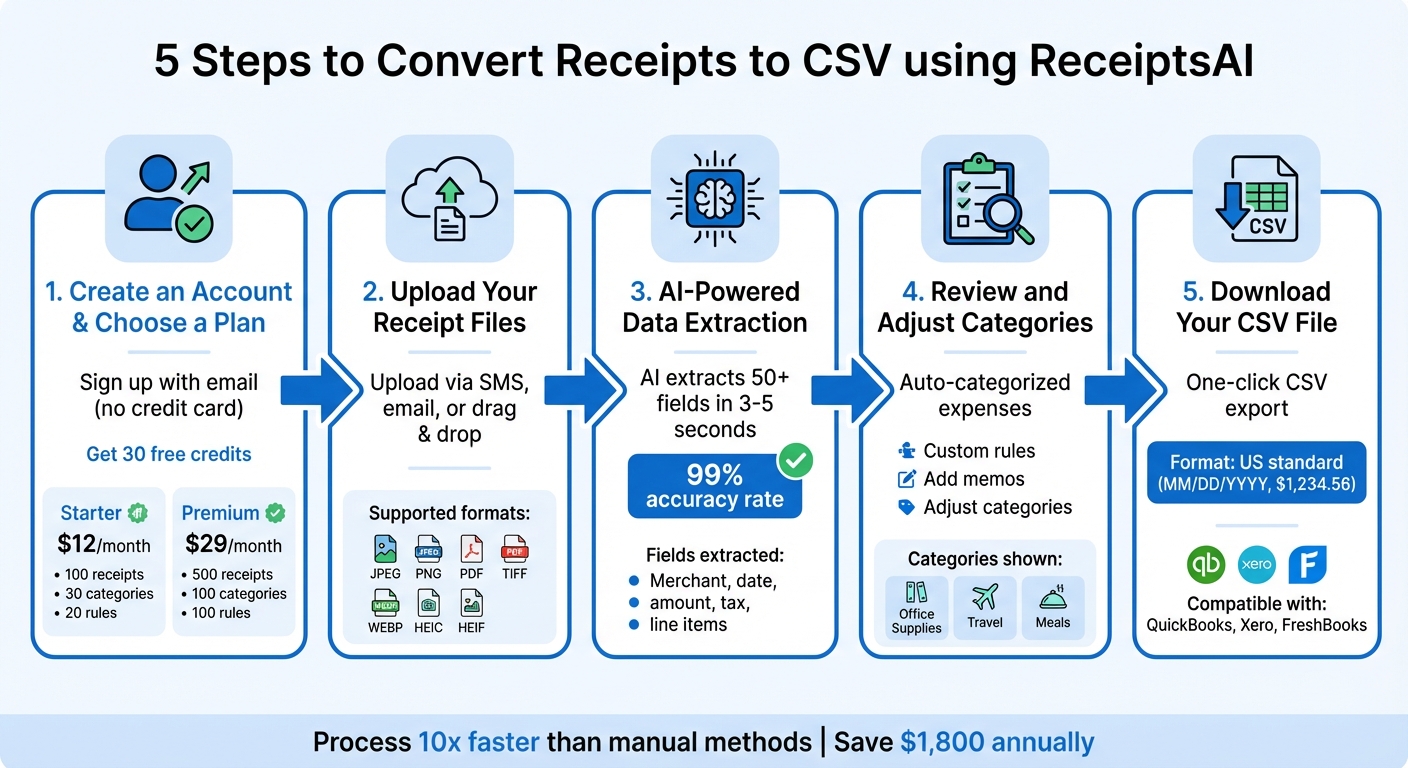
5-Step Process to Convert Receipts to CSV with ReceiptsAI
ReceiptsAI streamlines the process of turning your receipts into organized CSV files, making it easy to manage your financial records. With over 10,000 documents processed for more than 300 small businesses, the platform simplifies this task in five clear steps: account creation, receipt upload, AI-powered data extraction, category review, and CSV download. With an impressive accuracy rate of over 99%, ReceiptsAI minimizes manual work while keeping you in control of your data.
Step 1: Create an Account and Choose a Plan
Getting started is simple. Sign up with your email - no credit card required. Just visit the website, enter your email, and you'll receive a secure login link. This eliminates the need for passwords or lengthy registration forms. As a bonus, you'll get 30 free credits to test the platform's accuracy.
ReceiptsAI offers two subscription plans:
- Starter Plan: $12/month for up to 100 receipts, 30 custom categories, and 20 custom rules.
- Premium Plan: $29/month for up to 500 receipts, 100 custom categories, 100 custom rules, and priority support.
Both plans come with a 30-day money-back guarantee and can be canceled anytime without penalties.
Step 2: Upload Your Receipt Files
Uploading receipts is flexible and straightforward. You can send them via SMS, email, or simply drag and drop them into the platform. Supported formats include JPEG, PNG, PDF, TIFF, WEBP, HEIC, and HEIF (note that PDFs aren’t supported via SMS). Whether you’re snapping a quick photo of a restaurant receipt or uploading a batch of invoices, the system starts processing as soon as you upload. You can choose to upload receipts one at a time throughout the day or tackle them in batches - whatever works best for your workflow.
Step 3: AI-Powered Data Extraction
Once uploaded, ReceiptsAI’s advanced AI gets to work, extracting over 50 fields from each receipt. These fields include key details like the merchant name, date, total amount, tax, and even individual line items. With its advanced OCR and machine learning models, trained on millions of receipts, the system delivers over 99% accuracy. It can handle everything from handwritten invoices to printed receipts, no matter the source.
Step 4: Review and Adjust Categories
After the AI extracts the data, ReceiptsAI automatically categorizes each expense into groups like Office Supplies, Travel, and Meals. The platform’s dashboard displays the receipt image alongside the extracted data, making it easy to verify and adjust any details.
If a recurring vendor is miscategorized, you can create a custom rule to ensure future uploads are sorted correctly. For instance, if your favorite coffee shop is categorized under "Dining" but you’d prefer "Client Entertainment", you can set a rule, and the system will remember it. You can also add memos, like "Lunch with client", to provide additional context before exporting.
"The AI is incredibly accurate and I love how it categorizes everything automatically." - Norma W., Verified Purchase
Step 5: Download Your CSV File
Once you’ve reviewed and finalized your data, downloading your CSV file is as easy as clicking a button. The file is formatted with standard US date (MM/DD/YYYY) and currency ($) conventions, making it ready for import into your accounting software. Each row in the CSV represents a transaction, with columns for the date, merchant name, total amount, tax, category, and any memos you’ve added. You can choose to download files for specific date ranges or export all your receipts at once, depending on your needs.
US Formatting in Your CSV Files
ReceiptsAI takes care of formatting your CSV files to align with US financial standards. Dates are displayed in the MM/DD/YYYY format (e.g., 01/26/2026), dollar amounts include a dollar sign (e.g., $1,234.56), and numbers use commas and periods as thousand and decimal separators, respectively. This ensures your exported files are ready to integrate seamlessly with popular US accounting software like QuickBooks, Xero, and FreshBooks - no manual adjustments needed.
In addition to standard US formatting, ReceiptsAI is equipped to handle multiple currencies, including USD, EUR, GBP, and CAD. It automatically detects regional formats during data extraction and converts them to match US conventions. For example, if a receipt shows "1.234,56 €" in European format, the platform will reformat it as "$1,234.56" in the exported CSV.
Every column in the CSV adheres to US standards, ensuring compatibility with accounting tools. This eliminates the need for manual corrections, saving you time and effort.
With an accuracy rate exceeding 99% in extracting and formatting details, ReceiptsAI reduces manual entry errors by 95%. While the AI handles most of the work, you can easily review all amounts and dates side-by-side in the dashboard before finalizing your CSV export. This approach simplifies your financial workflows.
"Export receipt data as Excel or CSV files that import directly into QuickBooks, Xero, FreshBooks, and other accounting software. All fields are properly formatted for easy import." - ReceiptsAI
Fixing Common Conversion Problems
Even with a reported 99% AI accuracy, occasional hiccups can occur - often because of poor image quality or incomplete uploads. Thankfully, most of these issues can be fixed with a few simple tweaks.
Working with Blurry or Faded Receipts
The quality of your receipt photos plays a big role in how accurately data is extracted. To get the best results, take photos in steady, natural light on a flat surface, and smooth out any wrinkles. If you're dealing with long receipts, focus on capturing the key details like the merchant's name, date, and total amount, while skipping over nonessential parts such as promotional text or coupons. For faded receipts, consider adding a memo during the upload process to provide extra context about the expense.
"Conversion quality depends on the quality of the photos and the complexity of the receipt." - ReceiptsAI
If improving the image quality doesn’t solve all the issues, you can always review and manually correct the extracted data.
Correcting Wrong or Missing Information
Once the receipt is processed, use the side-by-side dashboard to review the extracted data. If you spot errors, the Edit Receipt feature allows you to update fields like merchant names, dates, tax amounts, and individual line items. You can also adjust expense categories if the system’s automatic sorting doesn’t align with your bookkeeping needs. Making these corrections directly in ReceiptsAI, instead of editing the CSV file later, helps improve the AI’s accuracy for future uploads.
After verifying your data, you’ll be ready to tackle any issues with CSV exports.
Solving CSV Export Problems
If some transactions are missing from your CSV export, start by checking for flagged duplicates or items marked Review Required due to image-related problems. Make sure your uploaded files are in a supported format, such as JPEG, PNG, PDF, TIFF, WEBP, HEIC, or HEIF. Keep in mind that SMS uploads don’t support PDFs. Additionally, check that you haven’t exceeded your monthly page limit - 100 pages for Starter plans and 500 for Premium plans.
Addressing these common issues ensures your data is accurate and ready for use.
Conclusion
Turning receipts into CSV files in real time takes the headache out of bookkeeping. With 99% extraction accuracy and processes that once dragged on for hours now wrapping up in mere minutes, you can shift your focus from tedious data entry to growing your business.
Features like automated categorization and one-click CSV export ensure your data stays organized and precise. This means fewer errors, no more misplaced receipts, and a lighter administrative load - all while saving you roughly $1,800 a year on bookkeeping and tax prep costs.
These tools streamline your financial workflow. Whether you're a freelancer keeping track of expenses or an accountant juggling multiple clients, ReceiptsAI works like a round-the-clock financial assistant. It processes receipts up to 10 times faster than manual methods, keeping your records up to date with minimal effort. Plus, it’s a cost-effective option that practically pays for itself by reducing administrative burdens and cutting down on costly errors.
Real-time receipt conversion isn’t just a convenience - it’s a smart way to save time and push your business forward.
FAQs
How does ReceiptsAI achieve such high accuracy in extracting data from receipts?
ReceiptsAI achieves an impressive over 99% accuracy in data extraction using cutting-edge AI-powered OCR (optical character recognition) technology. This advanced system has been trained on millions of receipts, allowing it to process a wide range of formats, languages, and layouts with precision.
The platform is designed to intelligently pull out essential details such as merchant names, dates, amounts, taxes, and even individual line items - even when dealing with complicated layouts or poor-quality scans. With its algorithms constantly improving and learning from fresh data, ReceiptsAI delivers dependable results, making financial tracking and compliance easier than ever.
What should I do if a receipt isn’t processed correctly by ReceiptsAI?
If ReceiptsAI doesn’t process a receipt correctly, start by checking the quality of the receipt image. Make sure it’s clear, well-lit, and laid flat before uploading. A sharp, high-quality image goes a long way in boosting data extraction accuracy.
Still not working? You can manually review and adjust the extracted details directly within the platform. To avoid similar issues in the future, consider customizing your expense categories and rules to align more closely with your receipt formats. If problems continue, try re-uploading the receipt after following these guidelines, or contact support for additional help.
Following these steps can help keep your receipts accurate and your financial records in order.
How does converting receipts to CSV in real time make tax preparation easier?
Real-time receipt conversion takes the hassle out of tax preparation by automatically pulling key financial details - like merchant names, dates, amounts, taxes, and line items - from receipts with impressive precision. This means no more tedious manual data entry, fewer mistakes, and a clear, organized record of every transaction.
It also simplifies compliance by automating expense categorization and keeping audit-ready records at your fingertips. Plus, with the option to export data directly into formats like CSV or Excel, you can easily share it with your tax software or accountant. This not only saves time but also makes spotting potential deductions a breeze.