Introducing ReceiptsAI's Line Item Categorization for Receipts


Reconciling a month of receipts from a busy team usually isn’t hard because of “data entry.” It’s hard because every receipt turns into a judgment call: was that $38.42 at a big-box store office supplies, snacks for the team, or a client-related expense? When you record a receipt as a single total, you lose the detail you need for clean reporting, reliable job costing, and tax-ready documentation. The predictable outcome is end-of-month cleanup, inconsistent categories, and more questions during review or an audit.
Line item categorization fixes the root issue. Instead of treating each receipt as one lump sum, you capture what was actually purchased and categorize it item by item. This article lays out a practical workflow using ReceiptsAI’s line item categorization to reduce manual bookkeeping back-and-forth, keep reporting consistent, and maintain an audit-friendly trail you can stand behind.
What you’ll achieve by the end: a repeatable process to capture receipts quickly, categorize spend consistently at the line-item level, validate edge cases, and export clean data for month-end close and tax prep.
Early outcomes you can expect:
- Fewer “miscellaneous” and “uncategorized” transactions because categories map to what was actually bought.
- Faster month-end close by reducing back-and-forth between ops and finance for receipt clarification.
- Cleaner expense reporting for clients, projects, and departments (especially when a single receipt spans multiple types of spend).
- Better tax readiness with itemized records that support deductions and reduce audit friction.
- Better vendor-level insight (e.g., separating fuel from snacks at a convenience store) without manual spreadsheet rework.
Step 1: Capture receipts with line-item detail in mind
What to do
Standardize how receipts enter your workflow. Use ReceiptsAI to ingest receipts from the channels your team already uses: mobile photos, emailed receipts, and PDFs. Optimize for consistent capture, not perfect capture. A steady stream of readable receipts beats an end-of-month dump every time.
Why it matters
Line item categorization depends on readable item names, quantities, and prices. Capturing receipts right after purchase gives you clearer text and fewer “what was this?” follow-ups.
Common mistake to avoid
Waiting until month-end and uploading faded thermal receipts. By then, line item text is often unreadable and the buyer won’t remember what the purchase included.
Practical checklist
- Take receipt photos the same day as the purchase (ideally immediately).
- Get the full receipt in frame: header, line items, subtotal, tax, total.
- Avoid angled shots; use good lighting.
- For emailed receipts, forward the original email/PDF to your ReceiptsAI intake method.
- If there are tips or service charges (hospitality), capture the final receipt, not the pre-tip version.
Mini-example
A freelance creative buys “paper, ink, snacks” in one trip. If the receipt is captured at the store, the line items are legible and can be split across Office Supplies and Meals/Snacks instead of pushing the whole total into one bucket.
Step 2: Extract line items and normalize vendors before categorizing
What to do
Once receipts are in ReceiptsAI, run extraction so each receipt includes structured fields (vendor, date, totals, taxes) and line items (description, unit price, quantity, line total). Then normalize vendor naming so duplicates collapse into one vendor identity. “Shell #102,” “Shell Oil,” and “SHELL” should behave like the same vendor in your reporting and rules.
If your intake includes multi-page PDFs (for example, vendor documents that mix receipts and invoice-like layouts), the same line-item-first approach applies—ReceiptsAI’s invoice scanner is designed to extract line items and taxes from multi-page documents so they can be reviewed and categorized consistently.
Why it matters
Vendor normalization is one of those unglamorous steps that pays off everywhere: more consistent categorization, cleaner reports, easier duplicate spotting, and fewer weird vendor groupings at month-end.
Common mistake to avoid
Accepting messy vendor names and trying to report on top of them. You’ll end up with fractured spend like “Amazon,” “AMZN MKTP,” and “Amazon.com,” and your categorization patterns won’t stick.
Practical checklist
- Confirm vendor name and purchase date look correct before reviewing categories.
- Scan for obvious extraction issues:
- Missing tax on a receipt that clearly shows tax
- Totals that don’t match subtotal + tax
- Line items that appear cut off
- Normalize the vendors that create the most noise early:
- Fuel stations
- Big-box retailers
- Online marketplaces
- Food delivery apps
Mini-example
A small logistics team buys fuel and windshield washer fluid at the same station. With normalized vendors, you can compare fuel spend month to month without manually consolidating “Chevron 1143” versus “Chevron #1143.”
Step 3: Categorize by line item (not receipt total) for accurate books
What to do
Use ReceiptsAI’s line item categorization to assign an accounting category to each item on the receipt. Don’t aim for perfection on the first pass. Aim for a consistent baseline that keeps books reviewable and corrections rare.
Use the categories your business actually reports on. Common examples:
- Office Supplies
- Tools & Equipment
- Meals (Client/Team)
- Travel
- Fuel & Vehicle
- Shipping & Postage
- Software & Subscriptions
- Repairs & Maintenance
Why it matters
A lot of receipts are mixed purchases. If you code the entire receipt to one category, your P&L gets distorted and you lose visibility into what’s driving spend. Line item categorization lets you split correctly without spreadsheet gymnastics.
Common mistake to avoid
Using “Miscellaneous” as a default. It feels faster in the moment, but it guarantees you’ll revisit the same decisions later during tax prep, budgeting, or any serious review.
Practical mini-example (mixed receipt)
A hospitality manager buys at a wholesale club:
- Paper towels → Cleaning Supplies
- Coffee beans → Food & Beverage
- Disposable gloves → Kitchen Supplies
If the entire receipt is categorized as “Supplies,” you lose visibility into cost drivers and make margin analysis harder.
Quick categorization checklist
- Watch the “usual suspects” that show up on mixed receipts:
- Snacks, drinks, and household goods at big-box stores
- Fuel plus convenience items at gas stations
- Hardware plus tools plus fasteners at home improvement stores
- Split at the line-item level when the receipt spans distinct spend types.
- Keep category names aligned to your chart of accounts so export doesn’t create rework.
Step 4: Add context: projects, clients, and locations (so the data is usable)
What to do
After categorizing line items, add the operational tags you’ll actually use: project, client, department, job site, or vehicle. This is what turns “categorized” into “actionable.”
ReceiptsAI helps you keep receipt data structured so you can filter and report later, especially when multiple people buy for different jobs.
Why it matters
Clean books are table stakes. Operators need to answer: where did the money go, and was it worth it? Project tagging supports job costing, client reimbursement, and profitability checks. Department or location tags help control spend without slowing down purchasing.
Common mistake to avoid
Only tagging at the receipt level when the receipt covers multiple jobs or purposes. If one receipt includes materials for two job sites, you still need to split it or your job costing will be off.
Practical checklist
- Pick a minimal tagging system and keep it tight:
- Client (if you bill clients)
- Project/job code (if you job cost)
- Location/vehicle (if you operate in the field)
- Apply tags consistently:
- Same naming conventions
- No duplicate project codes
- Use notes only for true exceptions (e.g., “Emergency replacement part for Job 1842”).
Mini-example
A handyman business buys:
- Screws and anchors for Job A
- A replacement drill bit for general stock
Line items can be categorized as Materials vs Tools and tagged to Job A vs General, so Job A doesn’t carry costs it didn’t cause.
Step 5: Set rules for repeat vendors and recurring items (to reduce review time)
What to do
After a few weeks of receipts, look for repeat patterns. If certain vendors or item keywords reliably map to the same categories, turn that into a rule or a consistent review approach inside ReceiptsAI.
The goal here is straightforward: make the common cases predictable so your team spends time on exceptions, not routine coding.
Why it matters
Review time is where throughput often breaks. Rules reduce decision fatigue and keep results consistent across team members, which matters for trend reporting and reduces corrections later.
Common mistake to avoid
Building strict rules too early. Until you’ve seen enough real receipts, you’ll create rules you end up undoing.
Practical checklist
- Start with high-frequency vendors:
- Fuel stations → Fuel & Vehicle (but watch for convenience items)
- Office supply stores → Office Supplies (but watch for electronics)
- Coffee shops → Meals (but decide client vs team policy)
- Add “exception flags” for mixed vendors:
- Big-box retailers
- Convenience stores
- Marketplaces
- Revisit rules monthly and adjust when purchasing patterns change.
Mini-example
A small admin team processes 200 receipts/month. After patterns are established, most coffee receipts consistently go to Meals, while any big-box retailer receipt gets a quick line-item scan before approval.
Quality control: verify totals, taxes, and split logic before export
What to do
Before you send data to your accounting system or accountant, do a quick QC pass focused on correctness. You’re not auditing every purchase. You’re checking that the receipt matches the extracted totals and that splits add up cleanly.
Why it matters
Line item detail only helps if it ties back to the receipt subtotal/tax/total. If totals don’t reconcile, you’ll create downstream cleanup and people will stop trusting the data.
Common mistake to avoid
Only reviewing categories and ignoring math. A receipt with mismatched totals can cause reconciliation issues or trigger adjustments you have to explain later.
QC checklist (fast and effective)
- Math check: Do line items sum to the subtotal (allowing for normal rounding)?
- Tax check: Is tax captured when it should be? Are tax-inclusive receipts handled consistently?
- Tip/service charge: Confirm tips follow your policy (Meals vs separate tip treatment).
- Splits: If a receipt is split across categories/projects, do the splits match the line items?
- Attachment integrity: Ensure the receipt image/PDF is linked for audit support.
Mini-example
A restaurant receipt includes subtotal, tax, and tip. If the tip is missing from the record, your total won’t match the card transaction. Catching that before export prevents reconciliation issues later.
Quality control: duplicates, refunds, and edge-case receipts
What to do
Deal with the receipts that create the most confusion later: duplicates (the same receipt uploaded twice), refunds/returns, and partial invoices.
Use ReceiptsAI review to spot:
- The same receipt captured as both an email and a photo
- Identical totals and dates from the same vendor
- Negative lines (returns) or receipts labeled “refund”
Why it matters
Duplicates inflate expenses. Refunds coded like purchases inflate spend in the wrong direction. Edge cases are what make your accountant pause and ask questions, which slows everything down.
Common mistake to avoid
Treating refunds like regular expenses without making it clear they’re negative. That distorts category totals and can create confusion depending on how you track cash vs accrual activity.
Edge-case checklist
- Duplicates: Keep one, archive the rest; confirm only one entry exports.
- Refunds/returns: Categorize consistently (often the same category as the original expense, but negative).
- Store credits: Add a note and track how the credit is applied later.
- Handwritten receipts: Add context; don’t force precision when line items aren’t readable.
- International receipts: Confirm currency and tax treatment before exporting.
Export to your bookkeeping stack (and make month-end smoother)
What to do
Export your cleaned, categorized receipt data from ReceiptsAI in the format your workflow needs, commonly CSV/Excel for internal review or a structured handoff for your bookkeeper/accountant. Make sure the export preserves:
- Vendor and date
- Receipt totals and taxes
- Line items with categories
- Tags (client/project/department)
- Receipt attachment reference for audit support
Why it matters
Reconciliation, client billing, job costing, and tax prep all depend on consistent structure. A clean export reduces manual journal entries and cuts down on clarification loops.
Common mistake to avoid
Exporting only receipt-level totals after doing line-item work. That throws away the value and forces manual splitting later.
Practical downstream wins
- Month-end close: Faster reconciliation because totals match and categories are consistent.
- Client reimbursements: Itemized, categorized receipts make billing easier to justify and approve.
- Job costing: Materials vs tools vs travel can be analyzed per job without rebuilding spreadsheets.
- Tax prep: Clear categorization with attached receipts reduces scramble during filing season.
Mini-example
A marketing agency exports itemized receipts tagged by client. When a client asks why spend increased, the agency can point to “Printing costs rose due to two event runs,” not a vague “Supplies” increase.
Conclusion: make receipts boring again (in a good way)
Line item categorization is how you stop treating receipts like a monthly mystery box. With ReceiptsAI, you can capture receipts consistently, extract line items, categorize spend where it belongs, and run QC on the small set of edge cases that cause most month-end friction. The payoff is practical: fewer errors, fewer follow-up questions, and reporting you can actually use for project profitability, budget control, and tax prep.
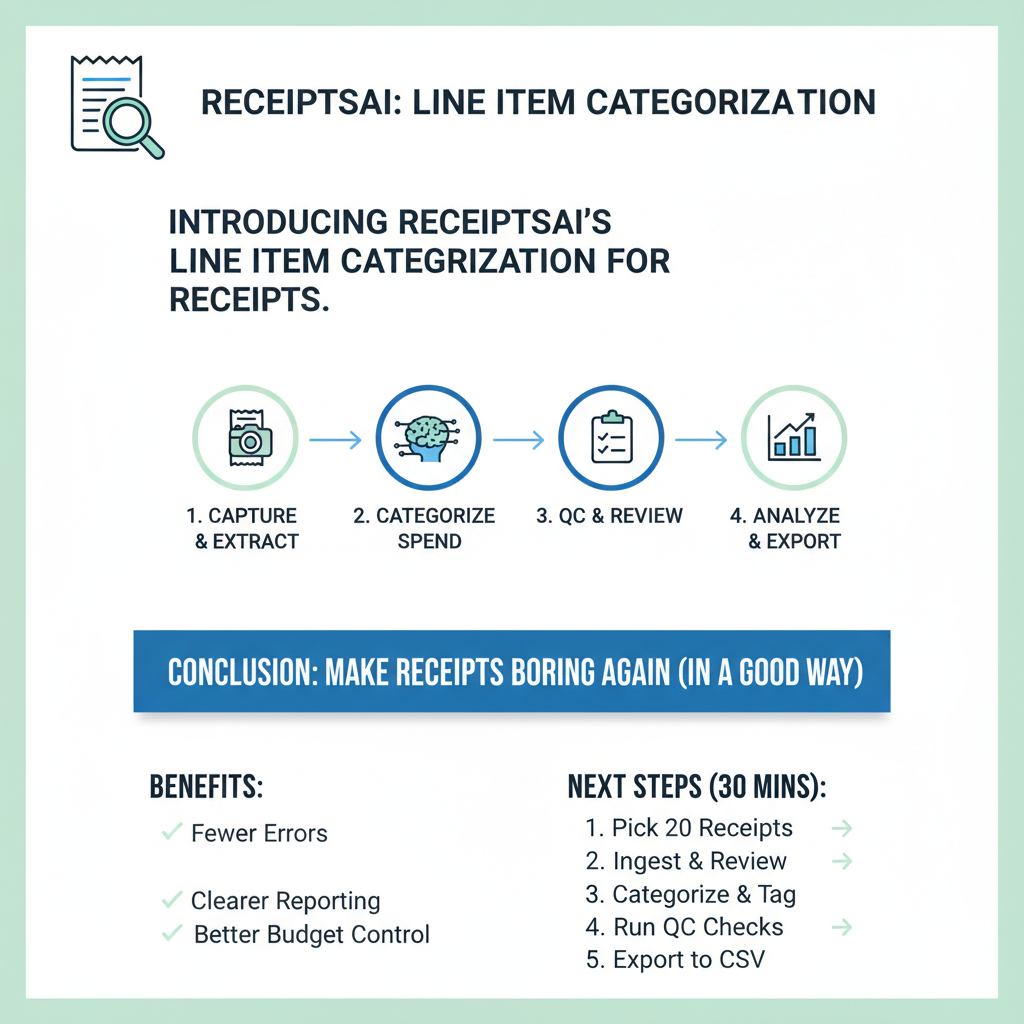
Next step action plan (30 minutes):
1. Pick 20 recent receipts (including 5 mixed-item receipts).
2. Ingest them into ReceiptsAI and review extracted line items.
3. Categorize line items and apply one operational tag (client or project).
4. Run the QC checks (totals, tax, duplicates).
5. Export to CSV/Excel and compare to your current process for time and clarity.
FAQ
Do I really need line item categorization if my accountant just wants totals?
If you only report at a very high level, totals can be enough. The issue is mixed receipts: they blur categories and create cleanup later. Line item categorization matters most for job costing, client reimbursements, department budgets, and defensible tax documentation. Even if your accountant posts totals, itemized records usually reduce follow-up questions.
What if a receipt’s line items are unclear or partially missing?
Handle it like an operator: categorize what’s readable, use a higher-level category for the rest, and add a short note. Keep the attachment in ReceiptsAI as the source document. The target is consistent, reviewable records, not forced precision.
How do we prevent team members from coding things differently?
Lock in a shared category list aligned to your chart of accounts, then write a few simple decision rules (snacks vs meals, tools vs materials, client vs internal). Do a short weekly review of exceptions. Once patterns are clear, it gets easier to stay consistent.
Will this slow down my process compared to just coding one category per receipt?
At first, mixed receipts will take a little longer because you’re making more than one decision. The tradeoff is you avoid bigger rework later, especially for multi-category receipts and anything tied to projects or clients. Most teams find they shift effort from month-end cleanup to quick ongoing review.
Is line item categorization audit-friendly?
It can be, when you keep attachments, totals/taxes reconcile, and categorization is consistent. The audit-friendly part is traceability: line items roll up to receipt totals, and the original receipt is available as support.