How to Generate An Expense Report with AI
Use AI to extract, categorize, and export receipts, invoices, and bank statements into accurate, tax-ready Excel or CSV expense reports—fast and error-free.


Expense reports don’t need to be tedious anymore. AI tools, like ReceiptsAI, simplify the process by automating data extraction, categorization, and reporting. Here’s how AI transforms expense tracking:
- Saves Time: AI processes receipts, invoices, and bank statements in seconds, cutting manual effort by up to 75%.
- Reduces Errors: Error rates drop from 20-30% (manual entry) to less than 1% with AI.
- Cost-Effective: AI tools cost $20-$200/month compared to hiring a bookkeeper ($40,000-$60,000/year).
- Improves Accuracy: Categorization accuracy reaches 95%, ensuring tax-ready reports.
- Handles Complexity: Supports multi-currency transactions and flags duplicates or suspicious expenses.
To get started, organize receipts, invoices, and bank statements, then upload them to ReceiptsAI. The system extracts key details, categorizes expenses, and generates export-ready reports in formats like Excel or CSV. It’s an efficient way to save time, minimize mistakes, and keep your finances in order.
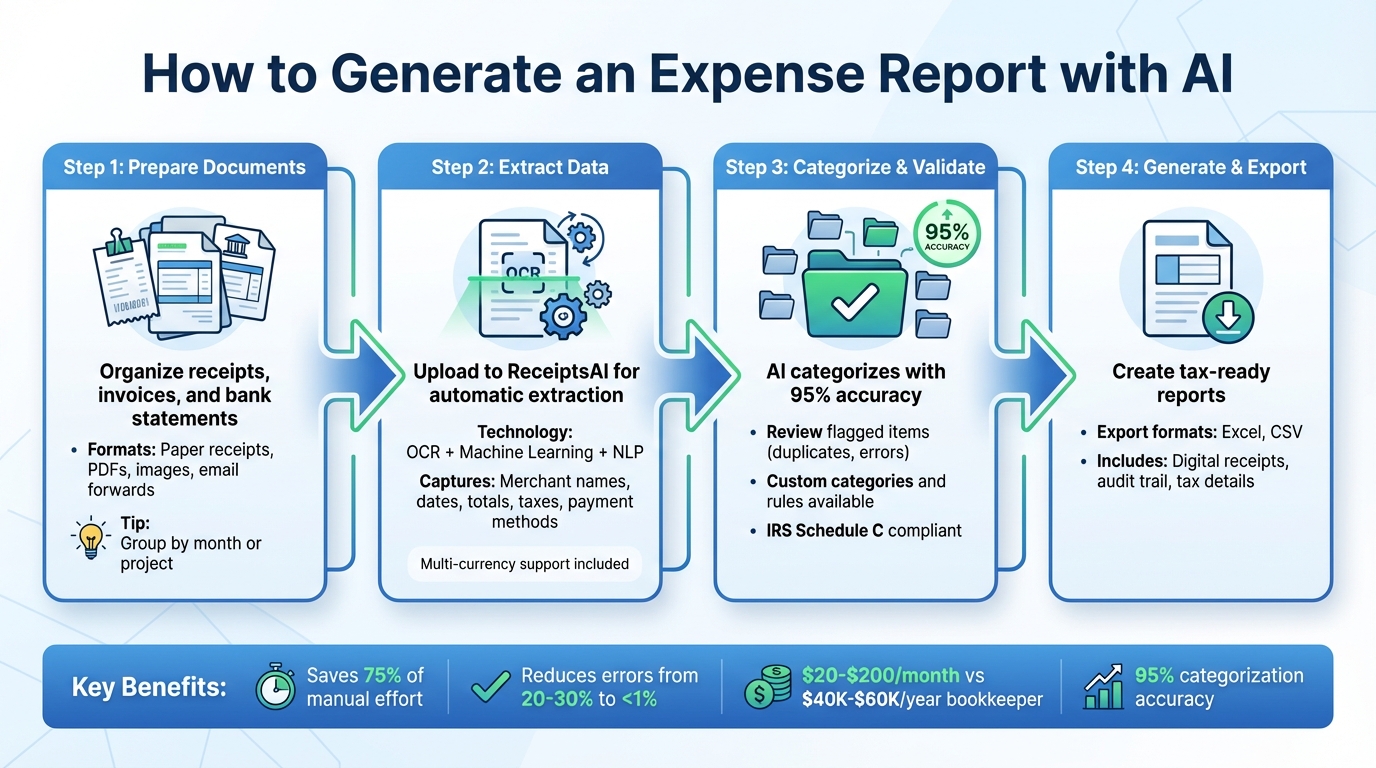
4-Step Process to Generate AI-Powered Expense Reports
{NEW} Never Dread Expense Reports Again: An AI Solution
Prepare Your Documents for AI Processing
Getting your documents ready for AI processing is straightforward. The main objective? Gather your financial documents and make sure they’re easy to read. While ReceiptsAI’s advanced OCR technology does the heavy lifting, starting with well-prepared materials ensures a smoother experience. Let’s break it down to help you get the best results.
Required Documents
There are three key document types you’ll need: receipts, invoices, and bank statements. This includes:
- Paper receipts: Collect those you’ve accumulated throughout the month.
- Digital receipts: Save them as PDFs, images, or forward email receipts directly to ReceiptsAI’s dedicated email address.
- Bank and credit card statements: Upload them in formats like PDFs, Excel, or CSV files so the AI can match transactions to receipts effectively.
How to Organize Your Documents
While ReceiptsAI automates much of the process, a little organization on your end can save time. Group your documents by month or project before uploading, especially if you’re preparing quarterly reports or tracking expenses for specific clients. Make sure dates are visible in the U.S. format (mm/dd/yyyy) to avoid extraction issues. This small step helps align your documents with your reporting needs and cuts down on manual adjustments later.
Tips for Clear Scans and Photos
The quality of your images plays a big role in OCR accuracy. Here’s how to ensure clear scans and photos:
- For paper receipts: Use good lighting and hold your phone steady to avoid blurry images. Make sure the entire receipt is in the frame.
- For digital documents: Stick to common formats like PDF, DOCX, TXT, or standard image files.
Clear, high-quality images reduce errors and speed up processing. In fact, businesses using AI-powered tools like ReceiptsAI have seen a 30% drop in error rates. Spending a few extra seconds to ensure quality scans can save you time and hassle later.
Extract Expense Data with ReceiptsAI
Once your documents are ready, ReceiptsAI steps in to handle the heavy lifting. Using a combination of Optical Character Recognition (OCR), Machine Learning, and Natural Language Processing, this platform transforms receipts, invoices, and bank statements into neatly structured digital data. Let’s break down how ReceiptsAI captures and organizes every critical detail.
How ReceiptsAI Reads Your Documents
ReceiptsAI doesn’t just scan your documents - it meticulously captures essential details like merchant names, dates, totals, taxes, vendors, and payment methods. It even differentiates between subtotals, final amounts, and tax line items, ensuring precision in data extraction. For instance, it can identify tax entries and extract individual line items from detailed invoices. This means you’re not left with unprocessed text but instead receive well-organized, actionable financial data that’s ready for reporting.
Upload and Verify Your Documents
Once the data is extracted, uploading and verifying your documents is a breeze. You can choose from multiple convenient methods: snap a photo using the mobile app right after a purchase, upload files through the web interface, or forward digital receipts via email, including attachments. The AI processes these files automatically, extracting key details in just seconds. Afterward, you can review the extracted data to ensure everything is accurate. While ReceiptsAI boasts a 95% categorization accuracy rate, a quick check of merchant names, amounts, and dates can help ensure your reports are spotless. If you spot any discrepancies, corrections can be made directly within the interface.
Working with Foreign Currency Transactions
Managing international expenses? ReceiptsAI’s got you covered. It handles multi-currency transactions seamlessly. The system automatically detects the currency on your receipt and converts the amounts into USD using live or historical exchange rates. Whether your expenses are in euros, pounds, or Canadian dollars, ReceiptsAI standardizes everything for consistent reporting. This eliminates the hassle of manual currency conversions and ensures your financial reports reflect accurate dollar amounts - perfect for tax filings and financial analysis.
Categorize and Validate Your Expenses
ReceiptsAI uses machine learning to sort your expense data into the right categories with impressive precision - 95% accuracy, to be exact. For instance, your morning coffee run at Starbucks gets classified under Meals, your hotel booking goes into Travel, and that ream of printer paper lands in Office Supplies. This automated system not only saves time but also makes it easy to review and tweak categories, creating accurate and reliable expense reports.
Automatic Expense Categorization
ReceiptsAI’s categorization engine dives into merchant names, transaction amounts, and your past spending habits to assign categories. It aligns these with IRS Schedule C guidelines, helping you claim the right tax deductions. Why does this matter? Because 75% of small businesses miss out on eligible deductions simply due to poor expense tracking and categorization. With ReceiptsAI, you can avoid leaving money on the table.
Create Custom Categories and Rules
If the automatic categorization doesn’t quite fit your business needs, no problem - you can customize it. Set up rules to automatically assign expenses based on merchant names, keywords, or spending habits. For example, you could route all Amazon purchases to a specific client account or project code. You can even create separate workspaces for different businesses, projects, or side gigs. This flexibility ensures your expense reports reflect the unique way your business operates, rather than sticking to one-size-fits-all categories.
Review and Correct Categorized Expenses
Even with 95% accuracy, it’s essential to review flagged items like duplicate receipts, unreadable amounts, or unusual transactions. ReceiptsAI provides real-time alerts to catch these issues. By reviewing categorized expenses, you can ensure your records are tax-ready and that merchant names, amounts, and dates are accurate. The system also highlights discrepancies and potential fraud, giving you peace of mind during audits. If something’s misclassified - like a client lunch being tagged as groceries - you can easily reassign it with a click. This review step is key for keeping personal and business expenses separate and ensuring your reports hold up under IRS scrutiny.
Generate and Export Your Expense Report
Once your expenses are verified, the next step is to create a professional, exportable report. This report should include key details such as your business information, reporting period, and a breakdown of itemized expenses - covering merchant names, dates, amounts, payment types, tax details, and category subtotals. With ReceiptsAI, all this information is compiled into a clear, concise summary. Each expense is linked to its corresponding digital receipt, ensuring compliance with IRS requirements and providing essential documentation for audits.
What to Include in Your Expense Report
A well-structured expense report should provide essential details for every transaction: the amount, merchant, date, and payment method. If any expenses were made in foreign currencies, include the original currency, the converted amount in USD, and the applied exchange rate. Tax details, such as sales tax, GST, or VAT, should be itemized separately to ensure you can claim accurate deductions. ReceiptsAI organizes reports with IRS-friendly categories, helping you maximize your eligible deductions. It’s worth noting that small businesses collectively lose about $140 billion annually because of unclaimed tax deductions.
Export Options: Excel and CSV
Once your report is ready, you can choose an export format that best suits your accounting needs. ReceiptsAI offers both Excel and CSV export options, which are compatible with most accounting software. CSV files are ideal for data manipulation, while Excel exports provide formatted workbooks with built-in formulas and subtotals, making them easy to share. According to ReceiptsAI, their exports are designed to be "properly formatted for easy import". This integration eliminates the need for manual data entry and ensures your accountant has real-time access to your financial records.
Make Your Report Tax-Ready
Preparing your report for tax filing means ensuring every expense is linked to a digital receipt. ReceiptsAI can automatically flag potential issues, such as duplicate receipts, missing amounts, or transactions that might raise audit concerns. The platform securely stores digital copies with encryption and maintains a complete audit trail. Before submitting, double-check that merchant names are accurate, dates match the reporting period, and personal expenses are excluded. With 75% of businesses reporting improved financial visibility after adopting AI-powered expense tools, getting your reports ready for tax season has never been easier.
Conclusion
AI is revolutionizing the way we handle expense reporting by taking over tedious tasks and minimizing errors. With tools like ReceiptsAI, everything from scanning receipts to categorizing expenses becomes effortless. This means you can keep accurate records without spending hours wrestling with spreadsheets, freeing up your time to focus on growing your business.
ReceiptsAI cuts manual data entry down from hours to mere seconds, delivering an impressive 95% accuracy rate. For small businesses and freelancers in the U.S., this translates to fewer mistakes, more time for meaningful work, and clearer financial insights to make smarter decisions.
But it’s not just about saving time. ReceiptsAI gives you real-time visibility into your spending habits and cash flow. Instead of waiting until the end of the month to figure out where your money went, you’ll always have up-to-date financial information at your fingertips. Plus, the platform ensures your records meet IRS requirements, keeping you tax-ready year-round.
Whether you’re running a business or working as a freelancer, ReceiptsAI serves as your affordable, around-the-clock financial assistant. With features like direct exports to Excel or CSV, your accountant receives clean, well-organized data without any extra effort. Say goodbye to outdated books and hello to accurate, accessible records. It’s time to transform how you manage expenses and focus on what truly matters - growing your business.
FAQs
How does ReceiptsAI accurately categorize expenses?
ReceiptsAI leverages cutting-edge AI-driven tools to streamline expense categorization with remarkable accuracy. By scanning receipts, invoices, and similar documents, it automatically pulls essential details such as the transaction amount, merchant name, and date. From there, it organizes expenses using smart rules and patterns customized to fit your specific requirements.
This process not only minimizes the chance of human error but also eliminates the tedious chore of manual data entry, ensuring your expense reports are both reliable and hassle-free.
Can ReceiptsAI process expenses in different currencies?
ReceiptsAI can handle expenses in multiple currencies without any hassle. It identifies the currency on your receipts, invoices, or bank statements and takes care of the conversions for you. This way, your expense reports stay precise, regardless of where your transactions occur.
How should I prepare my documents for processing with ReceiptsAI?
To get the best results with ReceiptsAI, start by preparing your documents properly. Smooth out your receipts to eliminate folds or creases, and remove any staples or paper clips. If there are tears, patch them up to ensure all details remain visible. Place the receipts on a clean, solid-colored surface and make sure the area is well-lit. Using a high-quality camera or scanner that captures sharp images with good contrast will make the text easier for the AI to process accurately.